



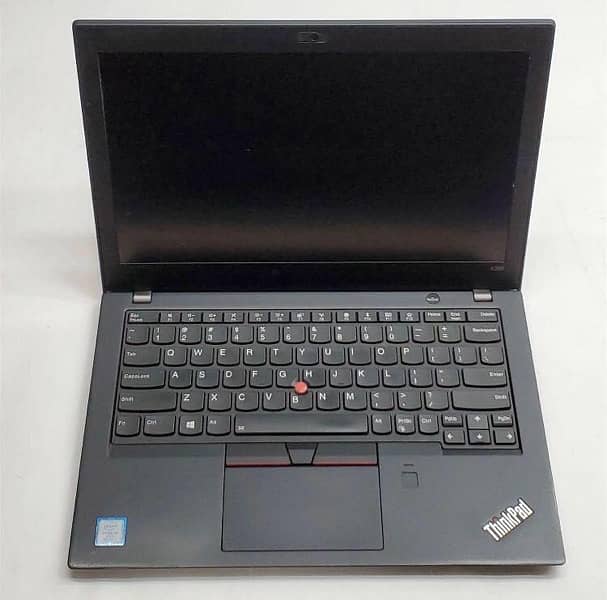
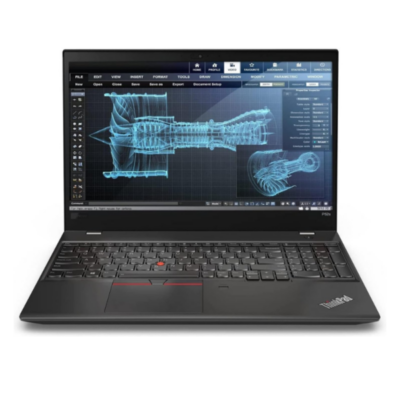
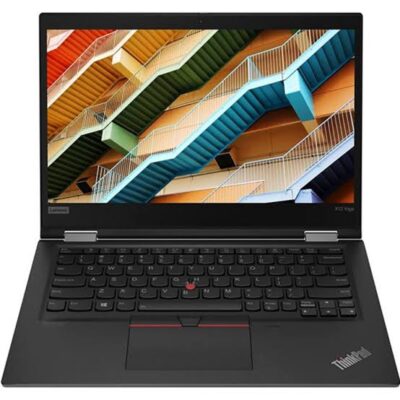
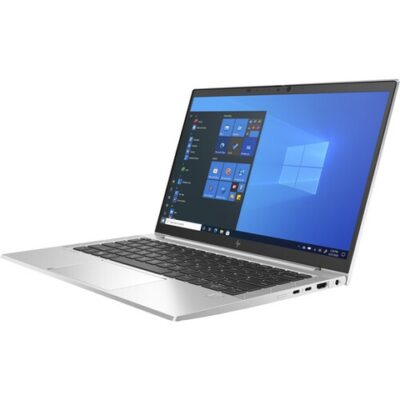
Lenovo ThinkPad X280 Core i7 8th Gen – Powerful & Premium 8GB RAM, 256GB SSD Touchscreen Laptop
Original price was: KSh 28,000.00.KSh 26,000.00Current price is: KSh 26,000.00.
Lenovo ThinkPad X280 Core i7 8th Gen – Powerful & Premium 8GB RAM, 256GB SSD Touchscreen Laptop
- ⚡ Powerful Intel Core i7 8th Gen – Reliable performance for business, office work, school, freelancing, and everyday computing.
- 🧠 8GB RAM – Smooth multitasking for documents, browsing, research, email, and productivity applications.
- 🚀 256GB SSD – Fast startup, quick application loading, and responsive access to your files and applications.
- 🖐️ Touchscreen Display – Convenient touch interaction for browsing, reading, presentations, and supported applications.
- 💼 Premium ThinkPad Design – Professional and practical for offices, entrepreneurs, students, and professionals.
- 🎓 Ideal for Students & Professionals – Great for assignments, research, presentations, online learning, and workplace tasks.
- 💻 Perfect for Freelancers & Remote Work – Suitable for writers, virtual assistants, digital marketers, administrators, and online professionals.
- 📊 Excellent for Business Productivity – Handles documents, spreadsheets, presentations, email, research, and everyday business applications.
- 👨💻 Great for Programming & IT – Suitable for coding, web development, technical research, and supported development tools.
- 🧳 Compact & Portable – Practical for users who work across the office, home, school, meetings, or other locations.
- 🛠️ Long-Term Value – Proper maintenance and compatible servicing can help extend the laptop’s useful working life.
- 🛒 Shop with Ring-Us Technologies – Visit https://www.ringus.co.ke for more quality laptops and technology solutions.
Lenovo ThinkPad X280 Core i7 8th Gen – Powerful & Premium 8GB RAM, 256GB SSD Touchscreen Laptop
Looking for a powerful, compact, professional, and versatile laptop for business, school, freelancing, remote work, or everyday computing? The Lenovo ThinkPad X280 Core i7 8th Gen combines an Intel Core i7 8th Gen processor, 8GB RAM, responsive 256GB SSD storage, and convenient touchscreen functionality in a compact ThinkPad design.
This configuration is a practical option for users who want a portable productivity laptop with a capable processor, fast SSD storage, and flexible touchscreen interaction.
Whether you are a student, business professional, entrepreneur, freelancer, writer, virtual assistant, digital marketer, programmer, or remote worker, the Lenovo ThinkPad X280 provides a practical platform for handling everyday digital tasks.
Lenovo ThinkPad X280 Key Specifications
| Feature | Specification |
|---|---|
| Model | Lenovo ThinkPad X280 |
| Processor | Intel Core i7 8th Gen |
| RAM | 8GB |
| Storage | 256GB SSD |
| Display | Touchscreen |
| Design | Compact ThinkPad laptop |
| Ideal For | Business, office work, students, freelancing, remote work and everyday productivity |
⚡ Powerful Intel Core i7 8th Gen Performance
The Intel Core i7 8th Gen processor gives this Lenovo ThinkPad X280 a capable performance foundation for a wide range of everyday and professional workloads.
The laptop is suitable for tasks such as:
- Microsoft Office applications
- Web browsing
- Online research
- Document creation
- Spreadsheet work
- Presentations
- Online learning
- Video conferencing
- Content writing
- Digital marketing
- Business administration
- Programming
- General productivity
For professionals and students who need a compact computer for regular productivity, the Core i7 processor provides a strong platform for everyday computing.
Actual performance will depend on the software being used and its individual system requirements.
🧠 8GB RAM for Everyday Multitasking
This Lenovo ThinkPad X280 comes with 8GB RAM, providing a practical amount of memory for everyday computing and productivity.
8GB RAM can comfortably support many common activities, including:
- Web browsing
- Documents
- Spreadsheets
- Online research
- Presentations
- Online learning
- Communication
- Office applications
- Everyday business tasks
For users who typically work with moderate numbers of browser tabs and applications, 8GB RAM can provide a balanced experience.
Users with particularly demanding multitasking requirements or workflows involving numerous heavy applications simultaneously may want to consider higher-memory configurations.
🚀 256GB SSD – Fast and Responsive Storage
The 256GB SSD provides responsive storage for applications, documents, projects, study materials, and everyday files.
SSD storage can help provide:
- Fast startup
- Quick application loading
- Responsive file access
- Faster opening of documents
- Smooth everyday computing
- Convenient storage for work and study files
The 256GB capacity is well suited to users who primarily work with documents, applications, research materials, and cloud-based services.
For users who regularly store large video files, extensive photo libraries, or large project folders, additional external or cloud storage may be useful.
🖐️ Convenient Touchscreen Experience
One of the attractive features of this configuration is its touchscreen display.
Touch functionality provides an additional way to interact with your laptop beyond the traditional keyboard and touchpad.
It can be useful for:
- Browsing
- Reading
- Scrolling
- Navigating applications
- Viewing presentations
- Online learning
- Document interaction
- Everyday navigation
For students and professionals who regularly read digital documents or navigate visual content, touchscreen interaction can make certain tasks more convenient.
💼 Excellent for Business and Office Work
The Lenovo ThinkPad X280 is designed around practical productivity, making it suitable for a wide range of professional activities.
Business users can use it for:
- Business documents
- Reports
- Spreadsheets
- Presentations
- Online meetings
- Research
- Customer communication
- File management
- Administrative tasks
The combination of Core i7 processing, 8GB RAM, and SSD storage provides a capable setup for everyday office workloads.
👔 A Practical Laptop for Entrepreneurs
Entrepreneurs often need a computer that can handle different business responsibilities throughout the day.
The Lenovo ThinkPad X280 can support:
- Business planning
- Email management
- Online research
- Marketing
- Customer communication
- Presentations
- Business documents
- Spreadsheet work
- Social media administration
- Online business activities
Its compact format is also convenient for business owners who work across different locations.
🎓 Ideal for Students
The Lenovo ThinkPad X280 can be an excellent productivity companion for students.
It is suitable for:
- Assignments
- Academic research
- Presentations
- Online classes
- Digital reading
- Research papers
- Group projects
- Microsoft Office work
- Communication
- Programming courses
- Online learning
The touchscreen adds another convenient way to interact with digital documents and supported applications.
💻 Perfect for Freelancers and Remote Workers
Freelancers and remote professionals often need a laptop that can handle communication, research, documents, and online platforms.
The Lenovo ThinkPad X280 can support many freelance workflows.
✍️ Writers
Writers can use it for:
- Blog writing
- Article writing
- Research
- Editing
- SEO content
- Copywriting
- Client communication
- Document management
🧑💻 Virtual Assistants
Virtual assistants can use it for:
- Email management
- Scheduling
- Online research
- Documents
- Spreadsheets
- Customer communication
- Cloud applications
📈 Digital Marketers
Digital marketers can use it for:
- Content planning
- Social media management
- Online research
- Marketing administration
- Communication
- Analytics dashboards
👨💻 Programmers and IT Professionals
The X280 can support coding, web development, technical research, programming courses, and supported development environments.
For specialised applications, always check the software’s recommended system requirements.
🌐 Great for Online Work
Modern work increasingly depends on cloud platforms and web-based applications.
The Lenovo ThinkPad X280 can support:
- Online research
- Cloud documents
- Online learning
- Remote meetings
- Customer service
- Freelancing platforms
- Business administration
- Website management
- Digital marketing
The SSD helps keep everyday file and application access responsive, while the Core i7 processor provides a capable foundation for supported productivity workloads.
✍️ Excellent for Writers and Content Professionals
For writers and content professionals, a compact productivity laptop can make it easier to work from different locations.
The Lenovo ThinkPad X280 is suitable for:
- Blog posts
- Articles
- Website content
- SEO writing
- Copywriting
- Editing
- Research
- Business proposals
- Reports
- Academic writing
- Email communication
The touchscreen can also make browsing and reading research materials convenient.
👨💻 Suitable for Programming and IT
The Lenovo ThinkPad X280 can be used for programming and technology-related learning and work.
It can support:
- Code editors
- HTML and CSS
- JavaScript development
- Python programming
- Web development
- Technical research
- IT coursework
- Supported development environments
For more demanding development software, check the application’s recommended hardware requirements before installation.
🏢 Productive Office Experience
For office productivity, having a balanced combination of processing capability and responsive storage is important.
This X280 configuration combines:
Core i7 8th Gen + 8GB RAM + 256GB SSD + Touchscreen
That makes it suitable for documents, spreadsheets, presentations, email, research, online communication, and everyday business applications.
🧳 Compact and Portable Productivity
The ThinkPad X280 is a compact laptop, making it practical for people who work in different locations.
It can be useful for:
- Students moving between classes
- Professionals travelling to meetings
- Freelancers working from different locations
- Remote workers moving between home and office
- Entrepreneurs working on the go
Its compact design makes it convenient for mobile productivity.
📊 Core i7 + 8GB RAM + 256GB SSD
| Component | Benefit |
|---|---|
| Intel Core i7 8th Gen | Capable foundation for professional and everyday computing |
| 8GB RAM | Practical multitasking capacity |
| 256GB SSD | Fast and responsive storage |
| Touchscreen | Convenient touch interaction |
| ThinkPad Platform | Professional-oriented productivity experience |
Together, these specifications create a practical configuration for work, study, freelancing, and everyday computing.
🔋 Battery and Power Management
Actual battery performance depends on battery condition, applications, brightness, power settings, usage patterns, and the condition of the individual unit.
To help maximise battery life:
- Reduce screen brightness when appropriate.
- Close applications you are not using.
- Limit unnecessary background processes.
- Use appropriate power-saving settings.
- Avoid excessive heat.
- Keep ventilation clear.
- Use a compatible charger.
- Monitor battery health over time.
If purchasing a pre-owned or refurbished unit, confirm the current battery condition before purchase.
🛠️ Maintenance for Long-Term Value
Proper maintenance can help extend the useful life of your Lenovo ThinkPad X280.
Keep it clean
Dust and debris can accumulate around the keyboard and ventilation areas. Regular cleaning can help maintain a cleaner working environment.
Keep software updated
Operating system and application updates can help maintain security and compatibility.
Manage your storage
Keep sufficient free space on the 256GB SSD and move larger files to suitable external or cloud storage when necessary.
Back up important files
Important academic, business, and personal files should always have an appropriate backup.
Handle the touchscreen carefully
Avoid unnecessary pressure on the screen and use a suitable protective bag when transporting the laptop.
Keep it cool
Avoid using the laptop on surfaces that block ventilation.
🔧 Upgradeability and Servicing
Upgradeability depends on the exact configuration and component design of the Lenovo ThinkPad X280.
Before purchasing RAM, storage, a battery, or other components, confirm compatibility with the exact unit.
For official product information and support resources:
Lenovo: https://www.lenovo.com/
♻️ Responsible Technology Use
Keeping a capable laptop in useful service can support more responsible technology consumption.
Regular maintenance, appropriate servicing, compatible upgrades, careful handling, and responsible electronics recycling can help reduce unnecessary replacement.
If a laptop continues to meet your needs, maintaining and repairing it appropriately can be a practical way to extend its useful working life.
👥 Who Is the Lenovo ThinkPad X280 Suitable For?
| User | Suitable Uses |
|---|---|
| Students | Assignments, research, presentations and online learning |
| Professionals | Documents, email, spreadsheets and presentations |
| Entrepreneurs | Business administration, marketing and communication |
| Freelancers | Writing, VA work, digital marketing and research |
| Remote Workers | Online meetings, cloud applications and communication |
| Writers | Writing, research, editing and publishing |
| Programmers | Coding and supported development environments |
| Office Workers | Administrative and productivity applications |
| Researchers | Browser research, documents and data organisation |
⭐ Why Consider the Lenovo ThinkPad X280?
- ⚡ Intel Core i7 8th Gen processor
- 🧠 8GB RAM for everyday multitasking
- 🚀 256GB SSD for fast and responsive storage
- 🖐️ Convenient touchscreen display
- 💼 Professional ThinkPad design
- 🎓 Great for students
- 💻 Suitable for freelancers and remote workers
- 📊 Excellent for office productivity
- 👨💻 Suitable for programming and IT work
- ✍️ Useful for writers and digital professionals
- 🧳 Compact and portable
- 🛠️ Long-term value with proper maintenance
❓ Frequently Asked Questions
Is the Lenovo ThinkPad X280 Core i7 8th Gen good for work?
Yes. The combination of an Intel Core i7 8th Gen processor, 8GB RAM, and a 256GB SSD makes this configuration suitable for many everyday professional and productivity workloads.
How much RAM does this X280 have?
This configuration comes with 8GB RAM.
Does this Lenovo X280 have a touchscreen?
Yes. The configuration provided is touchscreen.
How much storage does it have?
It comes with a 256GB SSD.
Is 8GB RAM enough for students?
For many everyday student workloads, 8GB RAM can handle documents, research, browsing, presentations, online learning, and standard productivity applications. Users with heavier multitasking requirements may prefer more memory.
Is this laptop good for freelancing?
Yes. It is suitable for many freelance activities, including writing, virtual assistance, digital marketing, administration, research, and supported online work.
Can I use it for programming?
Yes. The X280 can be used for coding, web development, programming courses, technical research, and supported development environments.
Is the touchscreen useful?
The touchscreen provides an additional input method for browsing, reading, navigating supported applications, and interacting with on-screen content.
Is the Lenovo X280 good for remote work?
Yes. The Core i7 processor, SSD storage, compact design, and touchscreen make it suitable for many remote-work tasks.
Is 256GB storage enough?
For documents, applications, research materials, and everyday files, 256GB can be sufficient. Users with large media collections or large project files may want additional external or cloud storage.
Can the Lenovo X280 be upgraded?
Upgradeability depends on the exact configuration and component design. Confirm compatibility before purchasing additional or replacement components.
🛒 Shop with Ring-Us Technologies
The Lenovo ThinkPad X280 Core i7 8th Gen with 8GB RAM, 256GB SSD and touchscreen is a practical choice for users looking for a compact, capable, and versatile laptop.
It combines Core i7 processing, responsive SSD storage, touchscreen functionality, and the professional ThinkPad platform for business, education, freelancing, remote work, programming, writing, and everyday computing.
For more quality laptops and technology solutions, visit https://www.ringus.co.ke
Customer Experience
“I wanted a compact laptop that could handle my everyday work and online tasks while still being easy to carry around. The X280 gives me the performance I need, and the touchscreen makes browsing and navigating certain tasks even more convenient.”
🔗 Useful Manufacturer Resources
- Lenovo Official Website: https://www.lenovo.com/
- Intel Core Processors: https://www.intel.com/content/www/us/en/products/details/processors/core.html
Final Thoughts
The Lenovo ThinkPad X280 Core i7 8th Gen – 8GB RAM, 256GB SSD Touchscreen Laptop brings together capable processing, responsive storage, touchscreen convenience, and a compact professional design.
The Intel Core i7 8th Gen processor provides a strong foundation for everyday computing, while 8GB RAM supports common multitasking needs. The 256GB SSD provides fast and responsive storage for applications, documents, projects, and everyday files.
For students, professionals, entrepreneurs, freelancers, writers, virtual assistants, programmers, and remote workers, this configuration offers a versatile platform for productive daily use.
Lenovo ThinkPad X280 — compact, capable, flexible, and ready for productivity.
Related products


Lenovo Yoga 9 Core i7 11th gen 16GB Ram/1TB SSD


HP Elitebook 840 G9 Core i5 12th gen 16gb/512ssd

Dell latitude 3410 core i5 10th gen 512ssd /8gb


MacBook Pro 2018 – Powerful, Sleek & Super Reliable (i5 | 16GB | 256GB)
???? MacBook Pro 2018 (Core i5 | 16GB RAM | 256GB SSD)
-
⚡ Powerful Performance: 8th-Gen Intel Core i5 processor delivers fast, smooth multitasking for work, study, and creativity.
-
???? Ample Memory: 16GB RAM ensures effortless multitasking with zero lag — perfect for designers, developers, and students.
-
???? Super-Fast Storage: 256GB NVMe SSD offers lightning-quick boot times and file access.
-
???? Brilliant Retina Display: 13.3″ True Tone Retina screen delivers sharp text and vibrant, true-to-life colors.
-
???? Enhanced Audio & Input: Backlit Magic Keyboard, large Force Touch trackpad, and immersive stereo speakers.
-
???? All-Day Battery Life: Reliable battery performance for productivity on the go.
-
????️ 6-Month Warranty: Includes a limited 6-month warranty for peace of mind.
-
???? Eco-Friendly Build: Energy-efficient design and recyclable aluminum enclosure.
-
???? Lightweight & Portable: Sleek, professional, and easy to carry anywhere.
-
???? Available at: www.ringus.co.ke




Reviews
There are no reviews yet.