



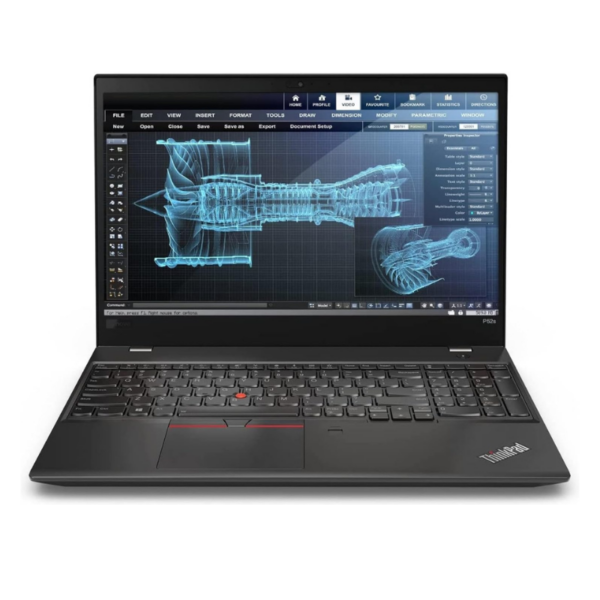
Lenovo ThinkPad T14s Core i7 10th Gen – Powerful & Premium 32GB RAM, 512GB SSD Touchscreen Laptop
Original price was: KSh 60,000.00.KSh 55,000.00Current price is: KSh 55,000.00.
Lenovo ThinkPad T14s Core i7 10th Gen – Powerful & Premium 32GB RAM, 512GB SSD Touchscreen Laptop
- 💻 Intel Core i7 10th Gen – Powerful performance for professional tasks
- 🚀 32GB RAM – Excellent for heavy multitasking
- 💾 512GB SSD – Fast and spacious storage
- 🖐️ Touchscreen – Convenient interactive display
- 💼 Business Ready – Ideal for professionals and entrepreneurs
- 👨💻 Great for Programming – Suitable for coding and IT work
- ✍️ Freelancer Friendly – Excellent for writing, research and digital work
- 🏠 Remote Work Ready – Perfect for modern work-from-home tasks
- 🎓 Student Friendly – Great for research, assignments and online learning
- ⚡ Productivity Focused – Built for demanding everyday multitasking
- 🛡️ Premium ThinkPad Design – Professional and practical
- 🌐 Shop with Ring-Us Technologies: www.ringus.co.ke
Lenovo ThinkPad T14s Core i7 10th Gen – Powerful & Premium 32GB RAM, 512GB SSD Touchscreen Laptop
Lenovo ThinkPad T14s Core i7 10th Gen – Powerful Business Performance
The Lenovo ThinkPad T14s Core i7 10th Gen is a powerful and premium business laptop designed for professionals, entrepreneurs, freelancers, students, remote workers and demanding everyday productivity. With an Intel Core i7 10th Gen processor, an impressive 32GB RAM, a spacious 512GB SSD and a touchscreen display, this ThinkPad T14s offers a strong combination of processing capability, multitasking power, responsive storage and convenient touchscreen interaction.
The standout feature of this configuration is the 32GB RAM. For users who regularly work with numerous applications, browser tabs, documents, communication platforms and professional software at the same time, having substantial system memory can make a meaningful difference to the overall workflow.
The 512GB SSD complements the high-memory configuration by providing generous storage for applications, documents, business files, projects and personal data while supporting a responsive everyday experience.
Whether you are managing a business, working remotely, studying, writing, programming or handling multiple professional applications, the Lenovo ThinkPad T14s Core i7 10th Gen 32GB/512GB Touch is built around productivity.
Key Specifications
| Feature | Specification |
|---|---|
| Brand | Lenovo |
| Series | ThinkPad T14s |
| Processor | Intel Core i7 10th Gen |
| RAM | 32GB |
| Storage | 512GB SSD |
| Display | Touchscreen |
| Operating System | Not specified |
| Best For | Business, professionals, freelancers, students, remote work and multitasking |
Powerful Intel Core i7 10th Gen Processing
At the heart of this ThinkPad T14s is an Intel Core i7 10th Gen processor, giving the laptop a capable platform for a wide range of productivity workloads.
Core i7 processors are designed for users who want additional performance headroom for multitasking and demanding applications. For everyday professional work, this can include managing large numbers of browser tabs, working with office applications, handling communication platforms and switching between multiple tasks.
The processor makes this laptop suitable for users who do not want a basic entry-level machine.
You can use the ThinkPad T14s for:
- Business applications
- Microsoft Office
- Web browsing
- Online meetings
- Research
- Document creation
- Presentations
- Spreadsheet work
- Content writing
- Digital marketing
- Programming
- Freelancing
- Remote work
- Online learning
For more information about Intel Core processors, visit Intel.
32GB RAM – Built for Serious Multitasking
One of the biggest advantages of this particular T14s configuration is its 32GB RAM.
While many everyday laptops are configured with lower memory capacities, 32GB gives users considerable room for multitasking.
You could be working on a document while keeping multiple browser tabs open, switching between communication applications, reviewing spreadsheets and running other productivity tools.
For professionals, this can be particularly useful when the workflow involves several applications at once.
32GB RAM is useful for:
- Heavy multitasking
- Large browser sessions
- Business applications
- Programming environments
- Content creation
- Research
- Virtual assistance
- Data-heavy workflows
- Multiple office applications
- Professional productivity
The actual performance of any application depends on the software being used and its system requirements, but the generous RAM configuration provides substantial memory capacity for demanding multitasking.
512GB SSD – Fast and Spacious Storage
The 512GB SSD provides a strong combination of capacity and responsive storage.
You have useful space for:
- Work documents
- Business files
- Applications
- Academic materials
- Presentations
- Photos
- Client projects
- Research
- Personal documents
- Digital resources
An SSD can also contribute to a more responsive experience when accessing files and launching applications compared with traditional mechanical storage.
For a professional who keeps many documents and applications on one machine, 512GB offers a practical amount of storage.
Touchscreen Convenience
This ThinkPad T14s configuration comes with a touchscreen, giving you another way to interact with the computer.
A touchscreen can be especially convenient when navigating certain applications, reviewing documents, browsing websites or interacting directly with on-screen controls.
For professionals who frequently present information or move between different types of content, touchscreen interaction can provide additional flexibility.
The touchscreen also makes the laptop more convenient for users who simply prefer interacting directly with the display for certain tasks.
ThinkPad T14s for Business Professionals
The Lenovo ThinkPad T14s Core i7 10th Gen is a natural fit for professional productivity.
Business users can take advantage of the combination of Core i7 processing, 32GB RAM and 512GB SSD storage for everyday workflows such as:
- Email management
- Microsoft Word
- Excel
- PowerPoint
- Business research
- Customer management
- Financial documents
- Online meetings
- Presentations
- Business communication
- Project management
- Web-based applications
The high-memory configuration is particularly useful for professionals who regularly move between several applications throughout the working day.
Excellent for Entrepreneurs
Entrepreneurs often need a laptop capable of handling many different responsibilities.
One minute you may be preparing a business proposal. The next, you may be checking email, updating a spreadsheet, researching competitors or communicating with customers.
The T14s 32GB/512GB Touch gives entrepreneurs a flexible productivity platform for these activities.
It can support:
- Business administration
- Online sales
- Customer communication
- Invoicing
- Marketing
- Social media management
- Business research
- Presentations
- Financial record keeping
- Project management
- Online meetings
The 32GB RAM configuration gives you plenty of memory for multitasking across different business applications.
Lenovo ThinkPad T14s for Freelancers
For freelancers, the laptop is often the main office.
A freelancer may need to communicate with clients, conduct research, write documents, manage projects, attend meetings and use several browser-based services during the same working session.
The Lenovo ThinkPad T14s Core i7 10th Gen can support these workflows effectively.
It is suitable for:
- Virtual assistance
- Content writing
- Copywriting
- SEO
- Digital marketing
- Customer support
- Online research
- Administrative work
- Project management
- Social media management
- Remote meetings
The 32GB RAM gives freelancers plenty of memory for keeping multiple work tools active.
Ideal for Remote Work
Remote workers need flexibility and dependable productivity.
The T14s can be used for many remote-work environments where employees depend on cloud applications, communication tools, documents, spreadsheets and web-based systems.
The combination of:
Core i7 + 32GB RAM + 512GB SSD + Touchscreen
creates a powerful productivity-focused configuration.
It can be particularly useful for professionals who spend significant portions of their working day switching between multiple applications.
Excellent for Writers and Digital Professionals
Writers, editors, virtual assistants, marketers and other digital professionals can benefit from a laptop with generous memory.
The 32GB RAM makes it practical to maintain large browser sessions alongside writing tools, research materials, communication applications and other digital platforms.
You can use the laptop for:
- Blog writing
- Copywriting
- SEO
- Editing
- Research
- Website management
- Social media management
- Content planning
- Email marketing
- Digital publishing
For someone whose work exists primarily online, the T14s provides a capable professional workstation in a portable laptop format.
Suitable for Programming and IT
The Core i7 processor and 32GB RAM make this configuration suitable for a variety of programming and IT workloads.
It can be used for:
- Web development
- Python
- JavaScript
- HTML and CSS
- Database work
- Coding environments
- Software development
- IT coursework
- Development tools
- Virtualised development environments, depending on the specific software requirements
The 32GB RAM is particularly useful for developers who need to run multiple development tools, browser windows, databases or other applications simultaneously.
For highly specialised workloads such as intensive 3D rendering, advanced workstation applications or demanding machine-learning workloads, the exact software requirements should be checked before purchase.
A Strong Choice for Students and Researchers
Students studying demanding courses can also benefit from the T14s.
It can support:
- Research
- Academic writing
- Online classes
- Presentations
- Programming
- Data work
- Research papers
- PDFs
- Microsoft Office
- Online collaboration
The 512GB SSD provides useful space for keeping academic materials organised, while 32GB RAM provides substantial multitasking capacity.
Productivity Without Constant Closing and Reopening
A common frustration with lower-memory computers is having to constantly close applications simply to keep the system manageable.
The 32GB RAM configuration gives the T14s substantial memory capacity for users who prefer to keep several programs and browser tabs available.
This is particularly valuable for professionals who move quickly between different tasks.
You can research something in a browser, prepare a document, respond to email and return to your previous application without constantly rebuilding your workspace.
Premium ThinkPad Productivity
ThinkPad laptops have long been associated with professional computing and productivity-focused design.
The ThinkPad T14s belongs to a business-oriented laptop family designed around users who need a dependable machine for professional tasks.
This makes it suitable for people who want a laptop that feels purposeful rather than simply designed for basic home computing.
Practical Storage for Business and Personal Files
The 512GB SSD offers room for organising your digital life.
You can create separate folders for:
Business
- Reports
- Financial documents
- Presentations
- Customer files
Freelancing
- Client projects
- Contracts
- Drafts
- Research
Education
- Assignments
- Notes
- PDFs
- Research papers
Personal
- Photos
- Documents
- Important records
Regularly organising and backing up these files can help protect important information.
Battery and Power Management
Actual battery life varies depending on factors such as battery health, brightness, application workload, network activity, power settings and the condition of the individual unit.
For longer working sessions, you can improve power efficiency by:
- Lowering display brightness when appropriate
- Closing applications you are not using
- Reducing unnecessary background activity
- Using appropriate power-saving settings
- Keeping software updated
- Avoiding unnecessary high-performance workloads when operating on battery
Because battery condition can vary between individual laptops, confirm the specific unit’s battery health when purchasing.
Maintenance Tips
Proper care can help keep your ThinkPad performing reliably.
Keep ventilation clear
Use the laptop on a firm surface and avoid blocking ventilation openings.
Keep the keyboard and display clean
Use suitable laptop-cleaning materials and avoid applying excessive liquid directly to the device.
Maintain adequate storage space
Avoid filling the SSD completely. Keeping reasonable free space can make file management easier and gives applications room to operate.
Back up important files
Important work documents, client files and academic materials should be backed up regularly.
Keep software updated
Install relevant operating system and application updates when appropriate.
Handle the touchscreen carefully
Avoid excessive pressure on the display and use appropriate cleaning methods.
Upgradeability
The exact upgrade options of a ThinkPad T14s can depend on the specific generation and configuration.
Since this particular laptop already has 32GB RAM and 512GB SSD, it is important to confirm the exact hardware configuration before purchasing additional components.
Do not assume that every component is user-upgradable. Confirm the specific unit’s supported upgrade paths before making hardware changes.
Responsible Technology Use
Keeping a capable laptop in service for longer can be a practical approach to reducing unnecessary electronic turnover.
Regular maintenance, careful handling, responsible upgrades where supported and proper recycling at the end of the device’s useful life can help make technology use more sustainable.
The T14s is particularly suited to users who want a powerful productivity machine that can continue supporting their professional, academic or business needs over time.
Lenovo ThinkPad T14s vs Other Productivity Configurations
| Feature | ThinkPad T14s Configuration | Basic Productivity Laptop | Higher-Spec Workstation |
|---|---|---|---|
| Processor | Core i7 10th Gen | Varies | Varies |
| RAM | 32GB | Usually lower | Often 32GB or more |
| Storage | 512GB SSD | Varies | Often 512GB+ |
| Touchscreen | Yes | Depends on model | Depends on model |
| Business Work | Suitable | Suitable for basic tasks | Suitable |
| Multitasking | Strong memory capacity | Depends on RAM | Strong |
| Programming | Suitable for many workloads | Basic to moderate | Suitable for demanding workloads |
| Professional Productivity | Strong fit | Depends on workload | Strong fit |
Frequently Asked Questions
Is the Lenovo ThinkPad T14s Core i7 10th Gen good for business?
Yes. The Core i7 processor, 32GB RAM and 512GB SSD provide a strong configuration for many business and professional productivity tasks.
How much RAM does this T14s have?
This configuration has 32GB RAM.
How much storage does the T14s have?
This configuration has a 512GB SSD.
Is this ThinkPad T14s touchscreen?
Yes. The listed configuration is touchscreen.
Is the T14s good for programming?
Yes. The Core i7 processor and 32GB RAM make it suitable for many programming, web-development and IT workloads.
Is the T14s good for freelancing?
Yes. It is well suited to virtual assistance, content writing, SEO, digital marketing, research, customer support and other remote professional work.
Can students use this ThinkPad T14s?
Absolutely. It can handle academic research, writing, online learning, presentations, programming and general productivity.
Is 32GB RAM enough for multitasking?
32GB provides substantial memory capacity and is suitable for users who regularly run multiple applications and browser tabs simultaneously.
Does this laptop come with Windows?
The operating system was not specified in the supplied specifications, so the exact OS should be confirmed for the individual unit.
Can the T14s RAM or SSD be upgraded?
Upgradeability depends on the exact T14s generation and configuration. Confirm the specific unit’s supported upgrade options before purchasing additional hardware.
Final Thoughts
The Lenovo ThinkPad T14s Core i7 10th Gen with 32GB RAM, 512GB SSD and touchscreen is a productivity-focused laptop built around a particularly generous memory configuration.
With 32GB RAM, it offers substantial multitasking capacity. The 512GB SSD provides useful storage, while the Core i7 10th Gen processor provides a capable foundation for professional and everyday computing.
It is suitable for business professionals, entrepreneurs, freelancers, remote workers, writers, programmers, students and anyone who regularly works across multiple applications.
For more information about Lenovo products, visit Lenovo.
To explore available laptops from Ring-Us Technologies, visit www.ringus.co.ke.
“The 32GB RAM is what immediately stood out to me. I can keep my work applications, browser tabs and documents open without constantly interrupting my workflow. The touchscreen is also a really convenient addition for everyday use.”
Key Features at a Glance
- 💻 Intel Core i7 10th Gen
- 🚀 32GB RAM for powerful multitasking
- 💾 512GB SSD for fast, spacious storage
- 🖐️ Touchscreen display
- 💼 Excellent for business and professional work
- 👨💻 Suitable for programming and IT
- ✍️ Great for writers, freelancers and digital professionals
- 🏠 Ideal for remote work
- 🎓 Suitable for students and researchers
- 📊 Strong productivity-focused configuration
- 🔒 Professional ThinkPad design
- 🌐 Available from Ring-Us Technologies – www.ringus.co.ke
Related products

Lenovo Yoga 7 Core i7(1165G7) 16gb/512ssd

Lenovo Yoga 7 Core Ultra 7(155U)16gb/1TBssd


HP Omen 16-wf Gaming Laptop

Dell latitude 3410 core i5 10th gen 512ssd /8gb


MacBook Pro 2023 M3 Pro Chip/18GB Ram/512GB SSD
- MacBook Pro 2023 M3
- Apple M3 Pro 12-Core Chip
- 18GB Unified RAM | 512GB SSD
- 16" 3456 x 2234 Liquid Retina XDR Screen
- 18-Core GPU | 16-Core Neural Engine
- Wi-Fi 6E (802.11ax) | Bluetooth 5.3
- Thunderbolt 4 | HDMI | MagSafe 3
- SDXC Slot | FaceTime HD 1080p Camera
- Backlit Magic Keyboard
- Force Touch Trackpad | Touch ID Sensor
- macOS
- Open Box
- 6 Months Warranty



Reviews
There are no reviews yet.