



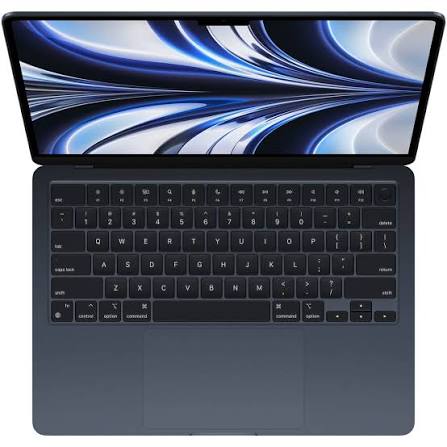
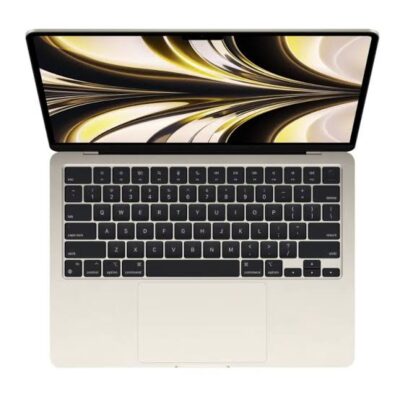
Apple MacBook Air M2 15-Inch – Powerful & Premium 8GB RAM, 256GB SSD, Space Grey
Original price was: KSh 186,000.00.KSh 184,000.00Current price is: KSh 184,000.00.
- 🍎 Apple MacBook Air M2 15-Inch – Sleek, premium Apple laptop.
- ⚡ Apple M2 Chip – Efficient performance for everyday productivity.
- 🧠 8GB Unified Memory – Supports everyday multitasking and compatible applications.
- 🚀 256GB SSD – Responsive storage for applications and personal files.
- 🖥️ 15.3-Inch Liquid Retina Display – Detailed visuals and a spacious workspace.
- 🎨 Integrated Apple Graphics – Suitable for compatible creative and visual tasks.
- 🪟 macOS – Apple’s intuitive desktop operating system.
- 📹 1080p FaceTime HD Camera – For compatible video calls and online meetings.
- 🔊 Six-Speaker Sound System – Enjoy rich audio for supported content.
- 🔌 MagSafe 3 and Thunderbolt / USB 4 – Connect compatible accessories and peripherals.
- 🌑 Space Grey Finish – Clean, professional styling.
- 🎓 Ideal for Students and Professionals – Suitable for compatible work and study.
- 🛒 Shop with Ring-Us Technologies – Visit www.ringus.co.ke.
Apple MacBook Air M2 15-Inch – Powerful & Premium 8GB RAM, 256GB SSD, Space Grey
Experience sleek design and dependable everyday performance with the Apple MacBook Air M2 15-inch, a premium laptop designed for productivity, creativity, and portable computing. Powered by Apple’s M2 chip, this MacBook Air combines an efficient processor architecture with 8GB unified memory, 256GB SSD storage, and a spacious 15-inch-class display.
Finished in elegant Space Grey, it offers a professional appearance suitable for business owners, students, freelancers, creatives, and everyday users. Its slim laptop design makes it a practical companion for working at home, studying, attending meetings, or moving between different workspaces.
Whether you are writing documents, managing business operations, browsing the internet, editing photographs, attending online meetings, or working with compatible creative applications, the MacBook Air M2 provides a versatile macOS computing experience.
Apple MacBook Air M2 15-Inch Specifications
| Feature | Details |
|---|---|
| Brand | Apple |
| Product | MacBook Air |
| Processor | Apple M2 chip |
| CPU | 8-core CPU |
| Graphics | Integrated Apple GPU; 10-core GPU configuration for the 15-inch M2 model |
| Memory | 8GB unified memory |
| Storage | 256GB SSD |
| Display | 15.3-inch Liquid Retina display |
| Display resolution | 2880 × 1864 pixels |
| Operating system | macOS; version depends on the installed configuration and updates |
| Colour | Space Grey |
| Camera | 1080p FaceTime HD camera |
| Wireless connectivity | Wi-Fi and Bluetooth |
| Charging | MagSafe 3 |
| Ports | Two Thunderbolt / USB 4 ports and a 3.5mm headphone jack |
| Warranty | Confirm with the seller |
Configuration note: These specifications describe the standard 15-inch MacBook Air with the M2 chip. Confirm the exact unit, condition, battery health, installed macOS version, and warranty coverage before purchasing.
1. Apple M2 Chip for Efficient Everyday Performance
At the heart of the MacBook Air M2 is Apple’s M2 chip, designed to combine processing performance and power efficiency in a portable computer.
Its 8-core CPU supports everyday computing activities, including document creation, browsing, email, spreadsheets, presentations, and compatible professional applications.
For users who frequently switch between different tasks, the M2 platform provides a capable foundation for a range of productivity workflows.
Students can use it for research and assignments. Entrepreneurs can manage everyday business activities, while freelancers can work with compatible writing, administrative, and creative tools.
The integrated GPU also supports graphics-related tasks, including photo editing, visual design, media playback, and selected video-editing workflows.
Performance depends on the application, project complexity, and memory requirements. Users working with particularly demanding professional software should check the recommended specifications before purchasing.
2. 8GB Unified Memory for Everyday Multitasking
The MacBook Air M2 comes with 8GB of unified memory, which is shared by the CPU and GPU.
Apple’s unified memory architecture allows different parts of the chip to access the same memory pool. This design supports efficient communication between processing components.
For everyday users, 8GB can be suitable for tasks such as writing, email, online research, presentations, spreadsheets, and using compatible applications.
It can also support moderate multitasking, although the experience will depend on how many applications and browser tabs are open and how much memory each application requires.
What can you do with 8GB unified memory?
- Office productivity: Prepare documents, spreadsheets, reports, and presentations.
- Online learning: Research topics, attend virtual classes, and organise study materials.
- Freelance writing: Draft articles, edit documents, and manage research.
- Business administration: Work with compatible accounting, invoicing, and management tools.
- Digital marketing: Manage web-based platforms, prepare content, and organise campaigns.
- Photo editing: Work with compatible image-editing software and moderate projects.
- Everyday entertainment: Browse the internet, stream content, and manage personal files.
The memory in this MacBook Air is integrated into the system and is not designed for a conventional user RAM upgrade. If you regularly work with large creative projects, virtual machines, or memory-intensive applications, consider whether 8GB will meet your long-term requirements.
3. 256GB SSD Storage for Files and Applications
The MacBook Air M2 features a 256GB SSD, providing storage for applications, documents, presentations, photographs, downloads, and personal files.
Solid-state storage offers responsive access to files and applications, helping make everyday computer use convenient.
For students, the capacity can accommodate coursework, research materials, and documents when files are managed carefully.
For professionals, it can store business records, presentations, reports, and active projects. Freelancers can organise client documents, writing assignments, and other working files.
The available storage will be lower than the advertised capacity because macOS, preinstalled applications, and system files occupy part of the drive.
How to make the most of 256GB
- Keep active projects organised and remove unnecessary downloads.
- Use suitable cloud storage for files you do not need to keep locally.
- Back up important documents regularly.
- Consider compatible external storage for larger photo, video, or project libraries.
- Review application and system storage periodically.
The internal storage is not intended as a conventional user-upgradeable component. Choose your storage configuration based on your expected needs.
4. Spacious 15.3-Inch Liquid Retina Display
One of the standout features of the 15-inch MacBook Air M2 is its 15.3-inch Liquid Retina display.
With a resolution of 2880 × 1864 pixels, the display provides detailed visuals for documents, photographs, presentations, websites, and compatible creative applications.
Its wide workspace can be particularly helpful when working with spreadsheets, comparing documents, researching several sources, or arranging windows side by side.
The display supports a wide P3 colour gamut and True Tone technology, helping provide rich colour reproduction and adapt the screen’s colour temperature to ambient lighting conditions.
This makes the laptop useful for everyday visual work and compatible photography or design tasks.
However, professional colour-critical work still benefits from proper calibration and a workflow suited to the intended output.
The larger screen also offers a comfortable workspace for online learning, reading, and extended productivity sessions.
5. Integrated Apple Graphics for Creative Work
The 15-inch MacBook Air M2 configuration features integrated Apple graphics, with a 10-core GPU configuration for this model.
Because the graphics processor is integrated into the M2 chip, it is designed to work alongside the CPU and unified memory.
This arrangement supports everyday graphics tasks and a range of compatible creative applications.
Photography and image editing
The MacBook Air can be suitable for organising photographs, adjusting images, preparing digital graphics, and working with compatible photo-editing software.
Performance depends on image resolution, the number of layers, effects, and the requirements of the selected application.
Graphic design
Designers can use compatible applications for layouts, illustrations, presentations, marketing graphics, and other visual content.
The high-resolution display provides a useful workspace for examining images and arranging design elements.
Video editing
The M2 chip includes media-processing capabilities that can help accelerate supported video workflows.
The laptop may suit lighter video editing and selected creative projects. However, 8GB unified memory and 256GB storage can become limiting when working with large footage libraries, complex effects, or demanding projects.
Users who edit video professionally should evaluate their software requirements and consider configurations with more memory and storage if necessary.
6. macOS for Productivity and Creative Work
The MacBook Air M2 runs Apple’s macOS operating system.
macOS provides a desktop environment for managing files, installing compatible applications, browsing websites, communicating online, and completing everyday productivity tasks.
Users can work with supported office applications, creative software, communication tools, and online business platforms.
For people who already use an iPhone or other Apple devices, Apple’s ecosystem can provide convenient ways to coordinate certain activities across devices, depending on their settings and software versions.
Compatibility is important when moving from Windows to macOS. Some Windows-only applications may require a Mac alternative, a web-based version, or another supported solution.
Before purchasing, confirm that your essential business applications, printers, accessories, and specialist software work with the MacBook Air and your intended macOS version.
You can learn more about Apple’s operating system through the official macOS website.
7. Slim, Portable Design in Space Grey
The MacBook Air range is known for its slim design, making it attractive to people who want a portable laptop for daily use.
The 15-inch model offers a larger display while retaining the MacBook Air’s portable laptop format.
Its Space Grey finish gives it a clean, understated appearance suitable for offices, classrooms, home workspaces, and professional meetings.
Students can carry it between lectures and study sessions, while business owners and freelancers can use it across different working environments.
As with any laptop, a suitable protective sleeve can help reduce scratches and accidental damage during transport.
Keeping the device clean and following Apple’s care recommendations can also help preserve its appearance over time.
8. 1080p FaceTime HD Camera for Online Meetings
The 1080p FaceTime HD camera supports video communication through compatible applications.
It can be useful for online classes, remote meetings, client consultations, interviews, and virtual collaboration.
For freelancers and remote workers, reliable video communication can be an important part of staying connected with clients and colleagues.
Actual meeting quality also depends on lighting, internet connectivity, application settings, and the camera configuration of the device.
For the best results, use a well-lit environment and a stable internet connection.
9. Audio and Connectivity for Everyday Use
The 15-inch MacBook Air M2 includes a six-speaker sound system, supporting a richer audio experience for compatible content.
This can be useful when attending online meetings, watching educational videos, listening to music, or reviewing multimedia content.
Its wireless connectivity supports internet access and compatible Bluetooth accessories.
The device also includes MagSafe 3 charging, two Thunderbolt / USB 4 ports, and a 3.5mm headphone jack.
The USB-C-based ports support compatible peripherals and external displays, subject to the device’s specifications and accessory requirements.
Because the MacBook Air has a limited selection of built-in ports, users who regularly connect multiple external devices may benefit from a compatible USB-C hub or docking accessory.
Check compatibility before purchasing adapters, external displays, storage devices, or other peripherals.
10. A Practical Laptop for Students
Students need a laptop that can support research, coursework, writing, presentations, and communication.
The MacBook Air M2 provides a macOS environment suitable for many everyday academic tasks.
Its 15.3-inch display gives users room to read learning materials and work on documents. The M2 chip supports compatible productivity applications, while the SSD provides space for study files and installed software.
It can be useful for preparing assignments, conducting research, participating in online learning, creating presentations, and managing personal projects.
Students studying programming, engineering, specialised design, or other technical disciplines should confirm software compatibility and memory requirements before purchasing.
The 8GB memory and 256GB storage configuration is best evaluated against the student’s course requirements and expected workload.
11. Business Productivity for Entrepreneurs and Professionals
The MacBook Air M2 can support many everyday business activities.
Entrepreneurs can use compatible applications for preparing quotations, managing spreadsheets, drafting correspondence, reviewing reports, and organising digital records.
Professionals can use it for presentations, research, document preparation, email, and supported communication tools.
Its larger display can be helpful when reviewing documents or working across multiple windows.
For small-business owners, a laptop can also serve as a portable workspace for compatible invoicing platforms, customer-management tools, and online business services.
Before adopting the device for business use, verify compatibility with any essential accounting software, payment tools, printers, security systems, and workplace applications.
Businesses handling confidential information should also establish suitable backup, account-security, and device-management practices.
12. Suitable for Freelancers and Remote Workers
Freelancers often need a reliable computer for writing, communication, research, administration, and client projects.
The MacBook Air M2 may be suitable for many freelancers whose tools are compatible with macOS.
Writing and editing
Writers can prepare articles, reports, proposals, manuscripts, and other documents using compatible word processors and writing applications.
The 15.3-inch display provides room for working with documents and reference materials.
Virtual assistance
Virtual assistants can use compatible email, scheduling, spreadsheet, document-management, and online administration tools.
The device can be a practical choice for professionals who manage tasks for clients from different locations.
Digital marketing
Digital marketers can work with compatible content-planning tools, online advertising platforms, research services, and social media management applications.
The exact suitability depends on the tools and workflows involved.
Remote communication
The built-in camera, microphone system, speakers, and compatible meeting applications support common remote-work activities.
For users who spend much of the day in virtual meetings, a suitable headset may also be useful.
13. Creative Projects, Content Creation, and Programming
The MacBook Air M2 can be useful for selected creative and technical workflows, although the 8GB memory and 256GB storage should be considered carefully.
Content creation
Users can prepare social media graphics, edit photographs, design marketing materials, and work with compatible content-creation applications.
For larger projects, storage management and realistic expectations about memory capacity are important.
Programming and web development
The M2 chip supports compatible development tools and software for macOS.
Developers can use suitable code editors, programming languages, and web-development tools, provided their dependencies and workflows are supported.
Some tools may have different requirements or workflows on macOS compared with Windows. Confirm support for specialist software, databases, virtual machines, and other development dependencies.
Video and multimedia work
The M2 media engine can accelerate supported media workflows.
For demanding video editing, complex timelines, large files, or professional creative work, a configuration with more memory and storage may be a better long-term investment.
14. Battery Efficiency and Everyday Mobility
The MacBook Air M2 is designed around Apple’s power-efficient M2 chip and a portable laptop form factor.
Apple advertised up to 18 hours of video playback for the 15-inch M2 MacBook Air under its specified testing conditions. Actual battery life varies with brightness, workload, network activity, applications, settings, and battery condition.
For students and professionals, battery efficiency can be helpful when working away from a permanent desk or moving between appointments.
If you are purchasing a used or refurbished unit, pay particular attention to battery health and condition. A device’s actual battery performance depends on its age, charging history, and overall maintenance.
Confirm the condition of the battery and charger with the seller before making your decision.
15. Responsible Maintenance and Long-Term Value
Maintaining a laptop properly can help extend its useful life.
Keep the device clean, avoid excessive heat and moisture, install supported software updates, and use a protective sleeve when travelling.
Back up important files regularly to help protect business records, school assignments, photographs, and client documents.
Since the memory and internal storage are not designed for conventional user upgrades, consider your future requirements before purchasing this configuration.
When the laptop reaches the end of its useful life, consider professional refurbishment, reuse, or responsible electronics recycling through an appropriate programme.
Extending the life of computing equipment and disposing of electronic waste responsibly can help reduce unnecessary waste.
16. Apple MacBook Air M2 Compared with Other Laptop Options
Different laptops are suited to different users. The best choice depends on your software requirements, budget, portability needs, and expected workload.
| Feature | MacBook Air M2 15-inch | Windows laptop | Desktop computer |
|---|---|---|---|
| Processor | Apple M2 | Varies by model | Varies by configuration |
| Memory | 8GB unified memory | Varies by model | Varies by configuration |
| Storage | 256GB SSD | Varies by configuration | Varies by configuration |
| Operating system | macOS | Usually Windows, depending on model | Depends on configuration |
| Display | 15.3-inch Liquid Retina | Varies by model | Depends on monitor |
| Portability | Portable laptop | Depends on size and weight | Usually designed for a fixed workspace |
| Software compatibility | macOS-compatible applications | Windows-compatible applications | Depends on operating system |
| Upgrade considerations | Memory and internal storage are not conventional user upgrades | Depends on the exact laptop | Often offers more expansion options |
| Ideal use | Everyday productivity and compatible creative workflows | Broad range of personal and professional tasks | Fixed workspaces and suitable expandable workloads |
This is a general comparison rather than a benchmark. Actual performance depends on the exact configurations and software being compared.
Is the MacBook Air M2 right for you?
Consider this MacBook Air if you want a larger high-resolution display, a portable design, macOS, and a processor suitable for everyday productivity and compatible creative applications.
If you depend on Windows-only software, confirm whether a suitable Mac alternative exists before purchasing.
If you regularly work with large video projects, demanding creative software, virtual machines, or extensive local file libraries, consider whether more memory and storage would better meet your needs.
Frequently Asked Questions
1. Which processor does the MacBook Air M2 use?
It uses Apple’s M2 chip, featuring an 8-core CPU in this model.
2. How much RAM does it have?
This configuration has 8GB unified memory. The memory is integrated and is not designed for a conventional user RAM upgrade.
3. How much storage is included?
It comes with a 256GB SSD. The available space will be lower after macOS and applications occupy part of the drive.
4. Is the display 15 inches?
It is marketed as the 15-inch MacBook Air and features a 15.3-inch Liquid Retina display.
5. Is it suitable for students?
Yes, it can suit many students who need a laptop for research, assignments, presentations, and compatible academic applications. Students should check specialist course-software requirements.
6. Can I use it for business?
Yes. It can support many everyday business activities, including document preparation, spreadsheets, communication, research, and compatible business applications.
7. Is it suitable for graphic design?
It can handle many compatible design and photo-editing workflows. More demanding projects may benefit from a Mac with additional memory and storage.
8. Can I use it for programming?
Yes, for compatible development tools and workflows. Check that your programming environment, dependencies, and specialist software support macOS and Apple silicon.
9. Can I upgrade the RAM or SSD later?
The memory and internal storage are not designed as conventional user-upgradeable components. Choose a configuration that suits your expected requirements.
10. What colour is this model?
This configuration is listed in Space Grey.
11. What is the battery life?
Apple advertised up to 18 hours of video playback under specified testing conditions for the 15-inch M2 MacBook Air. Actual battery life varies, especially with workload and battery condition.
12. What warranty is included?
The supplied product information does not specify a warranty. Confirm the applicable warranty and coverage with the seller before purchasing.
13. Where can I buy the Apple MacBook Air M2?
Visit Ring-Us Technologies to explore available laptops and technology products. Confirm the exact configuration, unit condition, battery health, and warranty before ordering.
Final Thoughts
The Apple MacBook Air M2 15-inch combines Apple’s M2 chip, 8GB unified memory, 256GB SSD storage, and a spacious Liquid Retina display in a sleek Space Grey laptop.
It is a practical option for students, entrepreneurs, freelancers, and professionals who need a portable computer for everyday productivity and compatible creative tasks.
The main considerations are the 8GB memory capacity, 256GB internal storage, and compatibility with your essential applications.
If those specifications match your needs, the MacBook Air M2 offers a versatile macOS experience in a clean, professional design.
Explore available technology products at Ring-Us Technologies: www.ringus.co.ke.
Related products

GIGABYTE Radeon RX 7700 XT | 12GB GDDR6 | WINDFORCE RGB Cooling | 192-Bit | 2599 MHz Boost | HDMI & DisplayPort | Epic 1440p Gaming
Step into the future of immersive gaming with the GIGABYTE Radeon RX 7700 XT 12GB graphics card. Built on the powerful AMD RDNA 3 architecture, it delivers exceptional 1440p performance, blazing-fast clock speeds, and superior thermal management. Whether you're a gamer, creator, or multitasker, this GPU is your gateway to next-level graphics.
Key Features
-
12GB GDDR6 VRAM – High-capacity memory for advanced games and creative workloads
-
2599 MHz Boost Clock – Lightning-fast processing power for smoother gameplay
-
192-bit Memory Interface – Ensures wide bandwidth for data-heavy performance
-
WINDFORCE Cooling System – Efficient thermal solution with 3D active fans & heat pipes
-
RGB Fusion Support – Customize lighting with vibrant RGB effects
-
Metal Backplate – Added durability and protection for long-term use
-
Multiple Outputs – Connect multiple displays with HDMI & DisplayPort

Graphics Coprocessor NVIDIA GeForce RTX 2080 Super Brand NVIDIA Graphics Ram Size 8 GB GPU Clock Speed 1650 MHz Video Output Interface DisplayPort, DVI, HDMI
Power your rig with the NVIDIA GeForce RTX 2080 — armed with 8GB GDDR6 memory, real-time ray tracing, and a 256-bit memory interface. This GPU is built for high-performance 1440p and 4K gaming with incredible visual fidelity and high frame rates.
Key Features
-
8GB GDDR6 Memory – Ideal for modern AAA games at 1440p and 4K
-
256-bit Memory Interface – Fast memory access and high bandwidth for large textures
-
Boost Clock up to 1710 MHz – Delivers superior rendering and gaming performance
-
Ray Tracing Cores – Real-time lighting, reflections, and shadows for next-gen realism
-
Turing Architecture – Efficient processing with enhanced shading and AI acceleration
-
Versatile Outputs – DisplayPort, HDMI, and DVI for multi-monitor flexibility
-
VR Ready – Built for immersive experiences with high refresh rates and low latency

Vandossy Radeon RX 5700 XT 8GB GDDR6 | RDNA | PCIe 4.0 | High-FPS Gaming Beast – Fast & Powerful
Unlock high-performance 1440p gaming with the Radeon RX 5700 XT. Featuring 8GB of GDDR6 memory, advanced RDNA architecture, and PCIe 4.0 support, this card delivers stunning visuals, high frame rates, and powerful multitasking — perfect for gamers and creators alike.
Key Features
-
8GB GDDR6 Memory – Fast, efficient VRAM for smooth gameplay and multitasking
-
RDNA Architecture (7nm) – Improved efficiency, performance, and cooler operation
-
PCIe 4.0 Support – Twice the bandwidth for future-proofed gaming builds
-
Boost Clock up to 1905 MHz – Delivers high FPS in modern AAA titles
-
Multi-Monitor Support – 1x HDMI and 3x DisplayPort for flexible output setups
-
Built for Gaming – Reliable performance for 1080p Ultra and 1440p High settings
-
600W PSU Recommended – Stable power for uninterrupted performance

NVIDIA Quadro K2200 4GB GDDR5 | Compact Pro GPU | Ultra-Quiet Cooling | Certified for CAD & 3D
Delivering efficient 3D performance and compact compatibility, the NVIDIA Quadro K2200 features 4GB GDDR5 memory, 640 CUDA cores, and support for up to 4 ultra-HD displays. Ideal for CAD, DCC, and professional workflows on space-constrained workstations.
Key Features
-
4GB GDDR5 Memory – High-speed professional-grade memory for fluid 3D performance
-
640 CUDA Cores – Reliable parallel processing for modeling, simulation, and creative apps
-
DisplayPort 1.2 + DVI Outputs – Supports up to 4 displays with ultra-HD 4K resolutions
-
80 GB/s Memory Bandwidth – Ensures smooth rendering and texture loading
-
Ultra-Quiet Active Cooling – Operates silently, ideal for quiet work environments
-
Low Power Consumption (68W) – Perfect for energy-efficient, compact workstation builds
-
ISV Certified – Optimized and tested for top professional software (AutoCAD, SolidWorks, Adobe)
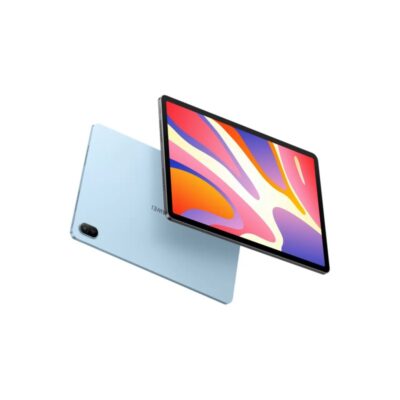

Huawei MatePad SE | 11″ Eye Comfort Display | 8GB RAM | 128GB ROM | 7700mAh Battery – Smart, Sleek & Powerful Tablet
The Huawei MatePad SE is a stylish and performance-driven 11" tablet designed for immersive viewing, exceptional audio, and long-lasting power. With 8GB RAM, 128GB storage, and a 7700mAh battery, it’s perfect for entertainment, learning, and everyday productivity.
Specifications
-
Display: 11” FHD+ Eye Comfort Display
-
Resolution: Full HD+ (Exact resolution varies by region)
-
Processor: Qualcomm Snapdragon (region-dependent variant)
-
RAM: 8GB
-
Storage: 128GB ROM
-
Audio: Quad-Speaker System, HUAWEI Histen 9.0
-
Battery: 7700mAh with 22.5W Fast Charging
-
Operating System: HarmonyOS (EMUI or Android-based depending on region)
-
Camera: Rear & Front Camera (specs not specified)
-
Connectivity: Wi-Fi, Bluetooth
-
Build: Lightweight metal body
-
Ports: USB Type-C, headphone jack
-
Security: Face Unlock (select models

Dell Core i3 2nd Gen Desktop | 4GB RAM | 500GB HDD | Windows 10 – Reliable Office Computer
Get the Dell Core i3 2nd Gen Desktop PC in Kenya – a dependable desktop with Intel Core i3 2nd Generation processor, 4GB RAM, and 500GB HDD storage. Ideal for everyday office tasks, web browsing, and multimedia, offering a solid balance of performance and value.
Specifications
-
Processor: Intel Core i3 2nd Generation
-
Memory: 4GB DDR3 RAM
-
Storage: 500GB HDD
-
Graphics: Integrated Intel HD Graphics
-
Operating System: Windows 10 Pro
-
Ports: USB 2.0, USB 3.0, VGA, Ethernet, Audio In/Out
-
Optical Drive: DVD-ROM
-
Connectivity: Wired LAN
-
Form Factor: Tower/Desktop

HP EliteBook 840 G3 | Intel® Core™ i7 6th Gen | 8GB RAM | 256GB SSD | Touchscreen – Reliable Business-Class Power & Flexibility
Buy the HP EliteBook 840 G3 Touchscreen Laptop in Kenya. A sleek and professional ultrabook with strong performance, security, and a responsive touch display—ideal for work and light creativity.
Specifications
-
Display: 14″ Full HD Touchscreen (1920 x 1080)
-
Processor: Intel® Core™ i7-6600U (6th Gen)
-
RAM: 8GB DDR4
-
Storage: 256GB SSD
-
Graphics: Intel® HD Graphics 520
-
OS: Windows 10 Pro / Upgradable to Windows 11
-
Design: Slim, durable, business-ready

HP EliteBook x360 1030 G4 | Intel® Core™ i7 8th Gen | 16GB RAM | 512GB SSD – Sleek, Fast & Powerful
Buy the HP EliteBook x360 1030 G4 Touch Screen Laptop in Kenya. Built with premium design, enterprise security, and convertible flexibility for mobile professionals.
Specifications
-
Display: 13.3″ Full HD Touchscreen
-
Processor: Intel® Core™ i7 (8th Gen)
-
RAM: 16GB LPDDR3
-
Storage: 512GB SSD
-
OS: Windows 10/11 Pro
-
Design: Sleek x360 convertible aluminum build


Reviews
There are no reviews yet.