



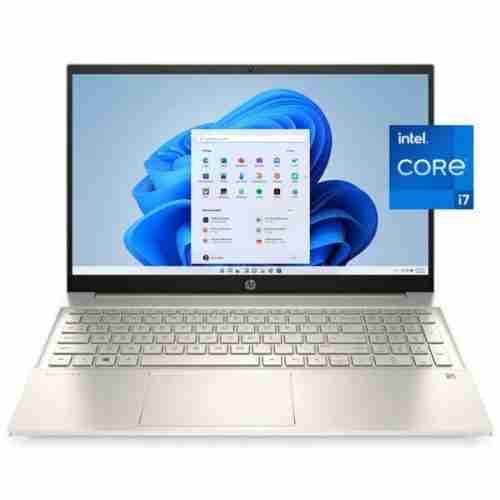

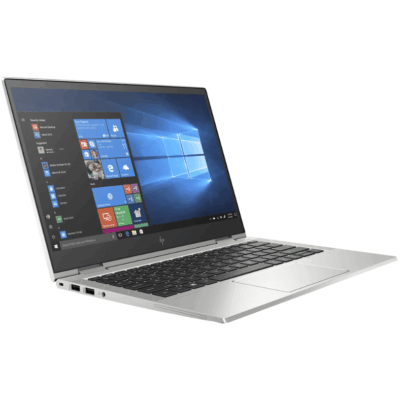
HP 15 Core 7 15th Gen – Powerful & Premium 16GB DDR4 3200, 512GB SSD, 15.6-Inch Touchscreen DOS Laptop
Original price was: KSh 115,000.00.KSh 112,000.00Current price is: KSh 112,000.00.
💻 HP 15 Core 7 15th Gen – Powerful & Premium Laptop
- ⚡ Core 7 15th Gen Processor
- 🧠 16GB DDR4 3200 RAM
- 💾 512GB SSD Storage
- 🖥️ 15.6-Inch Touchscreen
- 💿 DOS Operating System
- 💼 Excellent for Business & Office Work
- 🧑💻 Great for Freelancers & Remote Workers
- 🎓 Student Friendly
- 👨💻 Suitable for Programming & IT
- ✍️ Ideal for Writers & Digital Professionals
- 📣 Great for Digital Marketing
- 🚀 Powerful Multitasking Configuration
- 🔧 Fast SSD Storage for Responsive Workflows
- 🛒 Available through www.ringus.co.ke
HP 15 Core 7 15th Gen – Powerful & Premium 16GB DDR4 3200, 512GB SSD, 15.6-Inch Touchscreen DOS Laptop
The HP 15 Core 7 15th Gen is a powerful and practical laptop designed for users who want strong everyday productivity, responsive multitasking, fast storage, and the convenience of a touchscreen display.
This configuration combines a Core 7 15th Gen processor, 16GB DDR4 3200 RAM, and a 512GB SSD. Together, these specifications provide a capable foundation for office productivity, business operations, online work, education, programming, content creation, and everyday computing.
The laptop also features a 15.6-inch touchscreen, giving users an additional and intuitive way to interact with compatible applications and Windows after an operating system is installed.
This particular unit comes with DOS, meaning the operating system should be installed and configured according to the buyer’s requirements.
Key Specifications
| Feature | Specification |
|---|---|
| Brand | HP |
| Series | HP 15 |
| Processor | Core 7 15th Gen |
| RAM | 16GB DDR4 3200 |
| Storage | 512GB SSD |
| Display Size | 15.6-inch |
| Display Type | Touchscreen |
| Operating System | DOS |
| Graphics | Not specified |
Powerful Core 7 15th Gen Processing
At the heart of this HP 15 is the Core 7 15th Gen processor.
It provides a modern processing platform for users who need more than basic computing. The combination of a capable processor and generous system memory makes this laptop well suited to multitasking across everyday productivity applications.
Users can work with documents, spreadsheets, browsers, email, communication platforms, and other applications without needing to rely on a basic entry-level configuration.
For professionals, students, freelancers, and entrepreneurs, having a responsive processor can make everyday computer work more convenient and productive.
Actual performance will depend on the software being used and the complete system configuration.
16GB DDR4 3200 RAM for Multitasking
One of the major strengths of this configuration is its 16GB DDR4 3200 RAM.
Having 16GB of memory provides a useful amount of headroom for users who regularly work with multiple applications and browser tabs.
It can be beneficial for office professionals moving between spreadsheets, documents, email, web applications, and communication tools.
Freelancers can also benefit when managing several browser-based platforms, research material, documents, and productivity applications simultaneously.
Students working on research-heavy assignments can keep multiple resources open while working on their documents.
For professional software with particularly demanding memory requirements, users should still check the application’s recommended specifications.
Fast 512GB SSD Storage
The 512GB SSD provides a combination of useful storage capacity and fast storage performance.
Compared with traditional HDD storage, an SSD can provide faster system startup, quicker application loading, and more responsive file access.
The 512GB capacity also gives users room for documents, work files, applications, presentations, research material, photos, and other everyday data.
For freelancers and professionals who work with numerous files, having fast local storage can make everyday workflows more convenient.
Users working with very large video projects, extensive media libraries, or large datasets may eventually require additional external or compatible storage.
15.6-Inch Touchscreen Display
This HP 15 features a 15.6-inch touchscreen, giving users a more interactive way to work with compatible software.
Touch functionality can be useful for navigation, presentations, creative applications, browsing, and situations where direct interaction with the screen is convenient.
The larger 15.6-inch format also provides a comfortable workspace for documents, spreadsheets, dashboards, research, and general productivity.
The touchscreen adds flexibility for users who prefer having both traditional keyboard-and-touchpad interaction and direct screen interaction.
DOS Operating System
This particular configuration comes with DOS rather than a pre-installed Windows operating system.
This is important for buyers to understand before purchase.
If you require Windows for your applications, the operating system will need to be installed separately according to the appropriate licensing and compatibility requirements.
For users who already have a preferred operating system or intend to configure the machine themselves, a DOS configuration can provide flexibility.
For information about Windows, visit Microsoft Windows.
Excellent for Office Productivity
The HP 15 is well suited to professional and office environments.
With its Core 7 processor, 16GB RAM, and 512GB SSD, it can provide a capable workstation for common productivity activities.
It can be used for:
- Word processing
- Spreadsheet management
- Presentations
- Internet research
- Online meetings
- Document management
- Business applications
- Customer management
- Administrative work
- Financial and accounting applications
- Cloud-based productivity platforms
The touchscreen adds another convenient way to interact with compatible applications.
Ideal for Business Owners and Entrepreneurs
Entrepreneurs often need a computer that can handle multiple areas of business activity.
The HP 15 can serve as a workstation for preparing quotations, invoices, reports, presentations, business documents, emails, online research, and web-based business platforms.
Its 16GB RAM is also useful for users who regularly multitask between different business applications.
For small business owners, having one versatile laptop can make it easier to manage operations from different locations.
Excellent for Freelancers and Online Workers
The combination of a capable processor, 16GB RAM, and 512GB SSD makes this HP 15 a useful option for freelancers.
It can support many online-work activities, including:
- Virtual assistance
- Content writing
- Data entry
- Online research
- Customer support
- Digital marketing
- Social media management
- Administrative assistance
- Website management
- Email management
- Document formatting
The touchscreen can also be convenient when navigating certain web platforms and creative applications.
Great for Writers and Content Professionals
Writers, editors, bloggers, and digital professionals need a comfortable workstation for long periods of typing, research, editing, and communication.
The HP 15 provides a large 15.6-inch touchscreen display and a substantial 16GB of RAM.
This combination can be useful for keeping research, documents, browser tabs, communication tools, and writing applications available during a working session.
The 512GB SSD also provides fast access to locally stored documents and applications.
Useful for Programming and IT
The HP 15 can also serve students, developers, and IT professionals working with programming tools.
The Core 7 15th Gen processor and 16GB RAM provide a strong foundation for coding, web development, database work, scripting, and many general software-development tasks.
The 512GB SSD can also help provide faster application and project loading.
Developers working with virtual machines, large development environments, advanced AI workloads, or highly specialized tools should compare the requirements of their software with the laptop’s complete configuration.
Suitable for Students
Students can benefit from a versatile laptop that can handle both academic work and everyday productivity.
The HP 15 can be used for:
- Research
- Assignments
- Presentations
- Online learning
- Word processing
- Spreadsheet work
- Programming
- Internet browsing
- Document management
- Group projects
The 15.6-inch display provides a larger working area for research and academic applications.
The touchscreen can also be useful for interactive learning platforms and compatible educational applications.
Useful for Digital Marketing
Digital marketers often work with multiple browser tabs, content platforms, analytics dashboards, social media management tools, image-editing applications, and communication platforms.
The 16GB RAM configuration is useful for multitasking across these different tools.
The 512GB SSD provides fast local storage for marketing documents, campaign materials, images, presentations, and other files.
For heavier professional creative workloads, buyers should confirm the graphics specifications required by their preferred applications because the graphics configuration was not specified.
Content Creation and Creative Work
The HP 15 can support a variety of general creative and content-production workflows.
Writers can use it for long-form writing and editing.
Digital marketers can manage campaigns and content.
Freelancers can work with documents, presentations, graphics applications, and online platforms.
For advanced video editing, professional 3D rendering, advanced animation, or other GPU-intensive workloads, the exact graphics hardware should be confirmed before purchase.
Touchscreen Productivity
The touchscreen provides another method of interacting with the computer.
Instead of relying exclusively on the keyboard and touchpad, users can directly interact with compatible applications and interface elements.
This can be useful when reviewing presentations, navigating certain applications, browsing, or demonstrating content to another person.
The touchscreen can also make the laptop more versatile for users who enjoy a more interactive computing experience.
15.6-Inch Screen for Comfortable Work
A 15.6-inch display provides a generous physical workspace for everyday computing.
It can be useful when working with spreadsheets, documents, research pages, dashboards, presentations, and multiple application windows.
For office users and students, a larger screen can make extended productivity sessions more comfortable than working on a very small display.
The exact display resolution and panel specifications were not provided, so buyers should confirm those details if they are important to their intended use.
Storage and File Management
The 512GB SSD provides useful local storage for everyday work.
Users can store documents, presentations, applications, research files, photos, and other business or academic materials.
For important work files, regular backups are recommended.
External storage or cloud storage can be used for additional capacity and backup purposes, particularly for users working with large media collections.
Responsible Technology Use
Choosing a laptop that matches the user’s actual workload can help avoid unnecessary upgrades or replacements.
Keeping a capable laptop in service for longer can extend its useful life.
Regular maintenance, compatible upgrades where appropriate, proper file backups, and responsible recycling at the end of the device’s useful life are practical ways to use technology more sustainably.
The SSD can also contribute to a responsive everyday computing experience without requiring users to replace the entire laptop simply because an older storage system has become slow.
Maintenance Tips
Keep the laptop’s ventilation openings clear and avoid using it on surfaces that block airflow.
A clean working environment can help reduce dust accumulation.
Important files should be backed up regularly to external storage or a trusted cloud service.
Users should also keep their installed operating system, drivers, applications, and security software updated once the operating system has been configured.
If the laptop develops unusual heat, unexpected shutdowns, abnormal noises, or significant performance changes, it should be inspected.
Who Should Consider the HP 15 Core 7?
This laptop can be suitable for:
- 💼 Business owners
- 🏢 Office professionals
- 🧑💻 Freelancers
- ✍️ Writers and editors
- 📣 Digital marketers
- 🎓 Students
- 👨💻 Programmers and IT learners
- 🏠 Remote workers
- 📊 Administrative professionals
- 🧾 Accounting and business users
- 🌐 Online workers
- 🎨 General creative professionals
The exact suitability depends on the software and workload involved.
Comparison with Other Common Laptop Configurations
| Feature | HP 15 Core 7 15th Gen | Basic Productivity Laptop |
|---|---|---|
| Processor | Core 7 15th Gen | Varies |
| RAM | 16GB DDR4 3200 | Often lower |
| Storage | 512GB SSD | Varies |
| Display | 15.6-inch Touchscreen | Varies |
| Operating System | DOS | Varies |
| Multitasking | Well suited to demanding everyday multitasking | Depends on configuration |
| Office Work | Suitable | Suitable |
| Freelancing | Suitable | Depends on configuration |
| Programming | Suitable for many workloads | Depends on configuration |
| Student Use | Suitable | Suitable |
| Creative Work | Suitable for selected workloads | Depends on configuration |
The combination of Core 7 processing, 16GB RAM, 512GB SSD storage, and a 15.6-inch touchscreen gives this configuration a versatile productivity profile.
Frequently Asked Questions
What processor does the HP 15 have?
This configuration features a Core 7 15th Gen processor, as supplied.
How much RAM does it have?
It comes with 16GB DDR4 3200 RAM.
How much storage does it have?
The laptop has a 512GB SSD.
Does it have a touchscreen?
Yes. This configuration has a 15.6-inch touchscreen.
Does it come with Windows?
No Windows operating system was specified. This configuration comes with DOS, so the required operating system can be installed separately.
Is it good for business?
Yes. The processor, 16GB RAM, 512GB SSD, and 15.6-inch touchscreen make it suitable for many business and productivity workflows.
Is it suitable for students?
Yes. It can support research, assignments, presentations, online learning, document work, programming, and general academic productivity.
Can it be used for programming?
Yes. The Core 7 processor, 16GB RAM, and SSD provide a useful foundation for many programming and development tasks.
Is it suitable for video editing?
It can support selected video-editing workloads, but the exact graphics hardware was not specified. Buyers planning intensive video production should confirm the GPU and software requirements.
Can it handle multitasking?
The 16GB RAM and Core 7 processor provide a capable foundation for multitasking across common productivity and professional applications.
Customer Experiences
“The 16GB RAM makes a noticeable difference when I have several work applications and browser tabs open at the same time.”
— Customer, Nairobi
“I like the larger 15.6-inch touchscreen because it gives me plenty of room for my business documents and online work.”
— Customer, Kisumu
“The SSD makes the laptop feel responsive, and the Core 7 configuration gives me room for different types of work.”
— Customer, Nakuru
“I was looking for a laptop that could handle both schoolwork and programming, and this configuration gives me a good productivity setup.”
— Customer, Mombasa
“The touchscreen is a nice addition for presentations and everyday navigation.”
— Customer, Eldoret
Why Choose the HP 15 Core 7 15th Gen?
The HP 15 Core 7 15th Gen combines modern processing capability with 16GB DDR4 3200 RAM, 512GB SSD storage, and a 15.6-inch touchscreen.
This makes it a versatile choice for business users, freelancers, students, writers, programmers, digital marketers, remote workers, and everyday professionals.
The DOS operating system also means buyers should plan for the installation of their preferred operating system separately.
Learn more about HP products at HP and explore Intel processor technology through Intel.
For availability and purchasing information, visit www.ringus.co.ke.
Final Thoughts
The HP 15 Core 7 15th Gen is a powerful and versatile productivity laptop built around a strong combination of processing, memory, storage, and touchscreen convenience.
With 16GB DDR4 3200 RAM and a 512GB SSD, it provides a responsive foundation for multitasking, office work, freelancing, programming, education, digital marketing, and general professional use.
The 15.6-inch touchscreen adds another layer of flexibility, while the DOS configuration gives the buyer the option to install the required operating system separately.
For users looking for a modern HP 15 configuration with substantial memory, fast SSD storage, and touchscreen functionality, this specification offers a practical all-round computing platform.
Related products


ASUS ROG STRIX G15 i7 13th gen 16GB/1TB


MacBook Pro 2018 – Powerful, Sleek & Super Reliable (i5 | 16GB | 256GB)
???? MacBook Pro 2018 (Core i5 | 16GB RAM | 256GB SSD)
-
⚡ Powerful Performance: 8th-Gen Intel Core i5 processor delivers fast, smooth multitasking for work, study, and creativity.
-
???? Ample Memory: 16GB RAM ensures effortless multitasking with zero lag — perfect for designers, developers, and students.
-
???? Super-Fast Storage: 256GB NVMe SSD offers lightning-quick boot times and file access.
-
???? Brilliant Retina Display: 13.3″ True Tone Retina screen delivers sharp text and vibrant, true-to-life colors.
-
???? Enhanced Audio & Input: Backlit Magic Keyboard, large Force Touch trackpad, and immersive stereo speakers.
-
???? All-Day Battery Life: Reliable battery performance for productivity on the go.
-
????️ 6-Month Warranty: Includes a limited 6-month warranty for peace of mind.
-
???? Eco-Friendly Build: Energy-efficient design and recyclable aluminum enclosure.
-
???? Lightweight & Portable: Sleek, professional, and easy to carry anywhere.
-
???? Available at: www.ringus.co.ke


MacBook Air 2020 A2179 13inch i5 8gb/512SSD
- MacBook Pro A2179
- Processor: Intel Core
- RAM: 8GB LPDDR4X Memory
- Storage: 512GB SSD (ultra-fast performance)
- Display: 13.3-inch Retina Display with True Tone Technology
- Resolution: 2560 x 1600 pixels (227 PPI)
- Graphics: Intel Iris Plus Graphics
- Year: 2020 Model (A2179)
- Operating System: macOS (latest compatible version)
- Keyboard: New Magic Keyboard with improved reliability
- Touch Bar: Yes, with integrated Touch ID sensor
- 6 Months Warranty

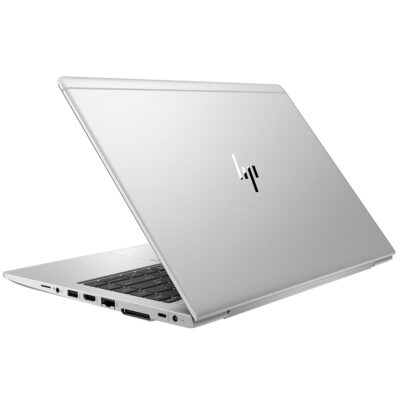
Hp Elitebook 745 G6 RYZEN 5 PRO

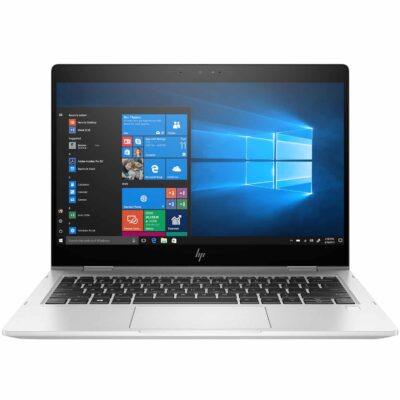
Hp elitebook 830 g7 i7 10th generation
- Hp elitebook 830 g7 i7 10th generation
- Operating system: Windows 10 / 11 Pro 64-Bit Edition
- Memory: 16GB DDR4-2666 MHz RAM (1 x 8 GB) | 64 GB
- Storage: 512GB PCIe® NVMe™ Value M.2 SSD
- Optical drive: None
- Graphics Processor: Integrated, Intel® Premium UHD Graphics
- Processor: Intel® Core™ i7-10510U (1.8 GHz base frequency, up to 4.9 GHz with Intel® Turbo Boost Technology, 8 MB L3 cache, 4 cores)
- Processor Family: 10th Generation Intel® Core™ i7 processor
- Display: 13.3 Inches (33.782cm) diagonal FHD, IPS, anti-glare, WLED-backlit, eDP, 250 nits, 45% NTSC (1920 x 1080)



Reviews
There are no reviews yet.