



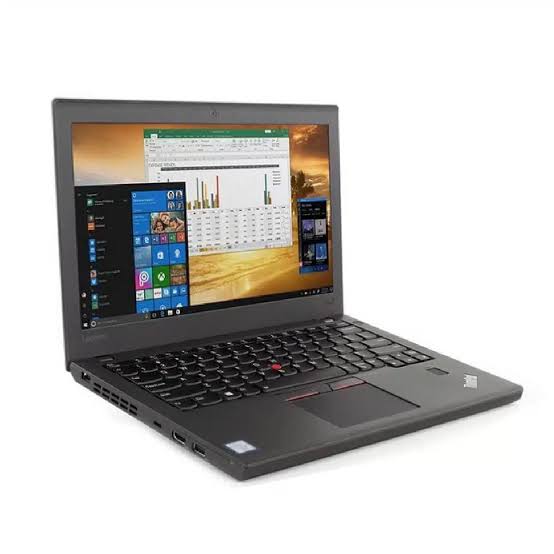
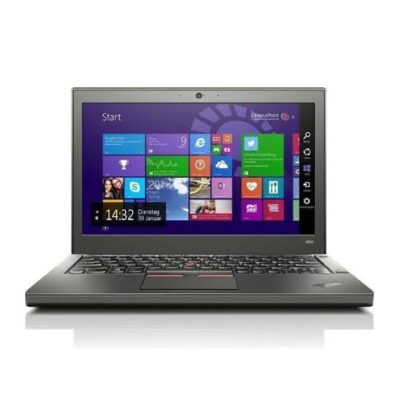
# Lenovo ThinkPad X270 Core i7 7th Gen – Powerful & Premium 8GB RAM, 256GB SSD Non-Touch Laptop
Original price was: KSh 26,000.00.KSh 24,000.00Current price is: KSh 24,000.00.
Lenovo ThinkPad X270 Core i7 7th Gen – Powerful & Premium 8GB RAM, 256GB SSD Non-Touch Laptop
- ⚡ Powerful Intel Core i7 7th Gen – Reliable performance for office work, business, school, freelancing, and everyday computing.
- 💾 8GB RAM – Smooth multitasking across documents, browsing, research, email, and productivity applications.
- 🚀 256GB SSD – Fast startup, quick application loading, and responsive access to your files.
- 🖥️ Non-Touch Display – Practical and professional for work, study, browsing, and everyday productivity.
- 💼 Premium ThinkPad Design – Professional business-oriented design ideal for offices, entrepreneurs, and remote workers.
- 🎓 Ideal for Students & Professionals – Great for assignments, research, presentations, online learning, and workplace tasks.
- 💻 Freelancer & Remote Work Ready – Suitable for writers, virtual assistants, digital marketers, administrators, and online professionals.
- 🧳 Compact & Portable – Convenient for professionals and students who need a practical laptop on the move.
- 🔧 Long-Term Value – Proper maintenance and compatible upgrades can help extend the laptop’s useful life.
- 🌱 Responsible Computing Choice – Extending the life of a capable business laptop can help reduce unnecessary device replacement.
- 🌐 Shop with Ring-Us Technologies – Visit www.ringus.co.ke for more laptops and technology solutions.
Lenovo ThinkPad X270 Core i7 7th Gen – Powerful & Premium 8GB RAM, 256GB SSD Non-Touch Laptop
Looking for a powerful, reliable, and practical business laptop that can handle everyday work without stretching your budget? The Lenovo ThinkPad X270 Core i7 7th Gen is a compact business laptop designed for professionals, students, entrepreneurs, freelancers, and anyone who values dependable productivity in a portable machine.
With an Intel Core i7 7th Gen processor, 8GB RAM, and a 256GB SSD, this Lenovo ThinkPad X270 offers a strong combination of processing performance, responsive storage, and practical multitasking for everyday computing. Its non-touch design keeps things simple and professional, making it a suitable companion for office work, online learning, remote work, business administration, research, communication, and general productivity.
The ThinkPad X270 is also part of Lenovo’s well-known ThinkPad business family, making it particularly appealing to buyers looking for a laptop built around productivity and portability rather than unnecessary extras.
Lenovo ThinkPad X270 at a Glance
| Feature | Lenovo ThinkPad X270 | Basic Entry-Level Laptop | Older 4GB Laptop |
|---|---|---|---|
| Processor | Intel Core i7 7th Gen | Basic processor | Older-generation processor |
| RAM | 8GB | Often 4GB–8GB | Often 4GB |
| Storage | 256GB SSD | May use slower storage | May use HDD or smaller SSD |
| Display | Non-Touch | Varies | Varies |
| Multitasking | Excellent for everyday productivity | Basic to moderate | Limited |
| Office Work | Well suited | Suitable for basic tasks | Suitable for lighter tasks |
| Students | Excellent for research and assignments | Suitable | Suitable for basic work |
| Freelancing | Well suited | Suitable | Suitable for lighter workloads |
| Remote Work | Excellent for everyday productivity | Suitable | Suitable |
| Portability | Compact business-laptop design | Varies | Varies |
| Storage Speed | Fast SSD responsiveness | Varies | Varies |
| Business Use | Designed for professional productivity | Basic | Business use varies |
| Value | Strong combination of performance and portability | Budget-focused | Budget-focused |
Note: Exact processor model/SKU, display resolution, battery condition, operating system, ports, keyboard layout, and upgrade options can vary by individual unit and should be confirmed before purchase.
Powerful Intel Core i7 7th Gen Performance
At the heart of the Lenovo ThinkPad X270 Core i7 7th Gen is an Intel Core i7 processor designed to provide dependable computing performance for everyday professional and personal tasks.
Whether you are preparing documents, working with spreadsheets, browsing the internet, attending online meetings, managing emails, conducting research, or using several productivity applications, the Core i7 platform provides a capable foundation for everyday computing.
The processor is particularly useful for buyers who want more than a basic entry-level laptop without necessarily moving into a much more expensive modern workstation category.
For general office productivity, administration, research, communication, online learning, and many freelance tasks, the combination of the Core i7 processor and 8GB RAM provides a practical performance package.
For more demanding workloads such as modern AAA gaming, intensive 3D rendering, heavy professional video production, or other applications requiring a modern high-performance GPU, buyers should consider a laptop specifically designed for those workloads.
8GB RAM for Smooth Everyday Multitasking
The 8GB RAM configuration gives the Lenovo ThinkPad X270 enough memory for a wide range of everyday productivity activities.
You can comfortably work between documents, web pages, email, spreadsheets, research materials, and other commonly used applications. This makes the laptop useful for professionals who need to switch between several tasks throughout the day.
For example, a student can research an assignment online while working on a document. A virtual assistant can manage browser tabs, email, documents, and online platforms. An office administrator can work with spreadsheets, reports, communication tools, and business applications.
RAM requirements depend heavily on the software and workload being used, but 8GB remains a practical starting point for many everyday computing tasks.
256GB SSD for Fast and Responsive Storage
One of the major advantages of this configuration is the 256GB SSD.
Unlike traditional mechanical hard drives, an SSD can provide significantly faster responsiveness for common activities such as starting the computer, opening applications, accessing documents, and managing files.
The result is a laptop that feels more responsive during everyday use.
The 256GB capacity also provides practical room for operating-system files, applications, documents, study materials, business files, photographs, and other personal data. Users who regularly handle large media libraries or very large project files may want additional external or compatible storage depending on their requirements.
An SSD also has no moving mechanical components like a traditional HDD, making it a popular choice for modern laptop storage.
Compact Non-Touch Design for Practical Productivity
The Lenovo ThinkPad X270 Non-Touch Laptop is designed for users who prefer a straightforward productivity experience.
A non-touch display can be particularly practical for traditional laptop activities such as typing documents, managing spreadsheets, browsing, research, programming, email, and business administration.
For users who spend much of their working day typing, the traditional laptop format remains highly practical.
The compact nature of the ThinkPad X270 also makes it suitable for professionals and students who move between locations and want a business laptop that is easier to carry than many larger machines.
Why Choose a Lenovo ThinkPad?
ThinkPad laptops have long been associated with professional computing, business productivity, and practical design.
The ThinkPad family is widely used for activities ranging from office administration and business management to education, programming, research, and remote work.
The Lenovo ThinkPad X270 follows this business-oriented approach, offering a compact platform for users who want a practical machine rather than a laptop designed primarily around entertainment.
Its professional appearance also makes it suitable for meetings, offices, classrooms, business travel, and home offices.
Lenovo ThinkPad X270 for Office Work
For office professionals, the Lenovo ThinkPad X270 Core i7 7th Gen can be a practical productivity machine.
It is suitable for tasks such as:
- Microsoft Office applications
- Word processing
- Spreadsheets
- Presentations
- Internet research
- Business administration
- Data entry
- Document management
- Online communication
- Customer service work
- General office applications
The Core i7 processor, 8GB RAM, and SSD storage provide a balanced configuration for many everyday business tasks.
Whether you are preparing reports, updating spreadsheets, responding to customers, or managing documents, the laptop is designed around the kind of productivity work that many professionals perform every day.
An Excellent Laptop for Students
Students need a computer that can handle research, assignments, online learning, presentations, communication, and document creation.
The Lenovo ThinkPad X270 can meet these everyday requirements while remaining practical for users who need a compact laptop.
Students can use it for:
- Online classes
- Research
- Assignments
- Microsoft Word
- PowerPoint presentations
- Excel
- Educational platforms
- Browsing
- PDF documents
- Academic writing
- Online collaboration
The 256GB SSD also helps keep everyday tasks responsive, while 8GB RAM provides useful multitasking capacity.
Whether you are in college, university, vocational training, or taking online courses, this configuration provides a capable platform for academic productivity.
Perfect for Freelancers and Remote Workers
Remote work has made reliable computing more important than ever.
The Lenovo ThinkPad X270 Core i7 7th Gen can be a useful option for freelancers, virtual assistants, writers, digital marketers, customer service representatives, researchers, and other online professionals.
A typical remote worker may need to keep several browser tabs open while working with documents, emails, communication platforms, cloud-based applications, and research materials.
The 8GB RAM configuration helps support this type of everyday multitasking, while the SSD contributes to a responsive working experience.
For someone starting an online career or building a freelance business, a dependable business laptop can be an important investment.
Ideal for Writers and Content Creators
If your work involves writing, editing documents, researching topics, managing websites, preparing articles, or communicating with clients, the ThinkPad X270 offers a practical working environment.
Writers and content professionals can use it for:
- Blog writing
- Copywriting
- Editing
- Research
- Email communication
- Content management
- SEO work
- Social media management
- Document creation
- Online collaboration
For more demanding content-creation workflows involving professional video editing, advanced graphics, or heavy rendering, a newer workstation with stronger graphics capabilities may be more appropriate.
Useful for Business Owners and Entrepreneurs
Small-business owners often need a laptop that can perform several roles throughout the day.
One moment you may be checking emails. The next, you could be updating an inventory document, preparing an invoice, researching a supplier, attending an online meeting, or communicating with customers.
The Lenovo ThinkPad X270 provides a compact business-oriented platform for these everyday responsibilities.
It can be useful for:
- Entrepreneurs
- Shop owners
- Accountants
- Administrators
- Receptionists
- Sales professionals
- Consultants
- Small-business managers
- Customer service teams
- Freelance business owners
Its professional design also makes it suitable for meetings and workplace environments.
Great for Online Business and Digital Work
Running an online business requires more than simply having an internet connection. You need a dependable computer for managing communication, documents, research, online platforms, and customer information.
The Lenovo ThinkPad X270 Core i7 7th Gen can support many of these activities.
It is suitable for tasks such as website administration, email marketing, online research, social media management, customer communication, product listing, virtual assistance, and other digital-business activities.
For someone building an online income stream, this laptop provides a practical productivity tool without requiring a high-end workstation for basic business operations.
Lenovo ThinkPad X270 for Everyday Home Use
A laptop does not have to be used exclusively for business.
The ThinkPad X270 can also handle everyday home computing activities such as:
- Web browsing
- Streaming
- Online shopping
- Personal documents
- Video calls
- Social media
- Online learning
- Personal finance management
- File management
Its business-oriented design makes it particularly useful for households that want a laptop capable of handling both work and personal activities.
SSD Advantage: Why It Matters
Storage technology makes a noticeable difference in everyday laptop responsiveness.
A 256GB SSD can make common activities feel considerably quicker compared with an older mechanical hard drive. Startup times, application launches, file access, and general system responsiveness can all benefit from SSD technology.
For a refurbished or pre-owned business laptop, having an SSD is particularly valuable because it gives the computer a more modern storage experience.
The exact performance will depend on the individual configuration, operating system, software, and condition of the laptop.
Business-Class Value Without Paying for Unnecessary Extras
Many users do not need a brand-new premium laptop for everyday productivity.
If your main requirements are documents, research, browsing, communication, online learning, business administration, and remote work, a capable business laptop can provide the features you actually need.
The Lenovo ThinkPad X270 Core i7 7th Gen combines a Core i7 processor, 8GB RAM, and 256GB SSD storage into a compact business-focused package.
This makes it worth considering for buyers looking for practical computing performance while keeping their technology budget under control.
Upgradeability and Long-Term Use
Depending on the exact X270 configuration, some components may support servicing or upgrades. However, compatibility should always be confirmed for the specific unit before purchasing components.
Potential upgrade considerations may include memory, storage, or other serviceable components depending on the configuration.
Before buying an upgrade, check the exact model, existing hardware, supported specifications, and available slots.
A laptop that can be maintained or upgraded appropriately may remain useful for longer, helping users get more value from their original investment.
Responsible and Sustainable Technology Use
Buying a capable pre-owned business laptop can be one way to extend the useful life of existing technology.
Instead of replacing a device simply because a newer generation exists, users can sometimes continue using a suitable laptop for years when its performance matches their requirements.
Regular maintenance, responsible repairs, appropriate upgrades, and proper recycling at the end of the laptop’s useful life can all contribute to more responsible technology consumption.
The Lenovo ThinkPad X270 is therefore worth considering for buyers who value practical performance and long-term use rather than replacing devices frequently.
Laptop Maintenance Tips
Proper maintenance can help keep your Lenovo ThinkPad X270 performing reliably.
1. Keep the laptop clean
Dust and dirt can accumulate around ventilation areas and other openings. Keep the exterior clean and avoid blocking airflow.
2. Keep software updated
Install important operating-system and security updates where supported.
3. Manage storage
Avoid allowing the SSD to become completely full. Keep unnecessary files backed up or remove files you no longer need.
4. Use appropriate charging habits
Use a compatible charger and avoid using damaged charging accessories.
5. Protect the laptop physically
A laptop bag or protective sleeve can help reduce the risk of damage when transporting the computer.
6. Back up important files
Important work documents, photographs, school assignments, and business data should be backed up regularly.
7. Service the laptop when necessary
If the laptop begins overheating, slowing down unexpectedly, or experiencing hardware problems, professional inspection can help identify the cause.
Battery and Power Management
Battery performance depends on factors such as battery health, age, software, workload, brightness, wireless connectivity, and power settings.
Because individual units can have different battery conditions, buyers should confirm the battery health of the specific Lenovo ThinkPad X270 they are purchasing.
To improve battery efficiency during everyday use, consider reducing unnecessary background applications, lowering screen brightness when appropriate, and using suitable power-management settings.
If a battery has significantly degraded over time, replacement may restore useful portable operation, subject to compatible parts being available.
Who Should Buy the Lenovo ThinkPad X270?
The Lenovo ThinkPad X270 Core i7 7th Gen is a practical choice for users who need a compact productivity laptop.
It is particularly suitable for:
- 👨💼 Business professionals
- 🎓 Students
- 💻 Freelancers
- 🏠 Remote workers
- ✍️ Writers
- 📊 Office administrators
- 📧 Customer service professionals
- 🌐 Digital marketers
- 👩💻 Virtual assistants
- 🧑💼 Entrepreneurs
- 📚 Researchers
- 🏡 Home users
It is best suited to everyday productivity rather than highly demanding modern gaming or professional graphics workloads.
Lenovo ThinkPad X270 vs Basic Laptop
The biggest advantage of choosing a business-oriented laptop such as the ThinkPad X270 is the overall balance between processor performance, memory, SSD storage, portability, and professional design.
A basic entry-level laptop may be enough for simple browsing and document creation, but users who regularly multitask may appreciate having a Core i7 processor and 8GB RAM.
The 256GB SSD also provides a responsive storage experience for everyday applications and files.
This makes the ThinkPad X270 an appealing option for someone who wants a practical work machine rather than the most basic computer available.
Why 8GB RAM and 256GB SSD Make a Practical Combination
A laptop’s performance is not determined by its processor alone.
The combination of Core i7 + 8GB RAM + 256GB SSD provides a balanced configuration for everyday productivity.
The processor handles computing tasks, RAM supports active applications and multitasking, while the SSD provides responsive storage.
When these components work together, the result is a practical laptop for everyday business, study, communication, research, and remote work.
Lenovo ThinkPad X270 for Professional Productivity
Professional users often need a laptop that simply works when they sit down to complete their tasks.
The ThinkPad X270 is designed around that principle.
Instead of focusing primarily on gaming aesthetics or entertainment features, its business-oriented design makes it suitable for people whose priority is productivity.
From preparing reports to answering emails, attending online meetings, researching information, managing documents, or completing assignments, the laptop can serve as a dependable everyday workstation.
Check Intel for Processor Information
For more information about Intel processors and their technologies, visit the official Intel website.
For information about Lenovo products and support, buyers can also consult Lenovo’s official website.
Frequently Asked Questions
Is the Lenovo ThinkPad X270 Core i7 7th Gen good for work?
Yes. Its Core i7 processor, 8GB RAM, and 256GB SSD make it suitable for many everyday work activities, including documents, spreadsheets, email, browsing, research, administration, and online communication.
Is the Lenovo ThinkPad X270 good for students?
Yes. It can handle common student activities such as assignments, research, online learning, presentations, browsing, email, and document creation.
Is the Lenovo ThinkPad X270 suitable for freelancing?
Yes. Freelancers such as writers, virtual assistants, digital marketers, researchers, and administrators can use it for many everyday online work tasks.
Does the Lenovo ThinkPad X270 have a touch screen?
The configuration listed here is Non-Touch.
How much RAM does this Lenovo ThinkPad X270 have?
This configuration comes with 8GB RAM.
How much storage does the Lenovo ThinkPad X270 have?
This configuration comes with a 256GB SSD.
What processor does the Lenovo ThinkPad X270 use?
This listing is for a Core i7 7th Gen configuration. The exact processor SKU should be confirmed for the specific unit.
Is 256GB SSD enough for everyday use?
For many users, 256GB is sufficient for documents, applications, browsing, schoolwork, and everyday business files. Users with large video collections or other large files may need additional storage.
Can I use the Lenovo ThinkPad X270 for remote work?
Yes. It is suitable for many remote-work activities, including email, documents, web applications, research, online communication, and administrative work.
Can I use it for online classes?
Yes. The laptop can be used for online learning, research, assignments, documents, presentations, and compatible video-conferencing applications.
Is the Lenovo ThinkPad X270 good for business?
Its compact ThinkPad business-oriented design and productivity-focused hardware make it suitable for many everyday business applications.
Can I use it for programming?
It can handle many programming and development tasks, particularly lightweight development environments and general coding. More demanding development workloads may require a newer or more powerful machine depending on the software being used.
Is it good for gaming?
The ThinkPad X270 is primarily a business and productivity laptop. It is not designed as a dedicated modern gaming machine, so demanding contemporary games may require more powerful graphics hardware.
Is the laptop upgradeable?
Upgrade possibilities depend on the exact X270 configuration. Confirm supported memory, storage, and other components before purchasing upgrades.
Is this laptop suitable for long-term use?
With proper maintenance and workloads appropriate to its hardware, it can continue to provide useful everyday service. Keeping the operating system, storage, cooling system, and battery in good condition can help extend its useful life.
Sample Customer Testimonials
Sample testimonial — replace with a genuine customer review:
“I needed a reliable laptop for office work and online tasks, and the ThinkPad X270 has been a great fit. It is compact, responsive, and easy to carry around.”
Sample testimonial — replace with a genuine customer review:
“The 8GB RAM and SSD make everyday work smooth. I mainly use it for documents, browsing, email, and online work.”
Sample testimonial — replace with a genuine customer review:
“I wanted a practical business laptop without spending too much. The ThinkPad X270 gives me what I need for work and study.”
Buy Lenovo ThinkPad X270 Core i7 7th Gen from Ring-Us Technologies
If you are looking for a Powerful & Premium Lenovo ThinkPad X270 Core i7 7th Gen with 8GB RAM, 256GB SSD, and a Non-Touch display, this configuration offers a practical combination of business-focused design, responsive SSD storage, useful multitasking capability, and everyday productivity performance.
It is suitable for students, professionals, entrepreneurs, freelancers, remote workers, writers, virtual assistants, and home users who need a dependable laptop for everyday computing.
For more laptops and technology solutions, visit Ring-Us Technologies.
Key Specifications
- Model: Lenovo ThinkPad X270
- Processor: Intel Core i7 7th Gen
- RAM: 8GB
- Storage: 256GB SSD
- Display: Non-Touch
- Category: Business & Productivity Laptop
- Ideal For: Business, school, freelancing, remote work, research, administration, and everyday computing
Lenovo ThinkPad X270 Core i7 7th Gen – Powerful & Premium performance for work, study, business, and everyday productivity.
Related products

Lenovo Yoga 7 Core Ultra 7(155U)16gb/1TBssd


Lenovo Yoga 9 Core i7 11th gen 16GB Ram/1TB SSD

MacBook Pro 2017 A1707 i716GB/1TB

Hp Elitebook 745 G6 RYZEN 5 PRO

Hp elitebook 830 g7 i7 10th generation
- Hp elitebook 830 g7 i7 10th generation
- Operating system: Windows 10 / 11 Pro 64-Bit Edition
- Memory: 16GB DDR4-2666 MHz RAM (1 x 8 GB) | 64 GB
- Storage: 512GB PCIe® NVMe™ Value M.2 SSD
- Optical drive: None
- Graphics Processor: Integrated, Intel® Premium UHD Graphics
- Processor: Intel® Core™ i7-10510U (1.8 GHz base frequency, up to 4.9 GHz with Intel® Turbo Boost Technology, 8 MB L3 cache, 4 cores)
- Processor Family: 10th Generation Intel® Core™ i7 processor
- Display: 13.3 Inches (33.782cm) diagonal FHD, IPS, anti-glare, WLED-backlit, eDP, 250 nits, 45% NTSC (1920 x 1080)





Reviews
There are no reviews yet.