



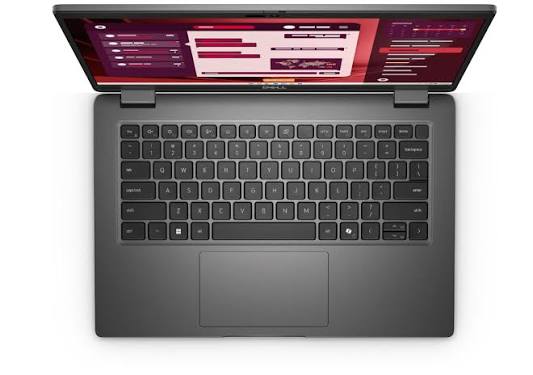
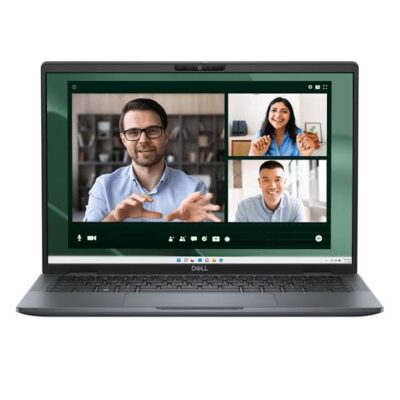
Dell Pro 14 PC14250 Core 7 150U – Powerful & Premium Business Laptop
Original price was: KSh 200,000.00.KSh 195,000.00Current price is: KSh 195,000.00.
💼 Dell Pro 14 PC14250 Core 7 150U – Powerful & Premium Business Laptop
- ⚡ Core 7 150U Processor – Built for everyday productivity and compatible professional workloads.
- 🧠 16GB RAM – Supports multitasking across compatible applications.
- 🚀 512GB SSD – Fast storage for applications, documents, and business files.
- 🖥️ 14-Inch Display – Practical for office work, study, and everyday computing.
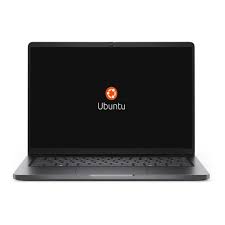
- 🐧 Ubuntu Operating System – A flexible Linux platform for compatible applications and development tools.
- 🔐 Fingerprint Reader – Convenient biometric authentication when supported by the software.
- 🎨 Platinum Finish – Clean, professional styling.
- 🎓 Ideal for Students – Suitable for research, coursework, and compatible learning applications.
- 💻 Programming Friendly – Supports many Linux-compatible development workflows.
- 🏢 Business Productivity – Useful for compatible office and administrative applications.
- 🛠️ Long-Term Care – Confirm upgrade options and maintain the device responsibly.
- 🛒 Shop with Ring-Us Technologies – Visit www.ringus.co.ke for laptops and technology solutions.
Dell Pro 14 PC14250 Core 7 150U – Powerful & Premium Business Laptop
Discover professional productivity with the Dell Pro 14 PC14250 Core 7 150U, a modern business laptop designed for professionals, entrepreneurs, students, and organisations seeking dependable everyday computing. Combining a Core 7 150U processor, 16GB RAM, a 512GB SSD, and a practical 14-inch display, this laptop provides a capable platform for multitasking, business applications, research, and compatible technical workloads.
Running Ubuntu, the Dell Pro 14 is especially worth considering for users who prefer a Linux-based operating system. It can support compatible office applications, programming tools, online services, and technical learning environments.
The Platinum finish adds a clean, professional appearance, while the built-in fingerprint reader offers a convenient biometric authentication option when supported by the installed software. Together, these features make the Dell Pro 14 PC14250 an appealing choice for everyday productivity and professional use.
Dell Pro 14 PC14250: Key Specifications
| Feature | Specification |
|---|---|
| Brand | Dell |
| Product series | Dell Pro 14 |
| Model | PC14250 |
| Processor | Core 7 150U |
| RAM | 16GB |
| Storage | 512GB SSD |
| Display size | 14 inches |
| Operating system | Ubuntu |
| Colour | Platinum |
| Security feature | Fingerprint reader |
| Product category | Business and productivity laptop |
Display resolution, touchscreen capability, RAM configuration, battery specifications, and exact port selection have not been supplied. Confirm these details for the specific unit before purchase.
Core 7 150U Processor for Everyday Performance
The Dell Pro 14 PC14250 features the Core 7 150U processor, providing a computing platform for everyday productivity and compatible professional applications. It is suitable for common business activities such as preparing documents, managing spreadsheets, browsing the web, conducting research, and communicating with colleagues.
For professionals who work across several applications during the day, the processor provides a foundation for managing routine workloads. Students can use the laptop for coursework, assignments, research, and online learning, while entrepreneurs can manage many day-to-day business responsibilities.
Actual performance depends on the application, workload, and complete system configuration. Users who rely on demanding specialist software should check its processor and system requirements before purchasing.
16GB RAM for Productive Multitasking
With 16GB RAM, the Dell Pro 14 offers useful memory capacity for users who regularly work with multiple applications. Compared with an otherwise similar 8GB configuration, additional memory can provide more headroom for compatible multitasking workloads.
Office professionals can switch between documents, spreadsheets, email, browser tabs, and communication applications. Students can keep research materials open while preparing assignments, and freelancers can manage several compatible tools during a typical working session.
The 16GB configuration is also worth considering for programming, technical learning, and selected professional applications. The benefits depend on the software being used, so particularly memory-intensive workloads should be assessed against their recommended specifications.
The exact RAM type and upgradeability have not been supplied. Confirm whether the memory is onboard or removable before planning any future expansion.
512GB SSD for Fast and Convenient Storage
The Dell Pro 14 PC14250 includes a 512GB SSD, providing space for compatible applications, business documents, coursework, presentations, and personal files.
Solid-state storage generally offers faster startup and application-loading times than a traditional mechanical hard drive. It also supports responsive file access, helping everyday computing feel more convenient.
For office workers and students, 512GB can provide a practical balance between storage capacity and everyday requirements. Users who maintain large media collections, extensive project archives, or substantial offline datasets should consider whether additional compatible storage will eventually be necessary.
Regular backups remain important regardless of storage capacity. Before purchasing an additional drive or planning a replacement, verify the supported storage format and servicing requirements for the exact model.
14-Inch Display for Work and Study
The Dell Pro 14 has a 14-inch display, offering a useful balance between screen space and portability. It is suitable for working with documents, spreadsheets, presentations, email, online research, and compatible business applications.
For people who move between the office, classroom, meetings, and home, a 14-inch laptop can be practical to carry while still providing a comfortable workspace for everyday tasks.
The supplied specifications do not confirm the display resolution, brightness, refresh rate, or touchscreen capability. Buyers with specific visual requirements should verify these details before making a purchase.
Ubuntu for Flexible, Linux-Based Computing
A key feature of this Dell Pro 14 configuration is Ubuntu, a Linux-based operating system used for productivity, education, software development, and technical work.
Ubuntu offers access to compatible applications and development tools. It is particularly relevant to users who prefer open-source software, Linux command-line utilities, and development environments that support Linux.
Students studying computer science or information technology can use Ubuntu to explore Linux commands, coding tools, and supported development workflows. Developers can install compatible editors, compilers, version-control tools, and other applications according to their needs.
However, not every Windows application runs natively on Ubuntu. Before purchasing, confirm compatibility with essential accounting software, business management platforms, specialist applications, printers, and peripherals.
Learn more through the official Ubuntu website.
Fingerprint Reader for Convenient Access
The Dell Pro 14 PC14250 includes a fingerprint reader, offering biometric authentication as a convenient alternative to entering a password each time.
When supported by the operating system and appropriate software configuration, fingerprint authentication can make accessing the laptop more convenient. It can be useful for professionals and students who sign in frequently throughout the day.
Because this configuration uses Ubuntu, buyers should confirm that the fingerprint reader works with the installed Ubuntu version and required drivers or authentication software. The presence of fingerprint hardware does not guarantee that every biometric feature will work automatically in every software configuration.
For better security, combine supported biometric access with strong passwords, regular updates, automatic screen locking, and suitable backup practices.
Professional Platinum Finish
The Platinum finish gives the Dell Pro 14 a refined and understated appearance. It fits naturally into professional offices, educational environments, meeting rooms, and home workspaces.
Its business-oriented styling suits users who prefer a laptop that looks professional without being overly decorative. The neutral colour also pairs easily with common office accessories and workstation setups.
For companies purchasing computers for staff, the appearance can complement a consistent workplace technology environment. Independent professionals and students can enjoy the same clean design in their everyday setup.
Ideal for Office and Administrative Work
The Dell Pro 14 is well suited to many common office responsibilities when the required applications are compatible with Ubuntu. Its Core 7 150U processor, 16GB RAM, and 512GB SSD provide a practical foundation for daily productivity.
Typical tasks include:
- Preparing reports, letters, and business documents.
- Creating spreadsheets and presentations.
- Managing email and digital correspondence.
- Conducting online research.
- Organising documents and digital records.
- Working with compatible browser-based business systems.
- Using supported communication and collaboration applications.
- Managing routine administrative responsibilities.
The 16GB RAM configuration provides useful capacity for multitasking across compatible applications. Organisations that depend on Windows-only business software should verify compatibility or choose an operating system that supports their existing systems.
Suitable for Students and Online Learning
Students need a laptop that supports research, assignments, presentations, coursework, and communication. The Dell Pro 14 offers a practical combination of memory, storage, and processing capability for many everyday educational activities.
The 14-inch display provides a workspace for reading and writing, while the 512GB SSD can hold learning materials, documents, and compatible applications. The 16GB RAM configuration is useful for keeping several supported applications open during study sessions.
Ubuntu may be particularly attractive to students learning programming, computer science, and information technology. It provides access to a range of Linux-compatible development and learning tools.
Students should confirm that their institution’s required applications work on Ubuntu. They should also verify support for any required examination software, virtual learning platforms, printers, or specialised academic programs.
A Practical Choice for Entrepreneurs and Small Businesses
Entrepreneurs often need one computer for customer communication, quotations, reports, research, and everyday business administration. The Dell Pro 14 can support many of these activities when the relevant applications are compatible with Ubuntu.
Its 16GB RAM provides useful capacity for multitasking, while the 512GB SSD offers space for documents, applications, and business files. The fingerprint reader adds a convenient authentication option when supported by the software configuration.
Small businesses should evaluate software compatibility before purchasing. If operations rely on a specific Windows-only accounting package, inventory system, point-of-sale application, or management tool, verify whether a compatible Linux version or suitable alternative is available.
Freelancing and Remote Work
Freelancers and remote professionals often move between writing, research, administration, communication, and project management. The Dell Pro 14 is worth considering for workflows that rely on Ubuntu-compatible applications and browser-based platforms.
Potential users include writers, virtual assistants, researchers, programmers, consultants, and administrative freelancers. The 16GB RAM configuration can provide useful multitasking capacity for compatible software, while the SSD offers responsive file access.
Before relying on the laptop for remote work, confirm the built-in camera, microphone, wireless connectivity, available ports, and battery specifications. These details have not been supplied and should not be assumed.
Programming and Information Technology
Ubuntu makes this Dell Pro 14 configuration particularly relevant to many programming and technical-learning workflows. Linux-compatible development environments can support activities such as web development, scripting, code editing, version control, and technical research.
With 16GB RAM, the laptop has more memory capacity than an otherwise similar 8GB configuration for supported development workloads. The 512GB SSD provides room for development tools, project files, and compatible applications.
Developers using virtual machines, large containers, local databases, or resource-intensive build systems should check their tools’ recommended requirements. The exact processor, operating-system support, memory configuration, and storage needs all matter when choosing a development computer.
Everyday Productivity and Personal Use
Beyond business and technical work, the Dell Pro 14 can support everyday computing activities such as browsing, digital reading, email, document organisation, and media playback through compatible applications.
Ubuntu offers flexibility for users who prefer Linux-based computing. The SSD can help make everyday file access responsive, while the 14-inch format suits a variety of home and work environments.
Buyers should check compatibility with their preferred streaming services, printers, accessories, and other peripherals. This is especially important when moving from another operating system and expecting all existing applications to work in the same way.
Dell Pro 14 Compared with an 8GB Laptop
| Feature | Dell Pro 14 PC14250 Core 7 150U | Typical 8GB Laptop |
|---|---|---|
| Processor | Core 7 150U | Varies by model |
| RAM | 16GB | 8GB |
| Storage | 512GB SSD | Varies by model |
| Display | 14 inches | Varies by model |
| Operating system | Ubuntu | Varies by model |
| Multitasking capacity | More memory headroom for compatible workloads | May be sufficient for lighter tasks |
| Programming use | Suitable for many Linux-compatible workflows | Depends on tools and workload |
| Ideal user | Users wanting 16GB RAM for varied tasks | Users with simpler computing requirements |
This is a general configuration comparison, not a benchmark against a specific laptop. Actual performance also depends on the processor, storage, software, and workload.
Security and Responsible Device Care
A fingerprint reader is useful, but good device security involves several complementary practices. Use strong passwords, lock the screen when stepping away, keep Ubuntu and installed applications updated, and download software from trusted sources.
For business users handling confidential information, regular backups and appropriate access controls are especially important. Follow any workplace IT policies for data storage, encryption, and device use.
Physical maintenance matters too. Keep ventilation areas clear, protect the laptop from liquid spills, avoid unnecessary impact, and use compatible charging accessories. If servicing is required, follow the manufacturer’s guidance or consult a qualified technician.
Maintaining a laptop and extending its useful life can help reduce avoidable electronic waste. When a device is no longer usable, consider responsible electronic-waste collection or recycling rather than disposing of it with ordinary household rubbish.
Upgradeability and Long-Term Value
The Dell Pro 14 PC14250 can be a practical investment when its supplied configuration meets your needs. However, the upgradeability of the memory and storage must be confirmed for the exact model.
Before purchase, verify whether the 16GB RAM is onboard or removable, what storage formats are supported, and whether replacement components are compatible. If you expect to run increasingly demanding applications over time, consider your likely memory and storage requirements now.
Regular software updates, careful handling, sensible backups, and compatible servicing can help maintain the laptop’s usefulness. Choosing a configuration that suits your workload from the beginning is one of the best ways to support long-term value.
Frequently Asked Questions
1. Which processor does the Dell Pro 14 PC14250 use?
This configuration features the Core 7 150U processor, as supplied in the product specifications.
2. How much RAM does it have?
It comes with 16GB RAM, providing useful capacity for everyday multitasking and compatible productivity applications.
3. How much storage is included?
The laptop has a 512GB SSD for applications, documents, and other digital files.
4. Which operating system does it use?
It comes with Ubuntu, a Linux-based operating system.
5. Does it have a fingerprint reader?
Yes. The supplied specifications include a fingerprint reader. Confirm compatibility with the installed Ubuntu version and required software.
6. Is it suitable for programming?
It can support many Linux-compatible development tools and programming workflows. More demanding tasks, such as running several virtual machines, should be checked against the relevant software requirements.
7. Can I run Windows applications on Ubuntu?
Some applications have Linux versions or suitable alternatives, but not every Windows application runs natively on Ubuntu. Check compatibility with your essential programs before purchasing.
8. Is it suitable for office work and university studies?
Yes. It can support many common office and study activities, including documents, presentations, research, communication, and compatible learning tools.
9. Does it have a touchscreen?
Touchscreen capability has not been specified. Confirm the exact display configuration if touch input is important to you.
10. Can the RAM or SSD be upgraded?
Upgradeability has not been confirmed. Check the manufacturer’s specifications and service documentation for the exact model before planning an upgrade.
11. Where can I buy the Dell Pro 14 PC14250?
Visit www.ringus.co.ke to explore laptops and technology solutions from Ring-Us Technologies.
Final Thoughts
The Dell Pro 14 PC14250 Core 7 150U combines a Core 7 processor, 16GB RAM, a 512GB SSD, a 14-inch display, Ubuntu, and a fingerprint reader in a professional-looking Platinum finish.
It is worth considering for compatible office applications, education, programming, administration, and everyday productivity. The 16GB RAM configuration provides additional memory capacity for multitasking, while Ubuntu offers a flexible platform for users whose software needs align with Linux.
Before purchasing, confirm compatibility with your essential applications, fingerprint support under Ubuntu, display specifications, and memory upgrade options. A laptop that matches your actual workflow will offer the most practical long-term value.
Explore available laptops and technology solutions at Ring-Us Technologies.
Related products

Lenovo Yoga 7 Core i7(1165G7) 16gb/512ssd


Lenovo Yoga 9 Core i7 11th gen 16GB Ram/1TB SSD

MacBook pro 16 2019 A2141 i7 16GB/512GB


MacBook Pro 2023 M3 Pro Chip/18GB Ram/512GB SSD
- MacBook Pro 2023 M3
- Apple M3 Pro 12-Core Chip
- 18GB Unified RAM | 512GB SSD
- 16" 3456 x 2234 Liquid Retina XDR Screen
- 18-Core GPU | 16-Core Neural Engine
- Wi-Fi 6E (802.11ax) | Bluetooth 5.3
- Thunderbolt 4 | HDMI | MagSafe 3
- SDXC Slot | FaceTime HD 1080p Camera
- Backlit Magic Keyboard
- Force Touch Trackpad | Touch ID Sensor
- macOS
- Open Box
- 6 Months Warranty

MacBook Pro 2017 A1707 i716GB/1TB


MacBook Air 2020 A2179 13inch i5 8gb/512SSD
- MacBook Pro A2179
- Processor: Intel Core
- RAM: 8GB LPDDR4X Memory
- Storage: 512GB SSD (ultra-fast performance)
- Display: 13.3-inch Retina Display with True Tone Technology
- Resolution: 2560 x 1600 pixels (227 PPI)
- Graphics: Intel Iris Plus Graphics
- Year: 2020 Model (A2179)
- Operating System: macOS (latest compatible version)
- Keyboard: New Magic Keyboard with improved reliability
- Touch Bar: Yes, with integrated Touch ID sensor
- 6 Months Warranty

Hp Elitebook 830 G8 i7 11th gen touch screen


HP ELITEBOOK 820 G3 i5 6th GEN
- HP Elitebok 820 G3
- Operating system: Windows 10 Pro 64-Bit Edition
- Memory: 16GB DDR4-2133MHz SDRAM (1 x 8 GB) | Supports upto 16GB
- Storage: 512GB PCIe® NVMe™ M.2 Solid State Drive (SSD)
- Optical drive: None
- Graphics Processor: Intel® HD Graphics 520
- Processor: Intel® Core™ i5 6200U (2.3GHz, up to 2.8GHz with Intel Turbo Boost Technology, 3MB cache, 2cores)
- Display: 12.5 inches (31.75 cm) diagonal, LED backlight FHD UltraSlim eDP UWVA (1920 x 1080)
- Condition: Boxed and Sealed
- 6 Months Warranty


Reviews
There are no reviews yet.