



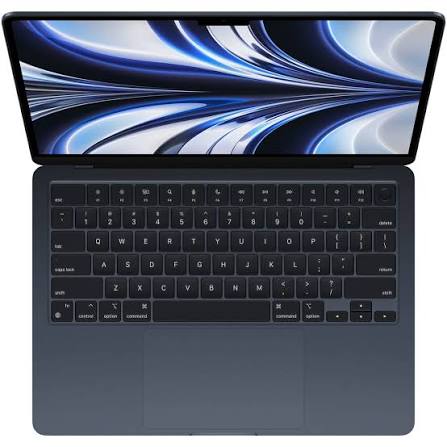
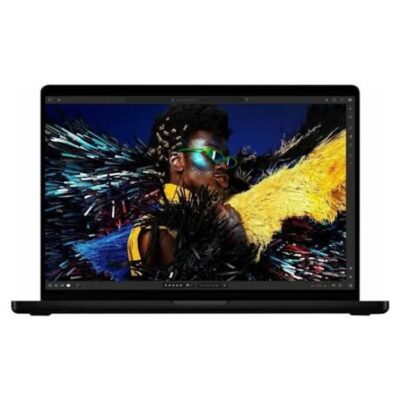
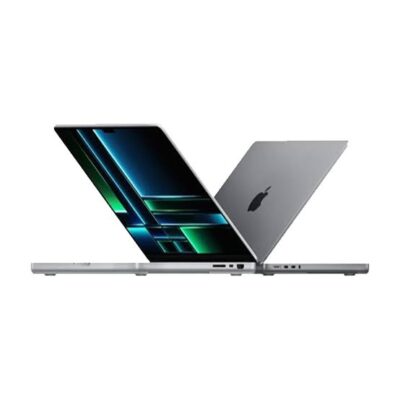
Apple MacBook Pro M5 Pro 14.2-Inch Space Black – Powerful & Premium Performance
Original price was: KSh 355,000.00.KSh 350,000.00Current price is: KSh 350,000.00.
- 💻 Apple MacBook Pro M5 Pro – Premium performance for professional computing.
- ⚡ Apple M5 Pro Chip – Designed for demanding compatible workflows.
- 🧠 24GB Unified Memory – Supports multitasking and professional applications.
- 🚀 1TB SSD Storage – Fast file access and generous storage capacity.
- 🖥️ 14.2-Inch Display – Compact workspace for work, study, and creativity.
- 🖤 Space Black Finish – Elegant, modern, professional design.
- 💼 Ideal for Business – Documents, presentations, research, and productivity.
- 👨💻 Developer Friendly – Suitable for compatible coding and development tools.
- 🎨 Creative Workflows – Supports compatible design, photo, and video applications.
- 🎓 Great for Professionals – Useful for freelancers, researchers, and students.
- 🔒 macOS Experience – Apple’s desktop operating system and compatible applications.
- 🛒 Shop at Ring-Us Technologies – Visit www.ringus.co.ke for technology solutions.
Apple MacBook Pro M5 Pro 14.2-Inch Space Black – Powerful & Premium Performance
The Apple MacBook Pro M5 Pro 14.2-inch is a premium laptop designed for professionals, business owners, developers, content creators, and demanding everyday users who want powerful computing in a portable design. With its M5 Pro chip, 24GB of unified memory, 1TB SSD storage, and sophisticated Space Black finish, this MacBook Pro combines performance, capacity, and professional style.
Whether you are managing business operations, working with large documents, developing software, editing creative projects, or handling demanding multitasking sessions, this configuration offers a strong foundation for productive work. Its compact 14.2-inch size also makes it suitable for people who need a capable workstation they can carry between the office, home, meetings, and other work locations.
Key Specifications
| Feature | Details |
|---|---|
| Brand | Apple |
| Product family | MacBook Pro |
| Processor | Apple M5 Pro chip |
| Memory | 24GB unified memory |
| Storage | 1TB SSD |
| Display size | 14.2 inches |
| Colour | Space Black |
| Operating system | macOS; exact version to be confirmed |
| Intended use | Professional work, business, programming, creative projects and multitasking |
Note: The specifications above reflect the configuration provided. Confirm the exact model number, chip configuration, display technology, ports, battery condition, warranty, and included accessories with the seller before purchase.
Apple M5 Pro Chip: Built for Demanding Workflows
At the heart of this MacBook Pro is Apple’s M5 Pro chip. It is designed to bring processing performance and graphics capabilities together with Apple’s integrated hardware and software ecosystem.
For users who regularly work with several applications, large files, technical tools, or demanding creative software, a capable processor can make everyday workflows more efficient. It is especially valuable when switching between tasks, processing information, or working on projects that place greater demands on the computer.
The M5 Pro configuration is worth considering for professionals who need more than a basic laptop for browsing, email, and document editing. Its suitability for specialised work will still depend on the exact application, project size, and software requirements.
Suitable for professional productivity
The MacBook Pro can support a wide range of professional activities, including preparing reports, managing spreadsheets, attending online meetings, handling communications, researching information, and working with multiple applications.
For business users, having a powerful computer can help keep different tasks within one workflow. You can work on presentations, review documents, communicate with clients, and manage projects without needing a separate device for each activity.
Useful for technical and creative applications
Developers, designers, video editors, photographers, and other creative professionals may benefit from a MacBook Pro configuration that combines a capable Apple chip with generous memory and fast storage. However, actual performance depends on the application, the type of project, and whether the software is optimised for Apple silicon.
Before purchasing for specialist work, check that your preferred software supports the required macOS version and Apple silicon architecture. Also verify that any specialised plugins, peripherals, or external devices you rely on are compatible.
24GB Unified Memory for Comfortable Multitasking
This MacBook Pro comes with 24GB of unified memory, providing capacity for running multiple applications and handling demanding workflows. Unified memory is part of Apple’s chip architecture, where the processor and graphics components can access a shared memory pool.
For everyday professional use, this can be helpful when keeping browser tabs open while working on documents, spreadsheets, communication tools, and other applications. It may also benefit compatible creative and development workflows that require more memory than basic office tasks.
Who benefits from 24GB RAM?
- Business professionals: Work across documents, spreadsheets, email, presentations, and management applications.
- Students and researchers: Manage research materials, online learning platforms, notes, and writing projects.
- Programmers: Work with code editors, development environments, documentation, and supported local development tools.
- Designers: Use compatible graphics and design applications for visual projects.
- Content creators: Work with supported photo, audio, and video editing software.
- Freelancers: Switch between client projects, communication platforms, research, and productivity tools.
Memory requirements vary considerably. Large video projects, complex 3D scenes, extensive virtual machines, and other specialised workloads may require different configurations depending on how the software is used.
Important: Apple’s unified memory is generally integrated into the chip package and is not a conventional user-upgradeable RAM module. Choose the memory configuration carefully before purchasing, because you should not assume that the 24GB capacity can be increased later.
1TB SSD Storage for Files, Projects and Applications
The included 1TB solid-state drive (SSD) provides storage for applications, documents, business files, photographs, creative projects, downloads, and other digital content.
An SSD can provide responsive file access and quick application loading compared with traditional mechanical hard drives. Actual performance also depends on the storage implementation, software, and workload.
For professionals who handle a mixture of office files and larger project folders, 1TB offers useful room for organising work locally. It can also reduce the need to move frequently used files between the laptop and external storage.
Practical storage uses
- Store business documents, spreadsheets, presentations, and reports.
- Keep research files, course materials, and writing projects organised.
- Install compatible productivity, programming, and creative applications.
- Maintain working copies of photographs and supported media projects.
- Organise customer files, proposals, and other professional records.
Storage needs differ from person to person. Large video libraries, extensive photo collections, and substantial project archives can consume available space quickly. For important files, maintain a separate backup using a compatible external drive or a trusted cloud-storage service.
As with the memory configuration, confirm the exact storage specifications and upgrade options before buying. Do not assume the internal SSD is user-upgradeable.
14.2-Inch Display in Space Black
The 14.2-inch display provides a compact workspace for professional computing while keeping the laptop convenient to carry. It is a practical size for people who work at a desk but also need to travel with their computer.
The display can be useful for reading documents, editing spreadsheets, managing presentations, viewing research, writing, coding, and working with supported creative applications. The available screen space is particularly useful when compared with smaller laptops, although users who regularly work with many windows may still prefer an external monitor at their main workstation.
The Space Black finish gives the laptop a refined, professional appearance. It suits corporate environments, creative studios, business meetings, educational settings, and personal workspaces.
The precise display technology, resolution, refresh rate, brightness, and other panel specifications should be verified against the exact model number. These details should not be assumed from the screen size and colour alone.
A Premium Laptop for Business and Everyday Professional Work
The MacBook Pro M5 Pro can serve as a primary computer for a wide variety of professional responsibilities. Its value comes from combining computing capability, memory, storage, portability, and macOS in one device.
Business owners and entrepreneurs
Business owners can use the laptop for preparing reports, managing business documents, communicating with customers, planning operations, conducting research, and coordinating projects. It is also suitable for supported business applications and cloud-based services.
Entrepreneurs who move between meetings and work locations may appreciate having their files and applications available on a single portable computer. As always, choose business software according to compatibility, licensing, and organisational requirements.
Office professionals and administrators
The configuration can support daily office work, including word processing, spreadsheet analysis, presentations, email, scheduling, online research, and document management. It is suitable for people who regularly move between several tasks throughout the working day.
For organisations that use specific Windows-only applications, confirm whether a macOS version or an appropriate alternative exists before choosing a MacBook Pro.
Students and researchers
Students can use the MacBook Pro for assignments, research, writing, presentations, online classes, and supported educational software. The 1TB SSD provides space for coursework and project files, while 24GB unified memory offers capacity for multitasking.
For students using specialised engineering, accounting, statistics, or laboratory software, it is important to check the institution’s software requirements before purchasing.
Freelancers and remote workers
Freelancers can use the laptop for writing, virtual assistance, digital marketing, customer communication, project management, research, and other compatible online work. The portable form factor makes it useful for working from home, the office, or other suitable locations.
Remote workers should also consider their internet connection, webcam and microphone requirements, conferencing software compatibility, and preferred accessories when setting up a complete workstation.
Programmers and developers
Developers can use a compatible MacBook Pro for coding, web development, application development, testing, and technical research. The available memory and storage can support development environments and project files, subject to each tool’s requirements.
For specialised workloads involving virtualisation, containers, emulators, or machine-learning frameworks, check current compatibility and system requirements. Not every development tool or dependency works identically across macOS, Windows, and Linux.
Designers and content creators
The MacBook Pro may suit professionals using compatible applications for graphic design, photography, audio production, and video editing. The combination of the Apple chip, 24GB unified memory, and 1TB SSD gives users a useful base for many creative workflows.
However, the best configuration depends on the media format, software, project complexity, and use of external displays or storage. Confirm the exact chip and graphics specifications if your work depends on a particular GPU capability or specialised acceleration feature.
macOS and the Apple Ecosystem
The MacBook Pro runs Apple’s macOS operating system. macOS provides a desktop environment for managing files, launching applications, organising windows, and working with compatible productivity and creative software.
Users who already own compatible Apple devices may also appreciate ecosystem features that help connect supported devices and services. The availability of particular features depends on the devices involved, software versions, account settings, and regional availability.
If you are switching from a Windows computer, check the availability of your essential applications, business systems, printers, scanners, and other peripherals. Some applications have native Mac versions, while others may require a web-based alternative or a different workflow.
For official information, visit the Apple Mac website and Apple’s macOS page.
MacBook Pro M5 Pro Compared with Other Laptop Categories
Choosing the right laptop depends on your workload, budget, portability needs, and preferred operating system. The comparison below describes general differences between product categories rather than claiming benchmark results for specific models.
| Feature | MacBook Pro M5 Pro | Everyday laptop | Gaming laptop |
|---|---|---|---|
| Main purpose | Professional and demanding workflows | General computing and office tasks | Gaming and graphics-intensive workloads |
| Memory in this listing | 24GB unified memory | Varies by model | Varies by model |
| Storage in this listing | 1TB SSD | Varies by model | Varies by model |
| Operating system | macOS | Often Windows or ChromeOS | Usually Windows |
| Software compatibility | macOS and Apple silicon-compatible apps | Depends on operating system and hardware | Depends on operating system and hardware |
| Portability | Compact 14.2-inch format | Depends on model | Often heavier, depending on design |
| Best choice for | Users whose software and workflows suit macOS | General users and budget-conscious buyers | Users prioritising compatible games and gaming hardware |
A gaming laptop with a dedicated graphics processor may be more appropriate for certain games or specialised graphics applications. An everyday laptop may be sufficient for users whose needs are limited to browsing, documents, email, and online meetings.
The MacBook Pro is best considered when its operating system, performance profile, memory, storage, and portability align with your actual work requirements.
Care, Maintenance and Long-Term Value
A premium laptop is an investment, and proper care can help keep it working reliably for longer. Use a suitable protective sleeve when carrying the device, keep liquids away from the keyboard, and follow Apple’s guidance for cleaning the display and exterior.
Install system and security updates when appropriate, and download applications from trusted sources. Avoid blocking ventilation areas during demanding work, and use compatible charging equipment and accessories.
Back up important files regularly. A separate backup is particularly valuable for business records, customer documents, coursework, creative projects, and other files that would be difficult to replace.
Before buying, confirm the device’s condition, battery health if it is not new, serial-number details, warranty coverage, and the accessories included in the sale. Also verify whether the listed unit is new, refurbished, or pre-owned.
When the laptop eventually reaches the end of its useful life, consider repair, reuse, resale, or responsible electronic-waste recycling through an appropriate service. Extending the useful life of electronics and disposing of them responsibly can help reduce unnecessary electronic waste.
Frequently Asked Questions
1. How much RAM does this MacBook Pro have?
This listed configuration comes with 24GB of unified memory. It is intended to provide capacity for multitasking and a variety of professional applications, although the ideal amount depends on the workload.
2. How much storage is included?
The laptop is listed with a 1TB SSD. This provides space for applications, documents, projects, and other files. Your available space will be lower after the operating system and installed applications occupy storage.
3. Is the MacBook Pro suitable for business use?
Yes, it can be suitable for business productivity, document preparation, presentations, research, communications, and compatible business applications. Check that any essential company software supports macOS.
4. Can I use it for programming?
It can support many development workflows, including coding and web development, provided the required tools are compatible with macOS and Apple silicon. Check the specific requirements for specialised development software.
5. Is it suitable for graphic design and video editing?
It may be suitable for compatible design, photography, and video-editing applications. The best performance depends on the exact software, project complexity, media format, and the laptop’s confirmed hardware configuration.
6. Can I upgrade the RAM later?
Do not assume that the unified memory can be upgraded. Apple’s unified memory is integrated with its chip architecture, so you should select the capacity that meets your expected needs.
7. Can I expand the storage?
External storage may be used with compatible connections and accessories. However, internal SSD upgradeability should not be assumed; confirm the exact model’s service and upgrade options before purchasing.
8. What does Space Black mean?
Space Black is the listed colour finish. It gives the laptop a dark, understated appearance suited to professional and personal environments.
9. Which operating system does it use?
This model belongs to Apple’s MacBook Pro family and runs macOS. Confirm the installed macOS version and available update support for the exact unit.
10. What should I confirm before buying?
Confirm the precise model number, M5 Pro chip configuration, 24GB memory, 1TB SSD, display specifications, physical condition, battery health where applicable, warranty, keyboard layout, and included accessories.
Final Thoughts
The Apple MacBook Pro M5 Pro 14.2-inch with 24GB unified memory, 1TB SSD, and Space Black finish is a premium configuration for users seeking a portable computer for professional productivity and compatible demanding workflows.
Its combination of memory, storage, macOS, and a compact display makes it worth considering for business owners, developers, freelancers, students, and creative professionals. The most important step is to confirm the exact model and software compatibility before purchasing, particularly if your work relies on specialised applications.
Explore available Apple computers and technology products at Ring-Us Technologies and choose a configuration that fits your professional needs, budget, and long-term plans.
Related products

Dell XPS 13 9315 Core i7(1250U) 16gb/512ssd

Lenovo Yoga 7 Core i7(1165G7) 16gb/512ssd

Lenovo Yoga 7 Core Ultra 7(155U)16gb/1TBssd

MacBook pro 16 2019 A2141 i7 16GB/512GB


Dell Latitide 7310 i7 10th gen 16gb/256gb

Hp Elitebook x360 1030 G3
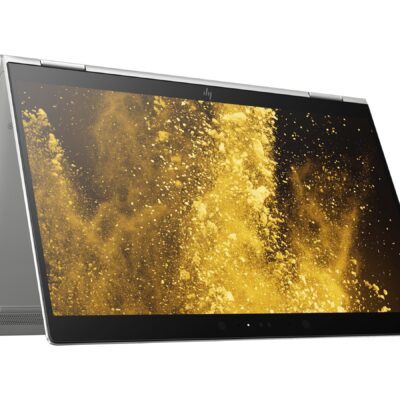
- HP ELITEBOOK X360 1030 G3
- Operating system: Windows 10 Pro 64-Bit Edition
- Memory: 16GB LPDDR3-2133 MHz SDRAM
- Storage: 512GB M.2 SATA SED SSD
- Optical drive: No optical drive
- Graphics Processor: Integrated: Intel® UHD Graphics 620
- Processor: Intel® Core™ i5-8250U (1.6GHz base frequency, up to 3.4GHz with Intel® Turbo Boost Technology, 6 MB cache, 4 cores)
- Processor Family: 8th Generation Intel® Core™ i5 processor
- Display: 13.3 Inches (33.8 cm) diagonal FHD IPS eDP + PSR anti-glare LED-backlit touch screen, direct bonded with Corning® Gorilla® Glass 4, 700 cd/m², 100% sRGB (1920 x 1080); HP Sure View Integrated Privacy Screen
- Condition: Boxed Sealed
- Warranty: 6 Months




Reviews
There are no reviews yet.