



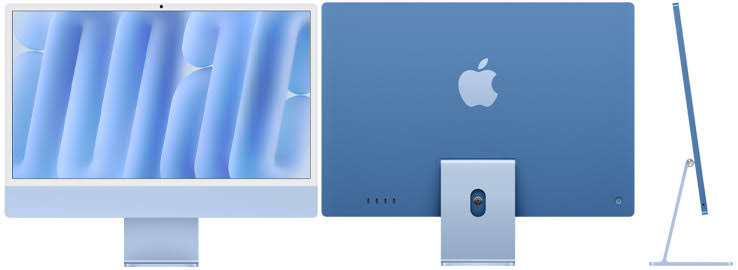
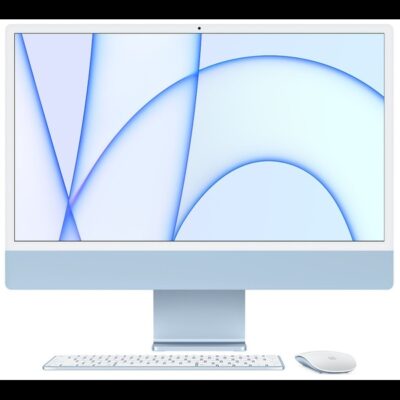
Apple iMac M4 24-Inch Blue – Powerful & Premium All-in-One DesktopM4
Original price was: KSh 290,000.00.KSh 285,000.00Current price is: KSh 285,000.00.
- 🍎 Apple iMac M4 – Powerful & premium all-in-one desktop.
- ⚡ 10-Core CPU – Responsive performance for everyday and professional tasks.
- 🎮 10-Core GPU – Supports graphics and compatible creative applications.
- 🧠 16GB Unified Memory – Comfortable multitasking for productivity workflows.
- 🚀 512GB SSD – Fast storage for applications, documents, and projects.
- 🖥️ 24-Inch 4.5K Retina Display – Enjoy detailed, high-resolution visuals.
- 💙 Elegant Blue Finish – Stylish design for modern workspaces.
- 💼 Business Ready – Ideal for office tasks, reports, and presentations.
- 🎓 Great for Students – Supports research, assignments, and online learning.
- 🎨 Creative Productivity – Suitable for compatible design and photo-editing tools.
- 🖥️ All-in-One Design – Combines the computer and display in one streamlined unit.
- 🛒 Shop at Ring-Us Technologies – Visit www.ringus.co.ke for quality computers and technology solutions.
Apple iMac M4 24-Inch Blue – Powerful & Premium All-in-One Desktop
Bring performance, elegant design, and a stunning high-resolution display to your workspace with the Apple iMac M4 featuring a 10-core CPU, 10-core GPU, 16GB unified memory, and 512GB SSD. With its 24-inch 4.5K Retina display and attractive Blue finish, this all-in-one desktop combines computing and display technology in a streamlined design for modern homes, offices, and professional workspaces.
Powered by Apple’s M4 chip, this iMac is designed for responsive everyday computing and a variety of compatible professional applications. It offers a useful combination of processing power, graphics capabilities, memory, and storage for users who want a desktop computer for work, study, business, and creative projects.
Whether you are preparing reports, managing business operations, attending online meetings, researching information, editing photographs, or creating digital content, the Apple iMac M4 provides a versatile computing platform. Its integrated design also helps keep your desk organised without requiring a separate desktop tower.
Key Specifications
| Feature | Specification |
|---|---|
| Brand | Apple |
| Product | Apple iMac |
| Processor chip | Apple M4 |
| CPU | 10-core CPU |
| GPU | 10-core GPU |
| Memory | 16GB unified memory |
| Storage | 512GB SSD |
| Display size | 24 inches |
| Display | 4.5K Retina display |
| Colour | Blue |
| Operating system | Confirm the installed and compatible macOS version |
| Computer design | All-in-one desktop |
| Suitable for | Business, office productivity, education, programming, browsing, and compatible creative applications |
Operating-system note: Your supplied listing mentions macOS Sonoma 14. However, the M4 iMac launched with macOS Sequoia, and Sonoma is not compatible with this model. Confirm the correct operating-system details with the seller before publishing the listing.
The specifications above are based on the information provided. Confirm the exact model number, connectivity options, accessories, warranty, and device condition before purchase.
Apple M4 Chip with a 10-Core CPU
At the heart of this iMac is Apple’s M4 chip with a 10-core CPU, designed to handle everyday computing and a broad range of compatible applications. The CPU processes instructions and coordinates the work performed by the operating system and software.
For everyday users, this means having a computer suited to document preparation, spreadsheets, browsing, presentations, email, and online communication. It can also support more involved professional workflows when the applications and project requirements are appropriate for the system.
The M4 architecture combines processing, graphics, and unified memory technologies within Apple’s silicon platform. This integrated approach is designed to support responsive computing across compatible applications.
Efficient everyday productivity
Modern work often involves using several applications throughout the day. You may need to research online, prepare a report, respond to emails, review a spreadsheet, and participate in an online meeting within the same work session.
The iMac M4 offers a capable foundation for these activities. Its 10-core CPU and 16GB unified memory can support everyday multitasking and a variety of professional productivity workflows.
A practical desktop for business
Business owners and office professionals can use the iMac for administration, document preparation, reporting, customer communication, scheduling, and compatible business software. It can also serve as a workstation for preparing proposals, managing records, and coordinating projects.
For businesses that rely on specialised accounting, inventory, point-of-sale, or enterprise systems, verify that the necessary applications support macOS and Apple silicon before purchasing.
10-Core GPU for Graphics and Creative Applications
The iMac M4 includes a 10-core GPU for graphics processing and supported computational workloads. Graphics capability is useful for more than gaming; it also contributes to visual applications, image editing, digital design, and other compatible creative tools.
For designers, photographers, and content creators, the GPU can help with applications that are optimised for Apple silicon. Actual performance depends on the software, project complexity, media format, and specific workload.
Graphic design and digital creativity
The high-resolution Retina display and GPU make this iMac worth considering for users working with compatible creative applications. It can provide a desktop workspace for creating visual content, editing images, and preparing digital materials.
Possible uses include:
- Designing marketing materials and social media graphics.
- Editing photographs using compatible software.
- Preparing presentations and visual reports.
- Creating illustrations and page layouts.
- Producing website graphics and digital assets.
- Working with supported audio and video applications.
For demanding professional video editing, complex 3D projects, or intensive visual effects, evaluate the software requirements carefully. GPU core count alone does not determine how well a computer will perform in every creative application.
16GB Unified Memory for Multitasking
With 16GB of unified memory, this iMac offers capacity for everyday multitasking and a range of professional applications. Apple’s unified-memory architecture allows the chip’s processing components to access shared memory.
This differs from a traditional desktop configuration with separately installed system RAM and dedicated graphics memory. The integrated architecture is designed to support compatible workloads across the CPU and GPU.
For office professionals, 16GB can be helpful when working with documents, spreadsheets, browser tabs, email, communication tools, and several applications in the same session. It also provides a useful foundation for many compatible development and creative workflows.
Who benefits from 16GB memory?
- Business owners: Manage documents, reports, customer communication, and compatible business applications.
- Office professionals: Switch between spreadsheets, presentations, email, and research.
- Students: Work on assignments, coursework, and educational applications.
- Programmers: Use compatible code editors and development tools.
- Designers: Work with supported illustration, graphics, and photo-editing applications.
- Freelancers: Coordinate client projects, research, communication, and productivity tools.
Memory requirements vary by workload. Complex virtual machines, extensive creative projects, and specialised technical applications may need more resources depending on how they are used.
Important: Apple silicon unified memory is integrated into the chip architecture and is not a conventional user-upgradeable RAM module. Choose your memory configuration carefully because you should not assume that the 16GB capacity can be increased later.
512GB SSD Storage for Applications and Files
This iMac comes with a 512GB solid-state drive (SSD), providing storage for applications, documents, photographs, business records, research materials, and compatible creative projects.
SSD storage is designed to provide responsive access to files and applications. The 512GB capacity also gives users more room for locally stored files than a 256GB configuration, making it useful for people who manage several projects or prefer to keep frequently accessed information on their computer.
What can you store on a 512GB SSD?
- Business documents, spreadsheets, and presentations.
- Productivity and creative applications.
- Research materials, assignments, and writing projects.
- Photographs and compatible creative assets.
- Programming tools and development files.
- Customer documents and administrative records.
- Supported audio and video files.
The available space for your own files will be lower after the operating system and installed applications occupy storage. Large video files and extensive media collections can still consume capacity quickly.
Managing storage effectively
Keep your files organised and remove unnecessary downloads when they are no longer needed. Compatible external storage and cloud-storage services can provide additional space for archives and larger projects.
Back up important documents regularly. A separate backup is especially useful for business records, customer files, coursework, and creative work that would be difficult to replace after accidental deletion or hardware failure.
Do not assume the internal SSD can be upgraded by the user. Confirm the exact model’s service and storage options if future expansion is important to you.
24-Inch 4.5K Retina Display
One of the standout features of the Apple iMac M4 is its 24-inch 4.5K Retina display. The high-resolution screen is designed to present text, images, and other visual content with fine detail.
For people who spend much of their day reading, writing, analysing information, or working with visual material, display quality is an important part of the desktop experience. The 24-inch screen also provides useful room for arranging application windows side by side.
Excellent for office and business tasks
The display provides a workspace for preparing reports, reviewing spreadsheets, creating presentations, handling email, and using compatible business applications. Users can organise their work across windows without depending entirely on a smaller laptop screen.
For reception areas, offices, and home workspaces, the integrated display can also help create a neat and professional setup.
Useful for photography and graphic design
A high-resolution display can be valuable when reviewing photographs, designing layouts, and preparing visual materials. Designers can inspect image details and work within compatible creative applications.
However, resolution alone does not guarantee colour accuracy for professional production. If your work depends on precise colour matching, confirm the display’s specifications and whether calibration is appropriate for your workflow.
Entertainment and everyday use
The display is also suitable for browsing websites, viewing photographs, watching supported video content, and using multimedia applications. Its 24-inch size provides a spacious viewing area for both work and leisure.
Blue Finish and All-in-One Design
The Blue finish gives the iMac M4 a distinctive appearance that complements modern offices, creative studios, reception areas, and home workspaces. Its all-in-one design combines the computer and display in a single unit.
Compared with a traditional desktop setup, this can help reduce the number of separate components on your desk. You may still need a keyboard, mouse, external storage, or other accessories depending on what is supplied with the unit.
The integrated format is especially useful for people who prefer a tidy workstation and do not need to carry their computer between locations regularly. Confirm which accessories are included before purchasing, as the supplied details do not specify the complete package.
macOS and the Apple Ecosystem
The iMac M4 runs Apple’s macOS operating system, which provides the desktop environment for installing compatible applications, managing files, organising windows, browsing the internet, and carrying out daily tasks.
Users with other compatible Apple devices may also appreciate features that connect supported devices and services. The availability of these features depends on the devices, operating-system versions, account settings, and applications involved.
Check software compatibility
If you are moving from Windows, review your essential applications before purchasing the iMac. Many popular productivity and creative tools support macOS, but certain specialised business, engineering, accounting, and institutional applications may have different requirements.
Also check compatibility with printers, scanners, external drives, and other peripherals you intend to use. Confirm the correct operating-system version with the seller, as macOS Sonoma 14 is not compatible with the M4 iMac.
For official information, visit the Apple Mac website and Apple’s macOS website.
Who Should Buy the Apple iMac M4?
The iMac M4 can serve as a primary desktop computer for users who want a high-resolution display, a streamlined workstation, and Apple’s computing ecosystem. Its suitability depends on your software, workload, and preference for a fixed desktop setup.
Business owners and entrepreneurs
Business owners can use the iMac for preparing reports, communicating with customers, managing compatible business applications, conducting research, and coordinating daily operations.
The integrated design is practical for a dedicated office workstation where a clean appearance and an organised desk are priorities.
Office professionals and administrators
The iMac supports common office tasks through compatible applications, including document preparation, spreadsheets, presentations, email, scheduling, reporting, and online meetings.
The 24-inch display is useful for reviewing information and working with multiple windows throughout the day.
Students and educators
Students can use the iMac for assignments, online learning, research, presentations, writing, and educational software that supports macOS. The 512GB SSD provides room for applications and coursework, while 16GB unified memory supports everyday academic multitasking.
Students in technical courses should confirm that required engineering, laboratory, accounting, or other specialist applications work on macOS.
Freelancers and remote professionals
Writers, virtual assistants, digital marketers, researchers, and other freelancers can use the iMac for client communication, content preparation, online research, and compatible productivity tools.
Its desktop format is best suited to people who work mainly from one location. Professionals who frequently travel with their computer may prefer a laptop.
Programmers and developers
The iMac M4 can support coding, web development, application development, and technical research using compatible tools. The CPU provides processing resources for development tasks, while the GPU may accelerate supported applications.
Check the requirements for virtualisation, containers, emulators, machine-learning frameworks, and specialised development environments before purchasing.
Graphic designers and content creators
The 10-core GPU, 16GB unified memory, and 4.5K Retina display make this configuration worth considering for compatible creative applications. It can provide a useful workspace for visual design, photography, and other supported content-creation workflows.
For large video projects, intensive 3D work, or specialised professional production, evaluate the application’s requirements and workload complexity before making a decision.
Home users
The iMac can serve as a home computer for browsing, email, online communication, personal administration, document preparation, photographs, and supported entertainment applications.
Its integrated design makes it a practical option for a dedicated desk or family workspace.
Apple iMac M4 Compared with Other Desktop Options
Choosing a desktop computer depends on your workload, software, budget, and workspace. This comparison outlines general differences between product categories rather than claiming benchmark results for specific models.
| Feature | Apple iMac M4 | Traditional desktop PC | Laptop |
|---|---|---|---|
| Design | Computer integrated with display | Typically separate computer and monitor | Portable computer with integrated display |
| Display | 24-inch 4.5K Retina | Depends on monitor | Depends on model |
| Processor | Apple M4, 10-core CPU | Varies by configuration | Varies by configuration |
| Graphics | Apple M4, 10-core GPU | Varies by configuration | Varies by configuration |
| Memory | 16GB unified memory | Varies by model | Varies by model |
| Storage | 512GB SSD | Varies by model | Varies by model |
| Portability | Mainly designed for a fixed workspace | Generally stationary | Designed for mobility |
| Upgrade flexibility | Limited; memory is not conventionally upgradeable | Often more flexible, depending on components | Varies by model |
| Best suited to | Users who prefer an integrated Apple desktop | Users who want component flexibility | Users who need to work in different locations |
The iMac M4 is worth considering if you prefer macOS and want a desktop with a high-resolution integrated display. A traditional desktop may offer greater flexibility for component upgrades, while a laptop is more appropriate if portability is essential.
Your software compatibility and preferred operating system should be central to the decision.
Maintenance, Care and Long-Term Value
Proper care can help keep your iMac working reliably. Follow Apple’s guidance for cleaning the display and exterior, avoid exposing the computer to liquids, and keep the workspace clean and suitable for computer use.
Install appropriate software and security updates, download applications from trusted sources, and back up important files regularly. A separate backup is particularly valuable for business documents, customer information, assignments, photographs, and creative projects.
Before purchasing, confirm whether the computer is new, refurbished, or pre-owned. If it is used, check the display, ports, camera and audio functions, general operating condition, and any included keyboard or mouse. Confirm warranty coverage and included accessories as well.
Because the unified memory is not a conventional upgradeable component, consider your expected application requirements carefully. The 512GB SSD offers useful storage capacity, but external or cloud storage may still be valuable for large archives.
When the computer eventually reaches the end of its useful life, consider repair, reuse, resale, or responsible electronic-waste recycling. Extending the useful life of electronics and disposing of them responsibly can help reduce unnecessary electronic waste.
Frequently Asked Questions
1. What processor does the Apple iMac M4 have?
This configuration is listed with the Apple M4 chip featuring a 10-core CPU. It is designed for everyday productivity and a range of compatible professional applications.
2. How many GPU cores does it have?
The supplied specifications list a 10-core GPU. It supports graphics processing and compatible visual or computational workloads, with actual performance depending on the application.
3. Is 16GB unified memory suitable for multitasking?
It can support everyday multitasking and many professional workflows, including office productivity, research, programming, and compatible creative applications. More demanding projects may require additional resources depending on the software.
4. Can I upgrade the RAM later?
Do not assume that you can. Apple’s unified memory is integrated into the chip architecture rather than installed as conventional replaceable RAM.
5. How much storage does this iMac have?
It comes with a 512GB SSD. The usable space for personal files will be lower after the operating system and installed applications occupy storage.
6. Can I add more storage?
Compatible external storage can provide additional capacity. Internal SSD upgradeability should not be assumed; confirm the exact model’s service options before purchasing.
7. What is special about the 4.5K Retina display?
The high-resolution 24-inch display is designed to show detailed text, images, and visual content. It can be useful for office productivity, research, photography, and compatible design applications.
8. Does the M4 iMac run macOS Sonoma 14?
No. The M4 iMac launched with macOS Sequoia, and macOS Sonoma 14 is not compatible with this model. Confirm the installed and supported macOS version with the seller.
9. Is this iMac suitable for graphic design?
It can support compatible graphic-design and image-editing applications. Users working with large professional projects should consider software requirements and workload complexity before purchasing.
10. Is it suitable for business and office work?
Yes, it can support documents, spreadsheets, presentations, email, research, and compatible business applications. Confirm compatibility with any specialised software your organisation requires.
11. Does it include a keyboard and mouse?
The supplied specifications do not confirm which accessories are included. Ask the seller whether the keyboard, mouse, power cable, and other accessories come with the unit.
12. What should I confirm before buying?
Verify the exact model number, 10-core CPU, 10-core GPU, 16GB unified memory, 512GB SSD, 24-inch 4.5K display, Blue finish, compatible macOS version, device condition, warranty, and included accessories.
Final Thoughts
The Apple iMac M4 24-inch with a 10-core CPU, 10-core GPU, 16GB unified memory, 512GB SSD, and 4.5K Retina display is a premium all-in-one desktop for users seeking a capable computer for business, education, home computing, and compatible creative work.
Its combination of Apple silicon, a high-resolution display, 16GB memory, and 512GB storage makes it worth considering for professionals, students, freelancers, and home users who prefer a fixed desktop workspace.
Before purchasing, confirm the exact model, operating-system version, included accessories, and compatibility with your essential applications.
Explore computers and technology solutions at Ring-Us Technologies to find a configuration that matches your work, study, and everyday computing needs.
Related products

HP LaserJet MFP M141w | Compact Monochrome Printer | Wireless | Print, Copy & Scan – Powerful & Reliable
The HP LaserJet MFP M141w is a compact, wireless monochrome printer designed for fast, reliable performance in small spaces. With print, scan, and copy capabilities, it’s the perfect all-in-one solution for home offices and small businesses.
Specifications
-
Brand: HP
-
Functions: Print, Copy, Scan
-
Print Technology: Laser (Monochrome)
-
Print Speed (Black): Up to 21 ppm
-
First Page Out (Ready): As fast as 8.3 seconds
-
Print Resolution: Up to 600 x 600 dpi
-
Monthly Duty Cycle: Up to 8,000 pages
-
Duplex Printing: Manual (No Automatic Duplex)
-
Wireless Connectivity: Yes (Built-in Wi-Fi 802.11b/g/n, 2.4 GHz)
-
Mobile Printing Support:
-
HP Smart App
-
Apple AirPrint™
-
Mopria™ Certified
-
Wi-Fi Direct®
-
-
Supported OS: Windows, macOS, Android, iOS
-
Ideal For: Home office users, freelancers, and small business owners

Gigabyte Radeon RX 6800 16GB GDDR6 | RDNA 2 | WINDFORCE 3X | RGB Fusion | 4K Stunning Gaming Powerhouse
Unleash elite 4K performance with the Gigabyte Radeon RX 6800 — featuring 16GB of GDDR6 memory, cutting-edge RDNA 2 architecture, and an advanced triple-fan WINDFORCE cooling system. Ideal for gamers and creators demanding power, efficiency, and style.
Key Features
-
Massive 16GB GDDR6 VRAM – High-capacity memory for 4K gaming, rendering, and high-res textures
-
RDNA 2 Architecture – Advanced AMD tech for better performance and power efficiency
-
WINDFORCE 3X Cooling – Triple-fan setup with alternate spinning to enhance airflow and heat dissipation
-
RGB Fusion 2.0 – Customize lighting effects to match your build’s aesthetics
-
Dual BIOS Switch – Easily toggle between performance and silent modes
-
Metal Backplate – Adds rigidity and passive thermal protection
-
Multi-Monitor Support – HDMI + DisplayPort outputs for flexible multi-display setups
-
Future-Ready – Supports DirectX 12 Ultimate, Vulkan, PCIe 4.0

Graphics Coprocessor NVIDIA GeForce RTX 2080 Super Brand NVIDIA Graphics Ram Size 8 GB GPU Clock Speed 1650 MHz Video Output Interface DisplayPort, DVI, HDMI
Power your rig with the NVIDIA GeForce RTX 2080 — armed with 8GB GDDR6 memory, real-time ray tracing, and a 256-bit memory interface. This GPU is built for high-performance 1440p and 4K gaming with incredible visual fidelity and high frame rates.
Key Features
-
8GB GDDR6 Memory – Ideal for modern AAA games at 1440p and 4K
-
256-bit Memory Interface – Fast memory access and high bandwidth for large textures
-
Boost Clock up to 1710 MHz – Delivers superior rendering and gaming performance
-
Ray Tracing Cores – Real-time lighting, reflections, and shadows for next-gen realism
-
Turing Architecture – Efficient processing with enhanced shading and AI acceleration
-
Versatile Outputs – DisplayPort, HDMI, and DVI for multi-monitor flexibility
-
VR Ready – Built for immersive experiences with high refresh rates and low latency

AMD Radeon RX 580 8GB GDDR5 | Dual-Slot | 256-bit | DirectX 12 | 1440p Stunning Gaming Performance
Get reliable 1080p and entry-level 1440p gaming with the AMD Radeon RX 580. Featuring 8GB of GDDR5 memory, DirectX 12 support, and a 256-bit memory interface, this card is perfect for budget-conscious gamers and creators looking for solid performance.
Key Features
-
8GB GDDR5 Memory – Ample VRAM for modern gaming, creative work, and multitasking
-
256-bit Memory Bus – Wide bandwidth (256GB/s) for smooth data flow and high-res textures
-
Dual-Slot Design – Efficient thermal performance in most standard cases
-
Multi-Monitor Output – 1x HDMI + 3x DisplayPort for versatile display configurations
-
DirectX 12 Support – Optimized for newer game engines and graphical enhancements
-
OEM Package – Card-only (no retail box or driver CD included; drivers available online)

MSI Gaming GeForce RTX 3060 | 12GB GDDR6 | 1710MHz | HDMI 2.1 + 3x DisplayPort | 15Gbps VRAM | Ray Tracing Ready- Fast & Powerful
Experience high-performance gaming and next-level graphics with the MSI Gaming GeForce RTX 3060 12GB. Built on NVIDIA’s Ampere architecture, it delivers stunning visuals, real-time ray tracing, and 12GB GDDR6 memory for smooth, immersive gameplay in 1080p and 1440p resolutions.
Specifications
-
GPU: NVIDIA GeForce RTX 3060
-
Brand: MSI
-
Graphics Memory: 12GB GDDR6
-
Memory Speed: 15 Gbps
-
GPU Clock Speed: 1710 MHz
-
Video Output Interfaces:
-
3 x DisplayPort 1.4a
-
1 x HDMI 2.1
-
-
Maximum Display Resolution: 7680 × 4320 (8K)
-
Ray Tracing & DLSS: Supported
-
Cooling: Dual Fan / Twin Frozr (variant dependent)
-
Power Requirements: 550W PSU minimum recommended
-
Form Factor: Standard dual-slot

Lenovo X1 Carbon Gen 9 | Core i7 11th Gen | 16GB RAM | 512GB SSD | 14” Powerful Touchscreen Ultrabook
Get the Lenovo X1 Carbon Gen 9 in Kenya – a premium ultrabook featuring the latest Intel Core i7 11th Gen processor, 16GB RAM, 512GB SSD, and a brilliant 14” Full HD touchscreen display. Engineered for professionals who demand performance, portability, and style.
Specifications
-
Display: 14" Full HD (1920 x 1080) IPS Touchscreen
-
Processor: Intel Core i7 11th Gen (i7-1165G7)
-
Memory: 16GB LPDDR4x
-
Storage: 512GB PCIe NVMe SSD
-
Graphics: Intel Iris Xe Graphics
-
Operating System: Windows 10 Pro / Windows 11 Ready
-
Weight: Approx. 1.13kg (2.49 lbs)
-
Battery Life: Up to 15 hours
-
Build: Carbon-fiber chassis with MIL-STD-810G military-grade durability

HP EliteBook x360 1030 G4 | Intel® Core™ i7 8th Gen | 16GB RAM | 512GB SSD – Sleek, Fast & Powerful
Buy the HP EliteBook x360 1030 G4 Touch Screen Laptop in Kenya. Built with premium design, enterprise security, and convertible flexibility for mobile professionals.
Specifications
-
Display: 13.3″ Full HD Touchscreen
-
Processor: Intel® Core™ i7 (8th Gen)
-
RAM: 16GB LPDDR3
-
Storage: 512GB SSD
-
OS: Windows 10/11 Pro
-
Design: Sleek x360 convertible aluminum build

HP EliteBook 1040 G3 | Intel® Core™ i5 6th Gen | 16GB RAM | 256GB SSD – Reliable Ultra-Slim Power for Work and Study
Short Description
Buy the HP EliteBook 1040 G3 Laptop in Kenya. A reliable, professional-grade ultrabook with 16GB RAM, perfect for multitasking and productivity on the go.
Specifications
-
Display: 14″ Full HD (1920×1080)
-
Processor: Intel® Core™ i5 (6th Gen)
-
RAM: 16GB DDR4
-
Storage: 256GB SSD
-
Operating System: None (OS of your choice)
-
Design: Slim and lightweight for business or school use


Reviews
There are no reviews yet.