



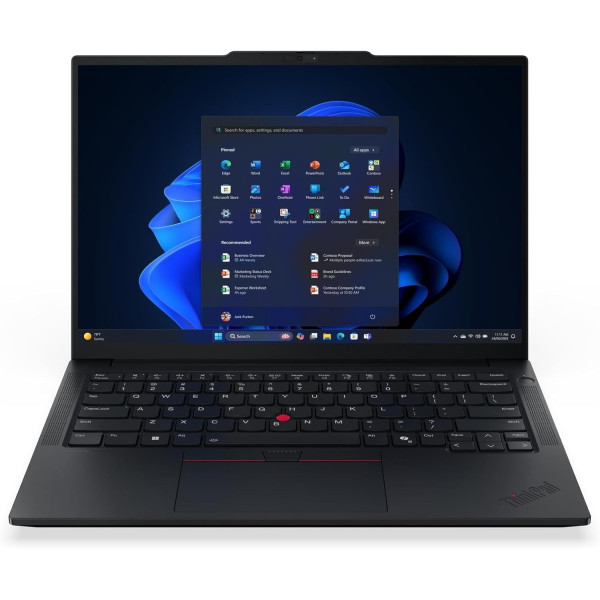
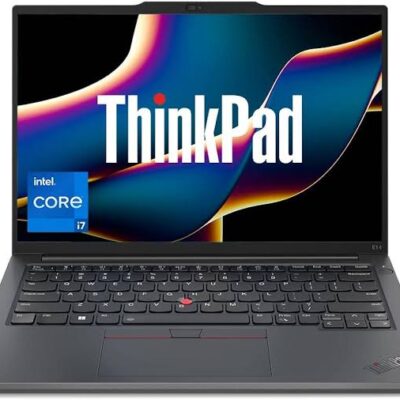
Lenovo ThinkPad E14 Gen 7 Core Ultra 7 15th Gen – Powerful & Premium 16GB RAM, 512GB SSD, 14-Inch Laptop
KSh 12,000.00
Lenovo ThinkPad E14 Gen 7 Core Ultra 7 15th Gen – Powerful & Premium 16GB RAM, 512GB SSD, 14-Inch Laptop
- ⚡ Intel Core Ultra 7 15th Gen – Modern processing for everyday productivity and professional workflows.
- 🧠 16GB RAM – Supports multitasking across compatible business and productivity applications.
- 🚀 512GB SSD – Responsive storage for documents, applications, projects, and files.
- 💼 Professional ThinkPad Series – Designed for business-oriented computing.
- 📚 Ideal for Students – Suitable for research, assignments, presentations, and online learning.
- 👨💻 Great for Freelancers – Useful for writing, virtual assistance, administration, and remote work.
- 📊 Business Productivity – Handles compatible office applications, spreadsheets, reports, and email.
- 🌐 Remote Work Support – Suitable for online tools and digital workflows.
- 💻 Programming & IT Learning – Supports many general coding and development tasks.
- 🖥️ 14-Inch Display – A practical screen size for work, study, and everyday use.
- 🛠️ Confirm the Configuration – Check the exact processor model, operating system, display, and upgrade options.
- 🛒 Shop at Ring-Us Technologies – Visit www.ringus.co.ke to enquire about availability and pricing.
Lenovo ThinkPad E14 Gen 7 Core Ultra 7 15th Gen – Powerful & Premium 16GB RAM, 512GB SSD, 14-Inch Laptop
Powerful Professional Performance with the Lenovo ThinkPad E14 Gen 7
The Lenovo ThinkPad E14 Gen 7 Core Ultra 7 15th Gen is a modern business laptop designed for professionals, entrepreneurs, students, and digital workers who need dependable computing for everyday productivity. Featuring an Intel Core Ultra 7 processor, 16GB RAM, 512GB SSD storage, and a 14-inch display, it combines a capable processing platform with practical memory and storage for a wide range of professional tasks.
Whether you are managing business operations, preparing reports, working with spreadsheets, conducting online research, attending virtual meetings, or developing new digital skills, the Lenovo ThinkPad E14 Gen 7 offers a configuration worth considering. Its specifications are suited to many everyday productivity workflows, with the potential to support more demanding compatible applications depending on the exact processor and software requirements.
For users who value a professional laptop for both office and flexible working environments, this ThinkPad offers a useful balance of memory, storage, and screen size. It can serve as a work companion for entrepreneurs, office administrators, consultants, freelancers, and students who want to manage their digital responsibilities efficiently.
Lenovo ThinkPad E14 Gen 7 Core Ultra 7: Key Specifications
| Feature | Specification |
|---|---|
| Brand | Lenovo |
| Series | ThinkPad |
| Model | ThinkPad E14 Gen 7 |
| Processor | Intel Core Ultra 7, described as 15th Gen |
| Memory | 16GB RAM |
| Storage | 512GB SSD |
| Display size | 14 inches |
| Category | Professional and business laptop |
| Operating system | Not specified |
| Display resolution | Not specified |
| Touchscreen | Not specified |
| Colour | Not specified |
Confirm the exact processor model number and full configuration with the seller before purchase. Display resolution, operating system, graphics configuration, and other features have not been specified.
1. Intel Core Ultra 7 Processing for Modern Workflows
The Intel Core Ultra 7 processor is the central performance feature of this Lenovo ThinkPad E14 Gen 7 configuration. Intel Core Ultra processors are designed for modern computing workloads, with capabilities that vary according to the particular processor model.
For everyday professional use, the laptop can be suitable for tasks such as document preparation, business communication, online research, presentations, spreadsheet management, and compatible productivity applications. Its overall performance will depend on the exact Core Ultra 7 processor fitted to the unit and the demands of the software you use.
Handle Everyday Tasks with Confidence
Professional computing often involves several activities throughout the day. You may need to review a report, respond to an email, update a spreadsheet, research a client, and prepare a presentation within the same working session.
The combination of a modern processor, 16GB RAM, and SSD storage provides a useful foundation for these workflows. It can help you work across compatible applications without relying on an entry-level configuration.
Support Business Applications
From administrative software to browser-based business platforms, the ThinkPad E14 Gen 7 can support many common office activities. It is suitable for users who need a laptop for preparing documents, maintaining records, organizing information, and communicating with colleagues or clients.
If your work depends on specialized software, check its processor, graphics, memory, and operating-system requirements before buying.
Learn More About Intel Core Ultra
Intel Core Ultra processors are available in different configurations, so the exact model matters when comparing performance and features. You can explore the manufacturer’s processor information on the official Intel Core Ultra website.
2. 16GB RAM for Productive Multitasking
The Lenovo ThinkPad E14 Gen 7 comes with 16GB RAM, giving users a practical memory configuration for many everyday professional and educational workloads.
Memory helps a computer keep active applications and information readily available while you work. Sufficient RAM is particularly useful when you regularly switch between browser tabs, office documents, spreadsheets, messaging platforms, and other applications.
Work Across Multiple Applications
For example, a business owner may need to manage customer enquiries while checking inventory records and preparing quotations. A student may research a topic while writing an assignment and reviewing lecture notes.
With 16GB RAM, the ThinkPad E14 Gen 7 offers a useful foundation for this type of multitasking. Actual performance depends on the programs running, their memory requirements, and the laptop’s complete configuration.
A Practical Option for Office Professionals
Office professionals often work with spreadsheets, presentations, documents, email, and web-based business systems. Having a suitable amount of memory can help make it easier to move between these applications during the working day.
The laptop is worth considering for administrators, accountants using compatible business software, project coordinators, sales representatives, and other professionals who need a capable everyday computer.
Support Freelancing and Remote Work
Freelancers and remote workers often depend on several online tools to manage clients, communicate, research, and complete assignments. Virtual assistants may use scheduling platforms, email, spreadsheets, customer relationship management systems, and online documents simultaneously.
The 16GB memory configuration makes this ThinkPad a useful candidate for many such workflows. Users running particularly demanding software, large virtual machines, or specialized technical applications should still check the recommended memory requirements.
3. Fast and Convenient 512GB SSD Storage
The Lenovo ThinkPad E14 Gen 7 includes a 512GB SSD, providing storage for applications, work documents, presentations, research files, photographs, and other digital content.
Solid-state drives use flash memory rather than moving mechanical parts. Compared with traditional mechanical hard drives, SSDs generally provide faster data access and can contribute to quicker startup and application-loading times.
Enjoy Responsive Everyday Computing
SSD storage can make routine computing feel more responsive. Opening files, launching applications, and accessing saved documents can be faster than on a computer using a conventional mechanical hard drive.
This is particularly useful for professionals who frequently access business files and switch between different tasks throughout the day.
Store Your Essential Work
A 512GB SSD offers useful capacity for many business and study requirements. It can accommodate productivity software, office documents, research materials, project folders, and personal files.
The available capacity will be lower than the advertised amount after the operating system and installed applications occupy part of the drive. Users with extensive video libraries, large design projects, or substantial local archives should consider their storage needs carefully.
Organize Files More Efficiently
Good file organization can make a significant difference to productivity. Keeping documents in clearly named folders, separating personal and business files, and regularly backing up important work can help you find information more easily.
The ThinkPad’s SSD provides a foundation for storing everyday digital work, while cloud storage or an external drive can offer additional capacity and backup options.
4. A Practical 14-Inch Display for Work and Study
The Lenovo ThinkPad E14 Gen 7 features a 14-inch display, providing a practical screen size for office work, study, research, and everyday computing.
A 14-inch laptop can be a suitable choice for people who want a screen large enough for documents and applications while maintaining a compact form factor compared with many larger-screen laptops.
Suitable for Documents and Presentations
The display can support common productivity activities such as preparing reports, reviewing spreadsheets, writing assignments, creating presentations, and browsing online resources.
For users who regularly work with large spreadsheets or several windows at once, an external monitor may provide additional workspace, subject to the laptop’s supported display connections and configuration.
Useful Across Different Work Environments
The 14-inch format can suit professionals moving between meetings, students carrying a computer between classes, and freelancers working from home or other locations.
The exact display resolution, brightness, panel type, colour coverage, and touchscreen capability have not been provided. If you need a screen for colour-critical design work or a particular visual experience, confirm the full display specification before purchasing.
5. Professional Design for Everyday Business Use
The Lenovo ThinkPad family is positioned around business and professional computing. The ThinkPad E14 Gen 7 continues that focus, offering a laptop configuration suited to people who need a computer for daily work, communication, and organization.
A professional laptop should support the way you work rather than simply provide impressive specifications. It should be useful for preparing documents, managing projects, handling communication, and completing tasks consistently.
The ThinkPad E14 Gen 7 is worth considering for people who want a general-purpose work computer for these responsibilities. Its 14-inch display and listed memory and storage configuration can make it a practical option for a variety of office and remote-working environments.
Details such as the exact weight, construction materials, keyboard layout, ports, colour, and security features depend on the specific configuration. Check these details if they are important to your purchase.
6. An Effective Work Companion for Entrepreneurs
Entrepreneurs frequently handle several responsibilities, including customer communication, financial records, marketing, inventory, supplier coordination, and planning. A suitable laptop can help bring many of these activities together.
The Lenovo ThinkPad E14 Gen 7’s Core Ultra 7 processor, 16GB RAM, and 512GB SSD provide a useful foundation for many general business workflows.
Manage Everyday Business Operations
You can use compatible applications for preparing quotations, maintaining spreadsheets, creating reports, organizing records, and coordinating projects. Browser-based business platforms can also help you manage customer enquiries, online services, and administrative tasks.
For small businesses, having a dedicated computer can help centralize important information and keep work organized.
Improve Customer Communication
Customer service often involves switching between email, messaging platforms, websites, order records, and customer management tools. A laptop configured for multitasking can make these activities easier to manage.
The ThinkPad E14 Gen 7 is a potential fit for sales teams, consultants, business owners, and administrators who require a professional productivity computer.
Support Business Planning
Entrepreneurs can use spreadsheets and compatible business applications to organize budgets, track expenses, prepare proposals, and plan projects. These tasks benefit from a computer that can comfortably handle everyday office workloads.
Remember to back up important business records and use appropriate security measures to protect confidential information.
7. A Useful Laptop for Students and Lifelong Learners
Students need a computer that can support assignments, research, presentations, online learning, and digital communication. The Lenovo ThinkPad E14 Gen 7’s 16GB RAM and 512GB SSD make it worth considering for many academic workloads.
Research and Assignment Preparation
Students can use compatible applications to prepare essays, take notes, organize references, and develop presentations. The SSD offers space for educational materials and personal files, while the memory configuration supports multitasking across common study applications.
The 14-inch display provides a practical workspace for reading documents and completing coursework.
Online Learning and Digital Communication
The laptop can support compatible learning platforms, web-based courses, online research, and video conferencing applications. Actual video-call performance depends on the webcam, microphone, network connection, software, and other hardware features.
If online classes are a major requirement, confirm the webcam, microphone, wireless connectivity, and operating system before purchase.
Develop New Digital Skills
Beyond formal education, the ThinkPad E14 Gen 7 can support learning in business administration, writing, research, digital marketing, and programming.
For courses involving advanced engineering, graphics, virtualization, or specialist software, compare the exact hardware configuration with the course provider’s requirements.
8. Freelancing and Remote Work Productivity
Remote work requires reliable access to communication tools, documents, online platforms, and project files. The Lenovo ThinkPad E14 Gen 7 can serve as a practical computer for many compatible remote-working workflows.
Virtual Assistants and Administrative Support
Virtual assistants often handle calendars, emails, spreadsheets, customer enquiries, online research, and task management platforms. With 16GB RAM and SSD storage, this ThinkPad offers a useful configuration for managing common administrative responsibilities.
It may also suit office assistants, reception support staff, project coordinators, and professionals who work with digital records.
Writers, Editors, and Researchers
Writers and researchers regularly work with long documents, reference material, browser tabs, and communication applications. The ThinkPad’s storage capacity can accommodate numerous writing projects and research files, while the 14-inch screen provides a practical workspace for editing and reviewing text.
For people who primarily write, research, prepare reports, or edit standard documents, a capable productivity laptop can be an important working tool.
Digital Marketers and Online Professionals
Digital marketers may use content management systems, email marketing platforms, social media dashboards, analytics tools, and spreadsheets. The ThinkPad E14 Gen 7 can support many browser-based and office-oriented tasks.
More intensive creative activities, such as complex video production or advanced visual effects, may require stronger dedicated graphics capabilities. Confirm the complete hardware specification if those tasks are central to your work.
9. Programming, IT, and Technical Work
The Lenovo ThinkPad E14 Gen 7 may suit students, developers, and IT professionals working with compatible programming and development tools.
The combination of an Intel Core Ultra 7 processor, 16GB RAM, and 512GB SSD can provide a useful starting point for many coding, testing, and general software development activities.
Coding and Web Development
Developers working on suitable projects can use compatible code editors, programming languages, command-line tools, and web development environments.
It can be considered for learning HTML, CSS, JavaScript, Python, and other programming technologies, depending on the software used and its requirements.
Database and Networking Studies
Students studying information technology may need to use database clients, network utilities, technical documentation
Related products

Lenovo Yoga 7 Core Ultra 7(155U)16gb/1TBssd


Lenovo Yoga 9 Core i7 11th gen 16GB Ram/1TB SSD


ASUS ROG STRIX G15 i7 13th gen 16GB/1TB

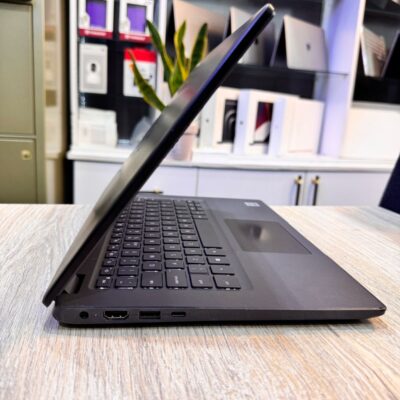
Dell latitude 3410 core i5 10th gen 512ssd /8gb


Asus Rog Zephyrus G14 AMD Reyzen 9 5000 Series 16GB Ram/1TB SSD


MacBook Pro 2023 M3 Pro Chip/18GB Ram/512GB SSD
- MacBook Pro 2023 M3
- Apple M3 Pro 12-Core Chip
- 18GB Unified RAM | 512GB SSD
- 16" 3456 x 2234 Liquid Retina XDR Screen
- 18-Core GPU | 16-Core Neural Engine
- Wi-Fi 6E (802.11ax) | Bluetooth 5.3
- Thunderbolt 4 | HDMI | MagSafe 3
- SDXC Slot | FaceTime HD 1080p Camera
- Backlit Magic Keyboard
- Force Touch Trackpad | Touch ID Sensor
- macOS
- Open Box
- 6 Months Warranty




Reviews
There are no reviews yet.