



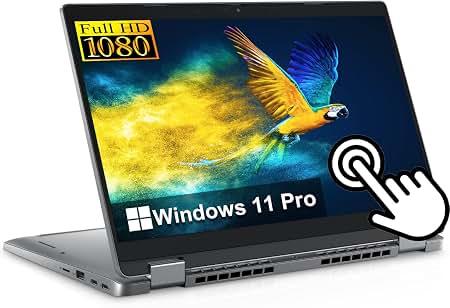
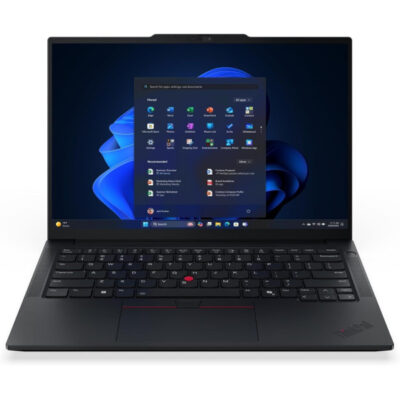

Lenovo ThinkPad X1 2-in-1 Gen 10 Aura Edition Ultra 7 268V – Powerful & Premium 32GB RAM, 1TB Gen 4 SSD, 14-Inch WUXGA Touchscreen Windows 11 Pro Laptop with Yoga Pen
Original price was: KSh 295,000.00.KSh 290,000.00Current price is: KSh 290,000.00.
Lenovo ThinkPad X1 2-in-1 Gen 10 Aura Edition Ultra 7 268V Pro – Powerful & Premium 32GB RAM, 1TB Gen 4 SSD, 14-Inch WUXGA Touchscreen Windows 11 Pro Laptop
- ⚡ Intel Core Ultra 7 268V Pro – Modern processing for professional productivity.
- 🧠 32GB Onboard RAM – Substantial memory for multitasking and demanding compatible applications.
- 🚀 1TB Gen 4 SSD – Fast storage with generous capacity for projects and files.
- 🖥️ 14-Inch WUXGA Touchscreen – 1920 × 1200-class display format for flexible interaction.
- 🔄 Premium 2-in-1 Design – Adaptable laptop and convertible working modes.
- ✍️ Yoga Pen Included – Convenient note-taking and annotation in compatible applications.
- 🪟 Windows 11 Pro – Professional operating system for compatible business workflows.
- ⌨️ Backlit Keyboard – Convenient typing in dimly lit environments.
- 🎨 Elegant Grey Finish – A refined look for professional settings.
- 💼 Ideal for Business Professionals – Suitable for compatible office applications, reports, presentations, and meetings.
- 👨💻 Freelancing & Technical Work – Useful for writing, research, programming, and remote productivity.
- 🛡️ One-Year Warranty – Confirm the coverage terms and service provider.
- 🛒 Shop at Ring-Us Technologies – Visit www.ringus.co.ke to enquire about availability and pricing.
Lenovo ThinkPad X1 2-in-1 Gen 10 Aura Edition Ultra 7 268V Pro – Powerful & Premium 32GB RAM, 1TB Gen 4 SSD, 14-Inch WUXGA Touchscreen Windows 11 Pro Laptop
Premium Performance Meets Intelligent 2-in-1 Flexibility
The Lenovo ThinkPad X1 2-in-1 Gen 10 Aura Edition Ultra 7 268V Pro is a premium business laptop designed for professionals who value performance, flexibility, and sophisticated productivity features. With an Intel Core Ultra 7 268V Pro processor, 32GB onboard RAM, a 1TB Gen 4 SSD, and a 14-inch WUXGA touchscreen, this laptop brings together powerful specifications and a versatile convertible design for modern work.
Whether you are managing business operations, preparing presentations, attending meetings, reviewing documents, developing digital projects, or working remotely, this ThinkPad offers a capable platform for professional productivity. Its touchscreen and included Yoga Pen add convenient ways to interact with documents, make handwritten notes, annotate presentations, and work with compatible creative applications.
Running Windows 11 Pro, the laptop is positioned for users who need professional computing features and a familiar Windows environment. The backlit keyboard supports working in different lighting conditions, while the grey finish gives the device a refined, professional appearance.
The Lenovo ThinkPad X1 2-in-1 Gen 10 Aura Edition is particularly worth considering for executives, entrepreneurs, consultants, business owners, educators, and other professionals who want a premium laptop that can adapt to different working styles.
Lenovo ThinkPad X1 2-in-1 Gen 10 Aura Edition: Key Specifications
| Feature | Specification |
|---|---|
| Brand | Lenovo |
| Product family | ThinkPad X1 |
| Model | X1 2-in-1 Gen 10 Aura Edition |
| Processor | Intel Core Ultra 7 268V Pro |
| Memory | 32GB onboard RAM |
| Storage | 1TB Gen 4 SSD |
| Display size | 14 inches |
| Display resolution | WUXGA |
| Display type | Touchscreen |
| Convertible design | 2-in-1 |
| Keyboard | Backlit |
| Operating system | Windows 11 Pro |
| Included accessory | Yoga Pen |
| Colour | Grey |
| Warranty | 1 year |
1. Intel Core Ultra 7 268V Pro for Premium Productivity
At the heart of this Lenovo ThinkPad X1 2-in-1 is the Intel Core Ultra 7 268V Pro processor. This processor designation places the laptop in a premium computing category designed for modern productivity, multitasking, and compatible advanced workloads.
The processor works alongside the laptop’s 32GB RAM and 1TB SSD to provide a capable platform for professional applications. From office administration and online research to managing multiple projects, the configuration is designed to support demanding everyday work.
Handle Complex Working Days
Professional responsibilities rarely involve a single application. A typical working session might include reviewing a presentation, responding to emails, updating spreadsheets, researching information, and joining an online meeting.
A capable processor helps manage these activities, while the memory and SSD contribute to the overall computing experience. The result is a configuration worth considering for professionals who need their laptop to support a variety of tasks throughout the day.
Productivity for Business Professionals
The ThinkPad X1 2-in-1 Gen 10 can be used with compatible office software, business management platforms, document editors, communication tools, and professional applications.
It is a practical option for people who need one computer for preparing reports, coordinating projects, handling business communication, and organizing digital information.
Support for Advanced Digital Work
Depending on software requirements, the processor can also support more advanced productivity workflows. These may include programming, technical research, data analysis, and compatible content creation applications.
For specialist engineering software, intensive 3D rendering, or demanding GPU-dependent tasks, check the exact application requirements and graphics capabilities before purchasing.
Learn more about Intel’s processor technology through the official Intel Core Ultra website.
2. 32GB Onboard RAM for Demanding Multitasking
The laptop features 32GB onboard RAM, providing substantial memory capacity for multitasking and many demanding professional workflows.
Memory allows the computer to keep applications and their working data available while you move between tasks. A larger memory capacity can be particularly useful for people who regularly work with numerous applications, extensive browser sessions, and complex documents.
Keep Multiple Applications in Your Workflow
Imagine managing a business presentation while reviewing financial spreadsheets, keeping email open, researching suppliers, and communicating with colleagues. Having 32GB RAM provides a useful foundation for working across these activities.
Actual performance depends on the applications being used, the processor, and the overall system configuration. Nevertheless, this memory capacity is well suited to many professional multitasking needs.
A Strong Option for Executives and Consultants
Executives and consultants often handle large documents, presentations, reports, online meetings, and business information across several platforms. The ThinkPad’s memory configuration can support these workflows, making it a useful candidate for professionals with busy schedules.
It can also suit project managers and administrators who need to switch frequently between communication tools, spreadsheets, online platforms, and document-based work.
Useful for Programming and Technical Projects
Developers may need to work with code editors, browser tools, development environments, testing applications, and documentation. The 32GB memory configuration offers useful capacity for many software development workflows.
Users running several virtual machines, large local databases, or specialized technical simulations should still check the requirements of their intended applications.
Important: Onboard Memory
The supplied configuration has 32GB onboard RAM. Onboard memory is integrated into the system board rather than installed as a conventional removable memory module, so it may not be upgradeable.
For that reason, choosing the right memory capacity at purchase is especially important. The supplied 32GB configuration provides substantial capacity for many professional uses, but confirm the manufacturer’s service documentation before assuming that additional RAM can be installed later.
3. Fast 1TB Gen 4 SSD Storage
Storage is another major strength of this configuration. The Lenovo ThinkPad X1 2-in-1 Gen 10 comes with a 1TB Gen 4 SSD, providing substantial space for applications, professional documents, project files, presentations, and personal content.
A solid-state drive uses flash memory and has no moving mechanical parts. Modern SSDs can deliver fast data access, helping improve everyday responsiveness compared with traditional mechanical hard drives.
Store More of Your Digital Work
The 1TB capacity provides room for a broad collection of work files, applications, research materials, photographs, presentations, and project folders.
This is useful for professionals who maintain several ongoing projects or prefer to keep important working files available locally. The exact usable capacity will be lower than the advertised amount after the operating system and installed applications occupy some of the drive.
Benefit from Gen 4 SSD Technology
Gen 4 refers to the fourth generation of the PCIe interface commonly used by modern SSDs. Compatible PCIe Gen 4 drives can offer high data-transfer performance, although the actual speed depends on the installed drive and system implementation.
For everyday work, responsive storage can help with application loading, file access, and moving between stored projects. Performance will also depend on the software and other hardware components.
Organize Large Projects More Conveniently
A 1TB SSD can be particularly useful for consultants, researchers, business owners, and digital professionals who maintain substantial collections of documents and working files.
You can organize projects into folders, keep current assignments accessible, and use suitable external or cloud storage for additional capacity and backup. Regular backups remain essential, especially when storing important business records or client information.
4. 14-Inch WUXGA Touchscreen for Flexible Interaction
The Lenovo ThinkPad X1 2-in-1 Gen 10 features a 14-inch WUXGA touchscreen, combining a practical screen size with touch-based interaction.
WUXGA commonly refers to a resolution of 1920 × 1200 pixels, offering a 16:10 aspect ratio. This format provides additional vertical workspace compared with a conventional 16:9 Full HD display of similar width, which can be helpful when reading documents, browsing websites, and working with spreadsheets.
Work Naturally with Touch
The touchscreen gives you another way to interact with compatible applications. You can tap controls, navigate supported interfaces, and work directly on the display without relying exclusively on the keyboard and touchpad.
This flexibility can be useful when reviewing presentations with colleagues, navigating documents, or working with touch-enabled software.
A Practical Display for Business Documents
The 14-inch display is a useful size for working with documents, presentations, spreadsheets, and web-based platforms. Its WUXGA format offers vertical space that can help when reviewing longer pages or writing reports.
For users who need more screen space, a compatible external monitor may provide a larger desktop workspace, subject to the laptop’s supported connections and display capabilities.
Useful for Presentations and Meetings
Touch interaction can make some presentation and collaborative workflows more convenient. When using compatible software, you can navigate content directly on the screen or make adjustments without constantly returning to the keyboard.
Display brightness, colour coverage, refresh rate, and other panel characteristics have not been specified, so confirm these details if they are important for your work.
5. Flexible 2-in-1 Design with Included Yoga Pen
One of the most distinctive features of the Lenovo ThinkPad X1 2-in-1 Gen 10 is its convertible design. The display can be repositioned into supported configurations, allowing the laptop to adapt to different activities.
The included Yoga Pen adds another layer of flexibility by supporting pen-based interaction with compatible applications.
Laptop Mode for Everyday Productivity
In conventional laptop mode, you can use the keyboard and touchpad for writing, spreadsheets, email, document editing, research, and other professional tasks.
This configuration is particularly useful when preparing reports, completing administrative work, managing projects, or handling several applications during the day.
Tablet-Style Interaction for Notes and Reading
When repositioned into a supported tablet-style configuration, the convertible design can make reading, annotating, and pen-based interaction more convenient.
The Yoga Pen can be useful for handwritten notes, document annotations, diagrams, and marking up compatible files. Exact pen features and software support depend on the application and device configuration.
Presentation and Collaboration Mode
Convertible laptops can be positioned to make sharing content more convenient during meetings or collaborative sessions. This can be helpful when discussing documents, reviewing presentation slides, or displaying information to a small group.
The ability to change the device’s position gives professionals more options for adapting their workspace.
A Useful Tool for Education and Planning
Teachers, trainers, students, and consultants may appreciate the ability to annotate material and write notes with a compatible pen. This can make the laptop useful for lesson preparation, meeting notes, brainstorming, and reviewing digital documents.
The Yoga Pen is included with the configuration you provided. Confirm its included accessories and compatibility details with the seller before purchase.
6. Windows 11 Pro for Professional Computing
The Lenovo ThinkPad X1 2-in-1 Gen 10 comes with Windows 11 Pro, a professional edition of Microsoft’s Windows operating system.
Windows 11 Pro supports a familiar desktop environment for compatible productivity applications, business tools, file management, and professional communication. It is suitable for users who want a Windows-based laptop for workplace responsibilities.
Familiar Productivity Environment
You can use compatible word processors, spreadsheet applications, presentation software, web browsers, email platforms, and other productivity tools.
This can help businesses and professionals maintain familiar working routines while managing documents, communication, and digital projects.
Business-Oriented Features
Windows 11 Pro includes features intended for professional and organizational use, such as domain or Microsoft Entra ID joining in supported environments, Group Policy management, and BitLocker device encryption on supported configurations.
The availability and setup of individual features depend on the hardware, Windows configuration, edition, and organizational requirements. Business users should confirm how their preferred security and management tools will be configured.
Suitable for Professional Workflows
Windows 11 Pro can be useful for users who work with business applications, organizational systems, and compatible productivity platforms. If your workplace uses specific software or management policies, confirm that the laptop meets those requirements.
For official operating-system information, visit Microsoft Windows 11.
7. Backlit Keyboard for Convenient Typing
The ThinkPad X1 2-in-1 Gen 10 includes a backlit keyboard, a useful feature for people who sometimes work in dimly lit environments.
Keyboard illumination can make the keys easier to identify when ambient lighting is limited. This may be helpful during evening work, presentations, travel, or other situations where bright room lighting is unavailable.
Comfortable Everyday Typing Workflows
The keyboard is an important part of the computing experience for writers, administrators, consultants, programmers, and other professionals who spend substantial time entering information.
A backlit keyboard adds convenience when working with reports, emails, spreadsheets, code, and other text-heavy tasks.
Useful for Flexible Working Hours
Professionals do not always work in perfectly lit offices. Whether you are completing a presentation in the evening or reviewing documents during travel, keyboard illumination can make the computer more adaptable to different working environments.
For your specific typing preferences, confirm the keyboard layout and any regional variations before purchase.
8. A Refined Grey Finish for Professional Environments
The supplied configuration comes in grey, offering a neutral, professional appearance suited to offices, meetings, business travel, and study environments.
A professional laptop should be practical as well as visually appealing. The ThinkPad X1 2-in-1 combines its premium positioning with features intended to support everyday work, including the touchscreen, convertible design, backlit keyboard, and included pen.
Its grey finish can complement a wide range of professional settings without drawing unnecessary attention.
Exact construction materials, surface finishes, weight, and dimensions should be confirmed from the specific manufacturer’s configuration if these details are important to your decision.
9. Productivity for Entrepreneurs and Business Owners
Entrepreneurs often need a computer that can support many parts of running a business. This may include preparing proposals, responding to customer enquiries, managing financial documents, coordinating projects, reviewing reports, and communicating with suppliers.
The Lenovo ThinkPad X1 2-in-1 Gen 10’s listed processor, memory, and storage provide a strong foundation for compatible business applications.
Manage Documents and Business Records
Use compatible applications to prepare quotations, organize spreadsheets, create presentations, review contracts, and manage everyday business documentation.
The 1TB SSD provides substantial local storage for working files, while 32GB RAM supports many multitasking scenarios.
Communicate with Customers and Teams
Business owners often move between email, messaging services, customer management platforms, and online meetings. The laptop can support these workflows when the required applications and network services are available.
Its convertible design can also be useful when sharing information during meetings or annotating documents with the included pen.
Support Business Planning and Decision-Making
Spreadsheets, reports, presentations, and planning documents are important tools for many entrepreneurs. A capable professional laptop can help centralize these activities and make digital work more convenient.
As with any business computer, use secure accounts, appropriate backups, and suitable access controls to protect sensitive information.
10. An Excellent Candidate for Executives and Consultants
Executives and consultants often require a premium computer for presentations, communication, research, planning, and document review.
The ThinkPad X1 2-in-1 Gen 10 combines a professional Windows environment with 32GB RAM, 1TB SSD storage, a touchscreen, and an included pen. These features can be useful when handling complex schedules and multiple ongoing assignments.
Prepare and Review Presentations
The touchscreen and convertible design can provide additional flexibility when reviewing slides, annotating material, and presenting information using compatible software.
Work Across Multiple Projects
Consultants may handle reports, spreadsheets, online research, project documents, and client communications simultaneously. The memory and storage configuration offers useful capacity for these professional workflows.
Take Notes and Annotate Documents
The Yoga Pen can support handwritten notes and document markup in compatible applications. This may be convenient for meetings, planning sessions, reviewing proposals, or recording ideas.
The usefulness of specific pen features depends on the software used and the exact pen configuration.
11. Suitable for Freelancers and Remote Professionals
Remote work places a premium on flexible computing. Professionals may need to write, research, communicate with clients, manage projects, and access online platforms from different locations.
The ThinkPad X1 2-in-1 Gen 10 offers a configuration worth considering for many of these workflows.
Virtual Assistants and Administrators
Virtual assistants often manage emails, scheduling systems, customer records, spreadsheets, online documents, and task management tools. The 32GB RAM configuration offers substantial memory for multitasking across compatible applications.
Writers, Editors, and Researchers
Writers and researchers can use the laptop for document preparation, online research, note-taking, editing, and organizing projects. The 1TB SSD provides space for extensive document collections and working files.
The touchscreen and Yoga Pen may also help when annotating source documents or capturing handwritten ideas in supported applications.
Digital Marketers and Online Professionals
Digital marketers may work with website administration tools, analytics platforms, content management systems, email marketing software, and spreadsheets.
The laptop can support many of these workflows. Intensive video editing, complex visual effects, and graphics-heavy creative work should be evaluated against the exact graphics configuration and software requirements.
12. Programming, Data Work, and Technical Learning
The Lenovo ThinkPad X1 2-in-1 Gen 10 can be considered for developers and IT professionals working with compatible development tools.
The Core Ultra 7 processor, 32GB RAM, and 1TB SSD provide a useful hardware foundation for many coding and technical productivity activities.
Software Development
Developers can use compatible code editors, programming environments, command-line tools, testing applications, and documentation.
The system may suit web development, software learning, and many general programming workflows. Actual performance depends on the development environment and project requirements.
Database and IT Applications
Technical users may need to work with database clients, local development services, network utilities, and data analysis applications. The memory capacity can be useful for applications that require multiple services or tools to remain active.
For workloads involving multiple virtual machines, intensive simulations, or large local datasets, check the recommended specifications before purchasing.
Artificial Intelligence and Advanced Workloads
Intel Core Ultra processors include capabilities that vary by model, and some compatible applications can use specialized acceleration features. However, AI performance depends on the processor’s specific capabilities, the application, and the workload.
Do not assume that every AI application will run locally or that every graphics-intensive workload will be suitable. Confirm the exact processor and graphics specifications if AI development or specialized computation is a major priority.
13. One-Year Warranty for Added Purchasing Confidence
The supplied configuration includes a one-year warranty, which is an important consideration when investing in a premium laptop.
Warranty terms determine which faults or failures may be covered, the period of coverage, and the process for obtaining service. These details can vary by seller, manufacturer, region, and product configuration.
Before purchase, confirm whether the warranty is manufacturer-backed or seller-provided, when coverage begins, what components are covered, and where service can be obtained.
Keep the purchase documentation and warranty information in a safe place. Understanding the terms in advance helps you know what support to expect if a covered issue occurs.
14. Lenovo ThinkPad X1 2-in-1 Gen 10 Compared with Other Laptop Categories
Choosing a laptop is easier when you compare its capabilities with your actual working requirements. The table below compares this configuration with broad categories of computers rather than unverified individual models.
| Feature | ThinkPad X1 2-in-1 Gen 10 | Standard Business Laptop | Dedicated Gaming Laptop |
|---|---|---|---|
| Processor | Intel Core Ultra 7 268V Pro | Varies by configuration | Varies by configuration |
| Memory | 32GB onboard RAM | Varies | Varies |
| Storage | 1TB Gen 4 SSD | Varies | Varies |
| Display | 14-inch WUXGA touchscreen | Varies | Often larger, depending on model |
| Convertible design | Yes | Not always | Usually not the main focus |
| Pen | Yoga Pen included | Depends on configuration | Usually optional or unsupported |
| Operating system | Windows 11 Pro | Varies | Varies |
| Keyboard | Backlit | Depends on configuration | Often backlit |
| General business work | Well suited to compatible applications | Often well suited | Suitable, but may be more than necessary |
| Intensive gaming | Check graphics and game requirements | Depends on hardware | Often designed for gaming workloads |
| Portability | Compact 14-inch format | Varies | Varies; some models are heavier |
The ThinkPad X1 2-in-1 Gen 10 is particularly appealing to users who value a premium professional configuration, pen input, and convertible flexibility. Users focused primarily on gaming or demanding GPU-intensive work should compare the exact graphics capabilities and application requirements.
15. Maintenance and Responsible Technology Use
A premium laptop is an investment, and proper care can help extend its useful working life.
Keep the Operating System Updated
Install appropriate Windows security updates and keep your applications updated. Use reputable security software and avoid downloading programs from untrusted sources.
For business users, follow organizational security policies and maintain suitable backups of important information.
Protect the Device Physically
Use a suitable protective bag when travelling and avoid exposing the laptop to excessive heat, liquids, dust, or physical pressure. Clean the display and keyboard using manufacturer-approved methods.
Take care when handling the touchscreen and included pen, and store the pen safely when it is not in use.
Maintain Storage and Backups
Organize documents into clearly named folders and back up important projects regularly. An external drive or trusted cloud service can provide additional protection if the laptop is lost, damaged, or affected by a storage failure.
Although 1TB provides substantial capacity, backups remain essential for important client files, business records, and personal documents.
Understand the Limits of Onboard RAM
Because the supplied memory is onboard, you should not assume it can be upgraded later. The 32GB configuration is substantial for many professional workloads, so assess your likely long-term requirements before purchase.
Storage upgrade options also depend on the exact model’s internal design and manufacturer specifications. Consult official documentation or a qualified technician before making hardware changes.
Choose Repair and Recycling Responsibly
Maintaining a device, using compatible replacement parts where appropriate, and responsibly recycling electronics at the end of their useful life can help reduce unnecessary electronic waste.
Choosing the correct configuration from the beginning can also reduce the likelihood of needing an early replacement because of insufficient memory or storage.
16. Frequently Asked Questions
Is the Lenovo ThinkPad X1 2-in-1 Gen 10 Aura Edition suitable for business?
Yes. Its listed processor, 32GB RAM, 1TB SSD, Windows 11 Pro, touchscreen, and convertible design make it worth considering for many professional and business productivity tasks.
How much RAM does it have?
This configuration has 32GB onboard RAM. Because the memory is onboard, confirm the official configuration before purchase and do not assume that it can be upgraded.
How much storage is included?
It comes with a 1TB Gen 4 SSD, providing substantial space for applications, documents, projects, and other files.
Does it have a touchscreen?
Yes. The supplied specification includes a 14-inch WUXGA touchscreen.
Is the Yoga Pen included?
Yes. The configuration you provided includes a Yoga Pen. Confirm the included accessories and supported pen features with the seller.
Does it come with Windows 11 Pro?
Yes. Windows 11 Pro is included in the supplied specification. Confirm the installation and activation status of the particular unit before purchase.
Is the keyboard backlit?
Yes. The supplied configuration includes a backlit keyboard, which can be useful when working in dimly lit environments.
What is the display resolution?
The display is specified as WUXGA, commonly referring to 1920 × 1200 pixels. Confirm the exact display specification for the individual unit if resolution is critical to your work.
Can I upgrade the RAM?
The RAM is specified as onboard. It may not be upgradeable, so check the manufacturer’s documentation before assuming any upgrade is possible.
Does it include a warranty?
Yes. The supplied listing specifies a one-year warranty. Confirm the provider, coverage, and service conditions before buying.
Is it suitable for programming and technical work?
It can support many compatible development and productivity applications. Specialist workloads such as intensive simulations, advanced 3D rendering, and demanding AI applications should be checked against the exact hardware requirements.
Where can I enquire about availability and pricing?
Visit Ring-Us Technologies to enquire about the Lenovo ThinkPad X1 2-in-1 Gen 10 Aura Edition, its price, availability, and warranty terms.
17. A Premium Laptop for Flexible Professional Productivity
The Lenovo ThinkPad X1 2-in-1 Gen 10 Aura Edition Ultra 7 268V Pro combines a premium processor configuration with 32GB onboard RAM, a 1TB Gen 4 SSD, a 14-inch WUXGA touchscreen, and Windows 11 Pro.
Its convertible design and included Yoga Pen provide additional flexibility for handwritten notes, document annotation, and compatible touch-based workflows. The backlit keyboard and grey finish further complement its professional positioning.
For executives, entrepreneurs, consultants, freelancers, educators, and other professionals, this configuration offers a compelling combination of performance-oriented specifications and adaptable interaction.
Before purchasing, confirm the exact processor designation, onboard memory configuration, warranty terms, and full manufacturer specifications. Choosing the right configuration helps ensure that the laptop suits your professional needs.
Explore the Lenovo ThinkPad X1 2-in-1 Gen 10 Aura Edition at www.ringus.co.ke and enquire about availability, pricing, and the one-year warranty.
Related products

Dell XPS 13 9315 Core i7(1250U) 16gb/512ssd


Lenovo Yoga 9 Core i7 11th gen 16GB Ram/1TB SSD


ASUS ROG STRIX G15 i7 13th gen 16GB/1TB

Dell latitude 3410 core i5 10th gen 512ssd /8gb


Asus Rog Zephyrus G14 AMD Reyzen 9 5000 Series 16GB Ram/1TB SSD


HP ELITEBOOK 830 G7 i7 10th gen 16GB Ram/512GB SSD
- Operating system: Windows 10 / 11 Pro 64-Bit Edition
- Memory: 16GB DDR4-2666 MHz RAM (1 x 8 GB) | 64 GB
- Storage: 512GB PCIe® NVMe™ Value M.2 SSD
- Optical drive: None
- Graphics Processor: Integrated, Intel® Premium UHD Graphics
- Processor: Intel® Core™ i7-10510U (1.8 GHz base frequency, up to 4.9 GHz with Intel® Turbo Boost Technology, 8 MB L3 cache, 4 cores)
- Processor Family: 10th Generation Intel® Core™ i7 processor
- Display: 13.3 Inches (33.782cm) diagonal FHD, IPS, anti-glare, WLED-backlit, eDP, 250 nits, 45% NTSC (1920 x 1080)
- Boxed sealed

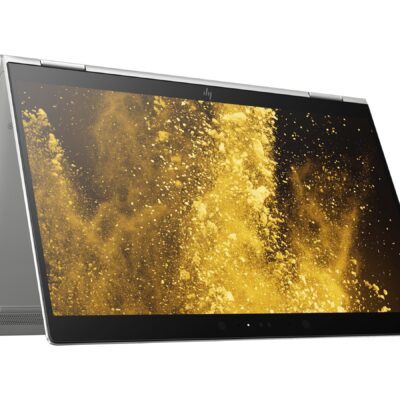
Hp Elitebook x360 1030 G3
- HP ELITEBOOK X360 1030 G3
- Operating system: Windows 10 Pro 64-Bit Edition
- Memory: 16GB LPDDR3-2133 MHz SDRAM
- Storage: 512GB M.2 SATA SED SSD
- Optical drive: No optical drive
- Graphics Processor: Integrated: Intel® UHD Graphics 620
- Processor: Intel® Core™ i5-8250U (1.6GHz base frequency, up to 3.4GHz with Intel® Turbo Boost Technology, 6 MB cache, 4 cores)
- Processor Family: 8th Generation Intel® Core™ i5 processor
- Display: 13.3 Inches (33.8 cm) diagonal FHD IPS eDP + PSR anti-glare LED-backlit touch screen, direct bonded with Corning® Gorilla® Glass 4, 700 cd/m², 100% sRGB (1920 x 1080); HP Sure View Integrated Privacy Screen
- Condition: Boxed Sealed
- Warranty: 6 Months


HP ELITEBOOK 820 G3 i5 6th GEN
- HP Elitebok 820 G3
- Operating system: Windows 10 Pro 64-Bit Edition
- Memory: 16GB DDR4-2133MHz SDRAM (1 x 8 GB) | Supports upto 16GB
- Storage: 512GB PCIe® NVMe™ M.2 Solid State Drive (SSD)
- Optical drive: None
- Graphics Processor: Intel® HD Graphics 520
- Processor: Intel® Core™ i5 6200U (2.3GHz, up to 2.8GHz with Intel Turbo Boost Technology, 3MB cache, 2cores)
- Display: 12.5 inches (31.75 cm) diagonal, LED backlight FHD UltraSlim eDP UWVA (1920 x 1080)
- Condition: Boxed and Sealed
- 6 Months Warranty


Reviews
There are no reviews yet.