



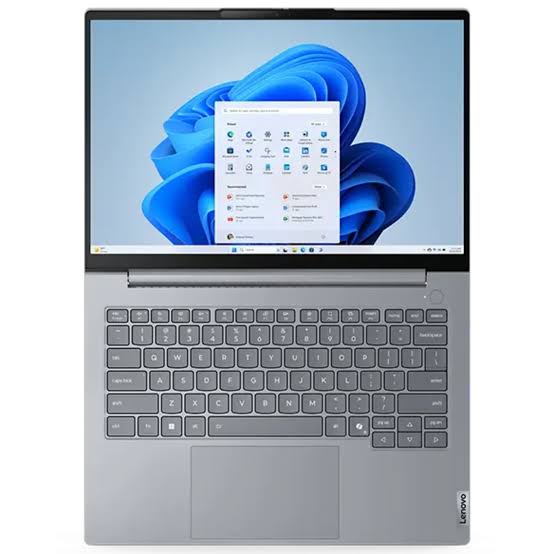
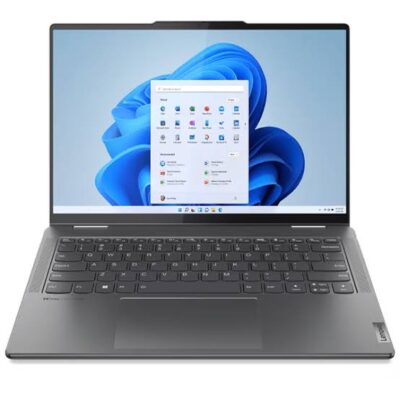
Lenovo ThinkBook 14 Gen 8 Ultra 7 255H – Powerful & Premium 8GB RAM, 512GB SSD 14-Inch Laptop
Original price was: KSh 128,000.00.KSh 125,000.00Current price is: KSh 125,000.00.
- Lenovo ThinkBook 14 Gen 8 Ultra 7 255H – Powerful & Premium 8GB RAM, 512GB SSD 14-Inch Laptop
- ⚡ Intel Core Ultra 7 255H – Modern processing for productivity and compatible professional workloads.
- 🧠 8GB RAM – Suitable for everyday office work, browsing, research, and standard applications.
- 🚀 512GB SSD – Responsive storage for applications, documents, and personal files.
- 🖥️ 14-Inch Display – Practical size for work, study, and everyday portability.
- 💼 Professional ThinkBook Design – Designed for business users and productivity-focused computing.
- 🎓 Great for Students – Useful for assignments, research, presentations, and online learning.
- 🏢 Ideal for Office Work – Supports documents, spreadsheets, email, reports, and administration.
- 💻 Suitable for Freelancers – Useful for writing, virtual assistance, digital marketing, and remote work.
- 👨💻 Useful for Programming & IT Learning – Supports coding practice, web development, and technical research.
- 🌐 Everyday Productivity – Suitable for browsing, communication, online research, and personal tasks.
- 🛠️ Maintenance Matters – Regular updates, backups, and proper care help extend useful life.
- 🛒 Shop with Ring-Us Technologies – Visit www.ringus.co.ke for quality laptops and technology solutions.
Lenovo ThinkBook 14 Gen 8 Ultra 7 255H – Powerful & Premium 8GB RAM, 512GB SSD 14-Inch Laptop
The Lenovo ThinkBook 14 Gen 8 Ultra 7 255H is a modern business laptop designed for professionals, entrepreneurs, students, freelancers, and everyday users who need a capable computer for productivity and multitasking. Featuring an Intel Core Ultra 7 255H processor, 8GB RAM, 512GB SSD storage, and a 14-inch display, it combines modern processing technology with a practical, portable form factor.
Part of Lenovo’s ThinkBook family, this laptop is suited to users who want a professional-looking computer for office responsibilities, business administration, academic work, online research, and everyday digital tasks.
Its 14-inch design makes it convenient for users who move between an office, home, classroom, meetings, and other work environments. The 512GB SSD provides useful space for applications and files, while the Intel Core Ultra 7 processor offers a strong processing foundation for compatible productivity workloads.
Whether you are managing a business, preparing reports, attending online meetings, writing, studying, or working remotely, the Lenovo ThinkBook 14 Gen 8 is worth considering as a versatile everyday work companion.
Key Specifications
| Feature | Specification |
|---|---|
| Brand | Lenovo |
| Product Series | ThinkBook |
| Model | ThinkBook 14 Gen 8 |
| Processor | Intel Core Ultra 7 255H |
| RAM | 8GB |
| Storage | 512GB SSD |
| Display Size | 14 inches |
| Laptop Type | Business and productivity laptop |
| Operating System | Not specified |
| Colour | Not specified |
| Touchscreen | Not specified |
Intel Core Ultra 7 255H Performance
At the heart of the Lenovo ThinkBook 14 Gen 8 is the Intel Core Ultra 7 255H processor. It provides a modern processing platform for compatible business applications, productivity software, research, communication, and a range of everyday computing activities.
A capable processor is valuable when your work requires you to switch between multiple tasks. You might be editing documents, reviewing spreadsheets, attending virtual meetings, researching online, and communicating with colleagues throughout the same working session.
The Core Ultra 7 family is designed for modern computing workloads. Actual performance depends on the application, system configuration, cooling, and workload being handled.
You can learn more about Intel’s processor technology on the official Intel Core Ultra website.
8GB RAM for Everyday Productivity
The laptop comes with 8GB RAM, which can support many everyday computing activities.
These include document preparation, email, online research, presentations, spreadsheets, web browsing, online learning, and general office work.
For students and office users working with standard productivity applications, this memory capacity can provide a practical starting point.
However, RAM requirements vary depending on the number and type of applications running simultaneously. Users who regularly operate many browser tabs, large spreadsheets, demanding development environments, or memory-intensive professional applications may benefit from more memory.
Because the exact memory configuration and upgrade options have not been supplied, confirm whether the RAM is expandable before purchasing if future memory upgrades are important to you.
Fast 512GB SSD Storage
The 512GB SSD provides useful storage capacity for everyday work and personal files.
Solid-state drives generally provide faster data access than traditional mechanical hard drives. This can contribute to responsive system startup, quicker application loading, and convenient access to documents and other files.
The 512GB capacity is suitable for storing work documents, presentations, assignments, photographs, applications, downloaded resources, and business records.
For professionals, it provides space for project files and daily business materials. Students can store coursework, research, and educational resources, while freelancers can keep client documents and work-related applications organized.
Users with extensive video libraries or large professional project files may also want external or cloud storage for additional capacity and backup.
14-Inch Design for Work and Portability
The 14-inch display gives the ThinkBook 14 Gen 8 a practical balance between workspace and portability.
A 14-inch laptop can be convenient for users who need a computer for daily office tasks but also carry it between different locations.
The screen size is suitable for writing, spreadsheets, presentations, online research, email, document review, and other common productivity activities.
For students, it offers a useful display size for assignments and online learning. Professionals can use it for meetings, reports, and everyday business applications.
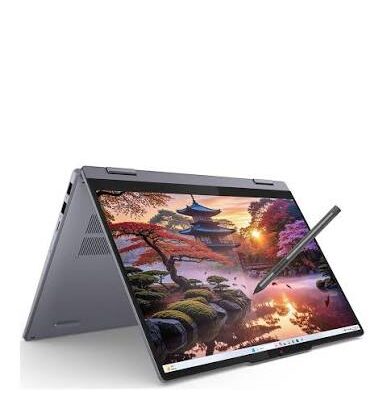
The exact display resolution, brightness, panel technology, refresh rate, and touchscreen capability were not specified, so these details should be confirmed for the available configuration.
A Professional Laptop for Modern Business
The Lenovo ThinkBook series is designed around productivity and professional use.
The ThinkBook 14 Gen 8 can support common business activities such as document preparation, spreadsheet work, presentations, customer communication, research, email, and administration.
Its processor and SSD storage provide a useful foundation for compatible business software and web-based applications.
For employees, entrepreneurs, consultants, and small-business owners, this type of laptop can help centralize everyday work and keep important digital resources accessible.
Suitable for Office and Administrative Work
Office professionals frequently work with multiple forms of information throughout the day.
They may prepare reports, update records, communicate with colleagues, create spreadsheets, organize meetings, and manage documents.
The ThinkBook 14 Gen 8 can support these standard productivity tasks, making it a practical option for administrative staff and office-based professionals.
It can also be used for document review, presentations, web research, and compatible business management systems.
For particularly demanding multitasking, consider whether 8GB RAM meets your workload or whether a configuration with more memory would be a better fit.
A Practical Choice for Entrepreneurs
Entrepreneurs often need a laptop that can support several aspects of running a business.
Daily responsibilities may include preparing quotations, communicating with customers, organizing records, researching suppliers, maintaining spreadsheets, and coordinating projects.
The Lenovo ThinkBook 14 Gen 8 can provide a central platform for these activities.
Its 512GB SSD offers storage for important files and applications, while its 14-inch format makes it convenient for business owners who work in different environments.
For users who mainly rely on office applications, web-based business tools, email, and everyday administration, it can be a useful business companion.
Useful for Freelancers and Remote Workers
Freelancers and remote workers often depend on a laptop for research, communication, project management, and delivering work to clients.
A virtual assistant may need documents, email, calendars, spreadsheets, and online business platforms. A writer may work with reference material and word-processing software. A digital marketer may manage website content, campaign reports, and social-media tools.
The ThinkBook 14 Gen 8 can support many of these common workflows.
Its 14-inch form factor is convenient for moving between a home office, shared workspace, and other locations.
Users with especially heavy multitasking requirements should carefully consider the 8GB RAM configuration before choosing this model.
Suitable for Students and Online Learning
Students need a computer for research, assignments, presentations, digital documents, and communication.
The Lenovo ThinkBook 14 Gen 8 can support activities such as:
- Preparing assignments and reports.
- Creating presentations.
- Conducting online research.
- Reading digital documents.
- Attending online classes.
- Managing email.
- Working with compatible office applications.
- Organizing coursework.
- Accessing educational websites.
- Storing project files.
The 14-inch display is practical for studying in different environments, including home, school, libraries, and shared study spaces.
For students studying computing or other technical subjects, the laptop can also support many introductory programming and IT learning activities, depending on software requirements.
Programming and IT Learning
The Intel Core Ultra 7 255H processor provides a capable processing foundation for many programming and technical learning tasks.
The laptop may be suitable for coding practice, web development, technical research, documentation, database coursework, and compatible development environments.
Potential uses include:
- Learning programming languages.
- Writing and testing code.
- Practising HTML and CSS.
- Learning JavaScript and other languages.
- Developing websites.
- Studying database concepts.
- Completing networking coursework.
- Managing development files.
- Accessing technical documentation.
The main consideration is memory capacity. Some development tools run comfortably with 8GB RAM, while larger projects, virtual machines, and more demanding environments may benefit from 16GB RAM or more.
Check the software requirements for your intended use before purchase.
Digital Marketing and Online Business
Digital marketing involves research, content management, communication, reporting, and working across multiple web-based platforms.
The ThinkBook 14 Gen 8 can support common activities such as website administration, email marketing, social-media management, content scheduling, analytics, and document preparation.
Its SSD storage provides space for marketing documents, downloadable resources, images, and project files.
For small-business owners and digital professionals, it can serve as a practical computer for managing an online presence and coordinating everyday digital tasks.
Writing, Research, and Content Production
Writers, editors, researchers, and administrators often use their laptops for extended periods.
Their work may involve drafting articles, editing documents, researching information, preparing reports, organizing reference materials, and communicating with clients or colleagues.
The Lenovo ThinkBook 14 Gen 8 is suitable for these general productivity activities.
Its 14-inch display provides a practical working area, while the SSD supports responsive access to documents and applications.
For users who mainly produce text, research online, and work with standard office tools, the configuration can be useful. Those who use memory-intensive content creation software should assess whether 8GB RAM is sufficient.
Everyday Computing and Entertainment
In addition to work and study, the ThinkBook 14 Gen 8 can serve as a general-purpose laptop for browsing, email, online shopping, video streaming, personal organization, and communication.
The 512GB SSD offers useful space for applications and personal files.
Its 14-inch display is suitable for everyday viewing and general computer use, although exact screen quality and multimedia features depend on the specific configuration.
For specialized gaming, professional graphics, 3D rendering, or intensive video production, check the graphics hardware and the requirements of the applications you plan to use.
Lenovo ThinkBook 14 Gen 8 Compared with a Typical 8GB Business Laptop
| Feature | Lenovo ThinkBook 14 Gen 8 | Typical 8GB Business Laptop |
|---|---|---|
| Processor | Intel Core Ultra 7 255H | Varies by model |
| RAM | 8GB | 8GB |
| Storage | 512GB SSD | Varies by model |
| Display | 14 inches | Varies by model |
| Main advantage | Modern Core Ultra 7 processor | Depends on processor and configuration |
| Multitasking | Depends on workload and memory needs | Depends on workload and memory needs |
| Best suited to | Productivity and compatible professional workloads | Everyday business and office use |
The ThinkBook’s processor is an important part of its appeal. However, processor performance is only one part of the overall experience: memory capacity, cooling, storage, graphics, and software requirements also matter.
Responsible Technology and Long-Term Value
Choosing a laptop that fits your actual workload can help you get better value from your technology investment.
Regular software updates, careful handling, appropriate cleaning, and secure backups can help preserve its usefulness over time.
When a laptop requires servicing, confirm the appropriate replacement parts and compatible upgrade options for the exact model.
Keeping devices in use for longer when they remain suitable for the job, and recycling them responsibly at the end of their useful life, can also help reduce unnecessary electronic waste.
Maintenance Tips for Your Lenovo ThinkBook
A few straightforward practices can help maintain your laptop:
- Keep the operating system and applications updated.
- Back up important documents regularly.
- Keep ventilation areas clear.
- Avoid exposing the laptop to liquids and excessive heat.
- Carry it in a protective bag when travelling.
- Use compatible chargers and accessories.
- Remove unnecessary applications and files periodically.
- Protect your accounts with strong passwords and appropriate security settings.
- Confirm servicing and memory upgrade options before making hardware changes.
These habits can help protect your files and support reliable everyday use.
Customer Impressions
“I wanted a professional laptop for daily office work, research, and online communication.” — Customer, Nairobi
“The 512GB SSD provides useful space for my business documents and applications.” — Customer, Kisumu
“The 14-inch size is convenient for carrying between work and home.” — Customer, Nakuru
“I was looking for a modern laptop for everyday productivity and technical learning.” — Customer, Mombasa
Frequently Asked Questions
What processor does the Lenovo ThinkBook 14 Gen 8 use?
The supplied specification identifies the Intel Core Ultra 7 255H processor.
How much RAM does it have?
This configuration has 8GB RAM. Confirm whether the memory can be upgraded if you anticipate heavier multitasking.
Does it have an SSD?
Yes. It comes with a 512GB SSD for applications, documents, and personal files.
What is the screen size?
The supplied specifications identify a 14-inch display. The exact resolution and panel characteristics should be confirmed with the seller.
Does it come with Windows 11?
The operating system was not specified in the supplied details. Confirm whether Windows 11 is preinstalled before purchasing.
Is it suitable for business?
Yes. It can support many everyday business activities, including documents, spreadsheets, presentations, email, administration, research, and online communication.
Can students use it?
Yes. It is suitable for many academic activities, including assignments, research, presentations, and online learning.
Is it good for programming?
It can support coding practice, web development, technical research, and many introductory development tasks. More demanding development environments may benefit from additional RAM.
Is the display touchscreen?
Touchscreen capability was not included in the supplied specifications. Confirm this feature if it is important to you.
Can the RAM be upgraded?
Upgradeability was not confirmed. Check the exact model number and memory configuration before purchasing.
Final Verdict
The Lenovo ThinkBook 14 Gen 8 Ultra 7 255H is a modern productivity laptop aimed at users who want a powerful processor, practical SSD storage, and a portable 14-inch design.
Its Intel Core Ultra 7 processor and 512GB SSD make it worth considering for business, office productivity, academic work, programming education, research, and everyday computing.
The main point to consider is the 8GB RAM configuration. It can suit many everyday tasks, but users who regularly run demanding applications or multitask heavily should check whether a higher-memory configuration is available.
For more quality laptops and technology solutions, visit Ring-Us Technologies.
Important: Confirm the operating system, exact display specification, RAM upgradeability, ports, warranty, and full model number before purchase.
Related products

Lenovo Yoga 7 Core i7(1165G7) 16gb/512ssd

Lenovo Yoga 7 Core Ultra 7(155U)16gb/1TBssd


ASUS ROG STRIX G15 i7 13th gen 16GB/1TB


Asus Rog Zephyrus G14 AMD Reyzen 9 5000 Series 16GB Ram/1TB SSD

MacBook Pro 2017 A1707 i716GB/1TB


MacBook Air 2020 A2179 13inch i5 8gb/512SSD
- MacBook Pro A2179
- Processor: Intel Core
- RAM: 8GB LPDDR4X Memory
- Storage: 512GB SSD (ultra-fast performance)
- Display: 13.3-inch Retina Display with True Tone Technology
- Resolution: 2560 x 1600 pixels (227 PPI)
- Graphics: Intel Iris Plus Graphics
- Year: 2020 Model (A2179)
- Operating System: macOS (latest compatible version)
- Keyboard: New Magic Keyboard with improved reliability
- Touch Bar: Yes, with integrated Touch ID sensor
- 6 Months Warranty

Hp Elitebook 745 G6 RYZEN 5 PRO


HP ELITEBOOK 830 G7 i7 10th gen 16GB Ram/512GB SSD
- Operating system: Windows 10 / 11 Pro 64-Bit Edition
- Memory: 16GB DDR4-2666 MHz RAM (1 x 8 GB) | 64 GB
- Storage: 512GB PCIe® NVMe™ Value M.2 SSD
- Optical drive: None
- Graphics Processor: Integrated, Intel® Premium UHD Graphics
- Processor: Intel® Core™ i7-10510U (1.8 GHz base frequency, up to 4.9 GHz with Intel® Turbo Boost Technology, 8 MB L3 cache, 4 cores)
- Processor Family: 10th Generation Intel® Core™ i7 processor
- Display: 13.3 Inches (33.782cm) diagonal FHD, IPS, anti-glare, WLED-backlit, eDP, 250 nits, 45% NTSC (1920 x 1080)
- Boxed sealed


Reviews
There are no reviews yet.