



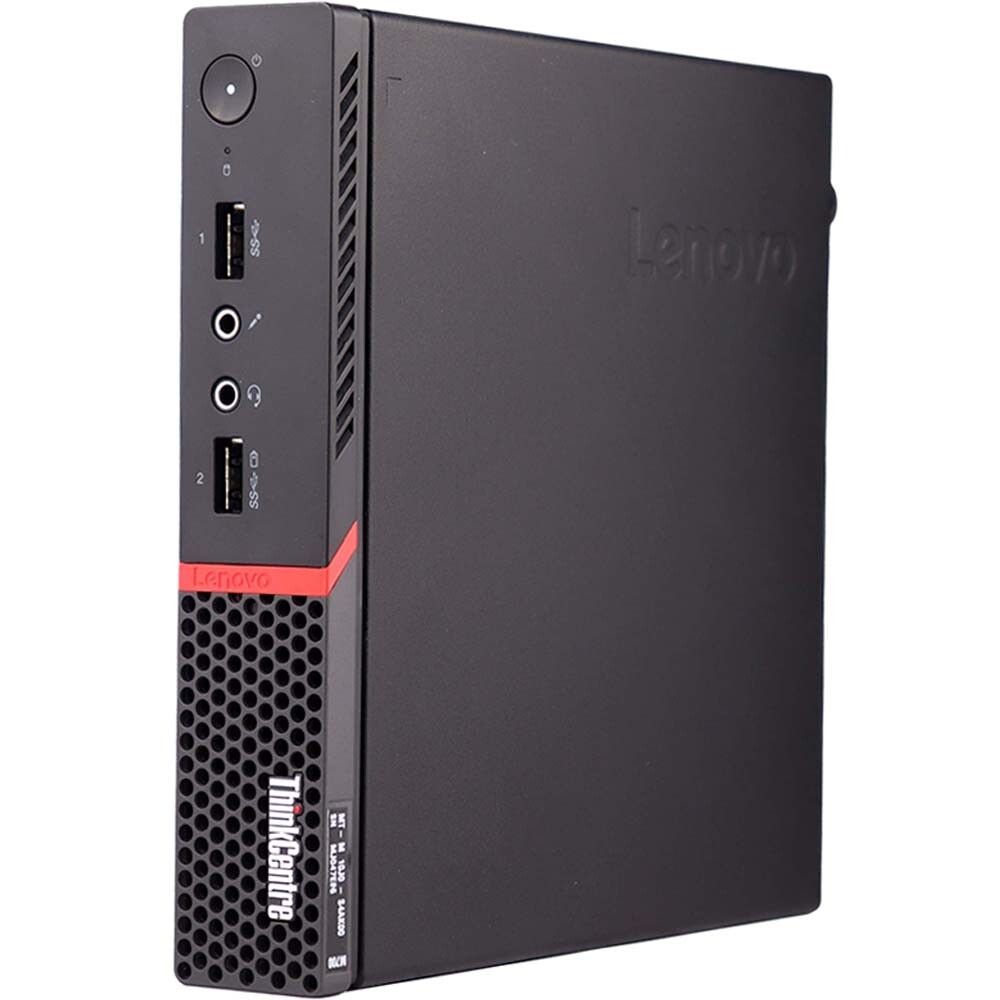
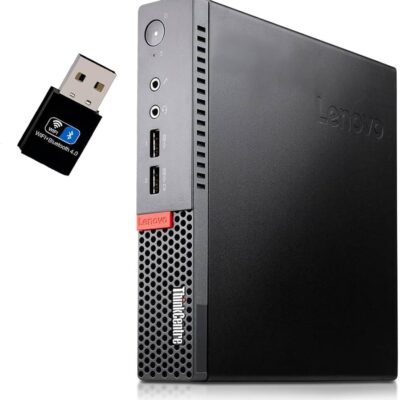
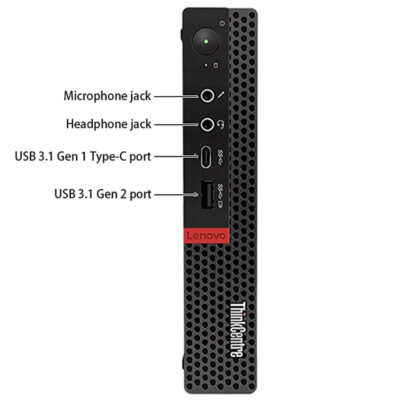
Lenovo ThinkCentre M710Q Core i5-8500 – Powerful & Premium 8GB RAM, 500GB HDD USFF Desktop
Original price was: KSh 18,000.00.KSh 16,000.00Current price is: KSh 16,000.00.
💻 Lenovo ThinkCentre M710Q – Powerful & Premium USFF Desktop
- ⚡ Intel Core i5-8500 Processor
- 🧠 8GB RAM for everyday multitasking
- 💾 500GB HDD Storage
- 📦 USFF – Ultra Small Form Factor
- 🏢 Ideal for Office & Business Work
- 💼 Great for Small Businesses & Administration
- 🧾 Excellent for Data Entry & Reception
- 🎓 Suitable for Students & Training Centres
- 🧑💻 Freelancer & Virtual Assistant Friendly
- ✍️ Great for Writers & Digital Professionals
- 🏠 Practical Home-Office Workstation
- 🔧 Storage Upgrade Options Depend on Exact Configuration
- ♻️ Compact & Space-Efficient Desktop Design
- 🛒 Available through www.ringus.co.ke
Lenovo ThinkCentre M710Q Core i5-8500 – Powerful & Premium 8GB RAM, 500GB HDD USFF Desktop
The Lenovo ThinkCentre M710Q Core i5-8500 is a compact USFF desktop designed for practical everyday computing, office productivity, administration, education, and home-office use.
Its small form factor makes it especially useful for workplaces where desk space is limited. Instead of occupying the space of a traditional desktop tower, a USFF computer can provide a dedicated workstation while keeping the workspace more compact and organized.
This configuration combines an Intel Core i5-8500 processor, 8GB RAM, and 500GB HDD storage. Together, these specifications provide a practical foundation for common productivity applications, internet browsing, documents, spreadsheets, email, data entry, and other everyday computing tasks.
Key Specifications
| Feature | Specification |
|---|---|
| Brand | Lenovo |
| Series | ThinkCentre |
| Model | M710Q |
| Form Factor | USFF – Ultra Small Form Factor |
| Processor | Intel Core i5-8500 |
| RAM | 8GB |
| Storage | 500GB HDD |
| Operating System | Not specified |
| Display | Not included/specification not provided |
Compact USFF Design
The Lenovo ThinkCentre M710Q is built around a compact desktop form factor that can be particularly useful in space-conscious environments.
A smaller desktop can make it easier to organize office desks, reception counters, computer labs, training rooms, and home workstations.
This is especially helpful for businesses that need several computers in one room. More compact workstations can leave additional room for documents, peripherals, monitors, and other office equipment.
The USFF design also makes the M710Q practical for users who want the benefits of a desktop computer without having a large tower occupying valuable floor or desk space.
Intel Core i5-8500 Performance
At the centre of this configuration is the Intel Core i5-8500 processor.
It provides a capable platform for many everyday productivity workloads, including document creation, spreadsheets, email, internet browsing, business applications, administration, and data-entry tasks.
For a typical office workstation, the processor can provide the computing foundation needed to move between common applications and browser-based systems.
It is also suitable for users who need a computer for general productivity rather than specialized high-end workloads.
For demanding professional applications, advanced graphics work, intensive rendering, or other specialized workloads, buyers should always compare the software requirements with the available hardware.
8GB RAM for Everyday Productivity
The 8GB RAM configuration gives the M710Q a practical amount of system memory for everyday computing.
It can support activities such as word processing, spreadsheets, email, browsing, online research, document management, and many standard business applications.
For office workers who regularly switch between documents, browser tabs, email, and productivity software, 8GB can provide a useful starting configuration.
Users working with particularly large datasets, multiple virtual machines, advanced creative applications, or other memory-intensive workloads may require additional memory, depending on the exact software being used.
500GB HDD Storage
This ThinkCentre M710Q comes with a 500GB HDD, providing local storage for everyday files.
The available capacity can be useful for documents, spreadsheets, PDFs, presentations, business records, photos, and other ordinary files.
An HDD can provide useful storage capacity at a practical cost. However, traditional hard drives generally have slower access speeds than SSD storage.
Users who want faster system startup, quicker application loading, and a more responsive storage experience may wish to investigate a compatible SSD upgrade.
Upgrade options depend on the exact configuration of the M710Q, so compatibility should be confirmed before purchasing replacement or additional components.
Ideal for Office Work
The Lenovo ThinkCentre M710Q is well suited to a variety of office environments.
It can be used for:
- Word processing
- Spreadsheet management
- Internet browsing
- Business applications
- Document preparation
- Data entry
- Printing and scanning workflows
- Customer records
- Administrative work
- General office productivity
For businesses that need several computers for employees, a compact ThinkCentre can also provide a consistent desktop solution across different workstations.
Useful for Small Businesses
Small businesses often need computers that can handle everyday operations without requiring unnecessarily specialized hardware.
The M710Q can be used for administrative tasks such as preparing quotations, invoices, reports, customer records, spreadsheets, emails, and online business systems.
It can also work well in small offices where several computers need to fit into a limited workspace.
For businesses expanding their operations, these types of compact desktops can provide dedicated workstations for administrative and support staff.
Reception and Customer-Service Work
The compact design makes the ThinkCentre M710Q suitable for reception desks and customer-service environments.
A receptionist may use the computer for customer registration, email, appointment systems, printing, document preparation, internet-based platforms, and general administration.
Because the computer is designed as a USFF system, it can help maintain a cleaner and less crowded workstation.
Data Entry and Administration
The Core i5-8500 and 8GB RAM combination can provide a practical platform for data-entry and administrative tasks.
Users can work with spreadsheets, forms, records, documents, browser-based applications, and other common administrative tools.
For organizations operating several administrative workstations, a compact desktop can also simplify the layout of the working environment.
Schools and Training Centres
The ThinkCentre M710Q can also be useful in educational environments.
Schools, colleges, libraries, computer labs, and training centres can use it for computer literacy, internet research, document preparation, office software training, and online learning.
Its compact design can be particularly valuable in computer labs where desk space needs to be used efficiently.
Students can also use it for assignments, presentations, research, and other general computing activities.
More demanding courses involving advanced 3D rendering, intensive engineering software, professional video production, or specialized graphics applications may require different hardware.
Students and Learning
For students, the M710Q can serve as a dedicated workstation for everyday academic work.
It can support research, writing assignments, presentations, spreadsheets, online classes, email, browsing, and document management.
It can also provide a useful platform for students learning basic programming and computer applications.
As with any computer, demanding software should be checked against its recommended hardware requirements before purchase.
Freelancing and Online Work
The Lenovo ThinkCentre M710Q can be useful for freelancers and people working online.
Many online jobs rely primarily on browsers, productivity applications, communication platforms, and document-management tools.
This makes the M710Q suitable for activities such as:
- Virtual assistance
- Data entry
- Content writing
- Online research
- Customer support
- Administrative assistance
- Email management
- Spreadsheet work
- Document formatting
- Basic website management
For someone creating a home-based workstation, the compact USFF design can help keep the working area organized.
Writers and Digital Professionals
Writers, editors, virtual assistants, and other digital professionals often spend much of their working day using documents, browsers, email, spreadsheets, and cloud-based platforms.
The ThinkCentre M710Q can provide a dedicated desktop workstation for these activities.
It can also be paired with a suitable external monitor and peripherals to create a comfortable desktop setup, subject to the exact ports and configuration of the unit.
Programming and IT Learning
The M710Q can also serve as a learning computer for programming and IT-related studies.
It can be suitable for learning programming languages, web development, basic database concepts, scripting, and general software-development fundamentals.
Students and beginner developers can use it to build projects and practice development skills.
For advanced development involving multiple virtual machines, large development environments, intensive compilation workloads, or specialized AI and machine-learning applications, buyers should consider the specific hardware requirements of their tools.
Home Office and Everyday Computing
The M710Q can make a practical home-office computer for users who need a dedicated workstation.
It can handle general activities such as browsing, email, documents, spreadsheets, online services, research, printing, and household administration.
Its compact design is particularly useful in homes where a full-size desktop tower would take up unnecessary space.
Business Workstation Comparison
| Feature | Lenovo ThinkCentre M710Q | Traditional Desktop Tower |
|---|---|---|
| Form Factor | USFF | Larger chassis |
| Processor | Core i5-8500 | Varies |
| RAM | 8GB | Varies |
| Storage | 500GB HDD | Varies |
| Desk Space | Compact | Requires more space |
| Office Work | Suitable | Suitable |
| Data Entry | Suitable | Suitable |
| Student Use | Suitable | Suitable |
| Small Business | Suitable | Suitable |
| Upgrade Options | Depend on exact configuration | Vary by model |
| Space Efficiency | High | Lower |
The major attraction of the M710Q is its combination of compact design and practical computing hardware.
Storage Upgrade Considerations
The included 500GB HDD provides useful capacity for everyday files, but users who want greater responsiveness may want to explore SSD options.
An SSD can improve system startup and application loading compared with a traditional HDD.
Before purchasing an upgrade, confirm the exact storage interface and supported configuration of the particular ThinkCentre M710Q unit.
This is especially important with compact desktops because internal space and supported component types can differ between configurations.
RAM Upgrade Considerations
The supplied 8GB RAM is a practical starting point for everyday productivity.
If the computer will be used for heavier multitasking, specialized applications, or memory-intensive workflows, users may wish to investigate whether a RAM upgrade is supported.
The exact supported memory configuration should be confirmed for the specific machine before purchasing additional RAM.
A Practical Desktop for Everyday Computing
A powerful workstation is not necessary for every user.
Many businesses, students, freelancers, schools, and home users primarily need a computer for documents, browsing, communication, spreadsheets, online systems, and general productivity.
For those types of workloads, a compact business desktop can be a practical solution.
The ThinkCentre M710Q provides a dedicated desktop platform while keeping the physical footprint small.
Responsible Technology Use
Choosing hardware that matches the intended workload can also encourage more responsible technology use.
Keeping a capable computer in service for longer can help reduce unnecessary replacement cycles.
Regular maintenance, compatible upgrades, proper backups, and responsible recycling at the end of the machine’s useful life are all sensible technology practices.
The M710Q’s compact design can also help make efficient use of limited workspace.
Maintenance Tips
Good maintenance can help keep a desktop reliable over time.
Keep the ventilation openings clear and avoid placing the computer in an area where airflow is blocked.
Dust should be removed periodically, particularly in environments where computers operate for long periods.
Important files should also be backed up regularly using an external storage device or an appropriate cloud service.
Keep supported operating systems, applications, and security tools updated.
If the computer begins showing unusual noises, overheating, unexpected shutdowns, or significant performance changes, it is worth having the system inspected.
Who Should Consider the Lenovo ThinkCentre M710Q?
This compact desktop can be useful for:
- 🏢 Offices
- 💼 Small businesses
- 🧾 Administrative departments
- 🖥️ Reception desks
- 📊 Data-entry teams
- 🏫 Schools
- 🎓 Students
- 🧑💻 Freelancers
- ✍️ Writers
- 💻 Virtual assistants
- 🏠 Home-office users
- 📚 Training centres
- 🌐 Everyday internet and productivity users
Its suitability ultimately depends on the applications and workload the user intends to run.
Frequently Asked Questions
What is the Lenovo ThinkCentre M710Q?
The ThinkCentre M710Q is a compact Lenovo business desktop in a USFF (Ultra Small Form Factor) design.
What processor does this M710Q have?
This configuration is supplied with an Intel Core i5-8500 processor.
How much RAM does it have?
It comes with 8GB RAM.
How much storage is included?
This configuration includes a 500GB HDD.
Is the M710Q suitable for office work?
Yes. The Core i5-8500, 8GB RAM, and 500GB HDD configuration is suitable for many everyday office activities, including documents, spreadsheets, email, browsing, data entry, and administration.
Can students use the Lenovo M710Q?
Yes. It can be used for research, assignments, online learning, presentations, document preparation, and general computing.
Can it be used for programming?
Yes. It can serve as a practical computer for learning programming, web development, scripting, and other general development activities. More demanding development workloads should be evaluated against their specific requirements.
Does it come with Windows?
The operating system was not included in the supplied specifications, so the exact OS should be confirmed before purchase.
Can the HDD be upgraded to an SSD?
Upgrade possibilities depend on the exact M710Q configuration. Compatibility should be confirmed before purchasing an SSD.
Is the M710Q suitable for gaming?
This configuration is primarily suited to productivity and general computing. Dedicated gaming performance should not be assumed without confirming the graphics hardware and the requirements of the intended games.
Customer Experiences
“The small form factor is very convenient for our office because we needed several computers without filling the desks with large towers.”
— Customer, Nairobi
“For our normal office applications, email and documents, the Core i5 configuration gives us a practical workstation.”
— Customer, Kisumu
“I wanted a desktop for my home office but did not have much space. The compact ThinkCentre design worked well for that setup.”
— Customer, Nakuru
“We use compact desktops in our training environment, and saving desk space makes a real difference.”
— Customer, Mombasa
“It handles my everyday documents, browsing and online work without needing a large desktop tower.”
— Customer, Eldoret
Why Choose the Lenovo ThinkCentre M710Q?
The Lenovo ThinkCentre M710Q Core i5-8500 combines a compact USFF design with 8GB RAM and 500GB HDD storage.
It is a practical choice for office productivity, administration, data entry, education, freelancing, home-office work, and everyday computing.
Its small footprint makes it particularly useful for organizations and individuals working with limited desk space.
Learn more about Lenovo products and technology at Lenovo. For information about Intel Core processors, visit Intel.
For availability and purchasing information, visit www.ringus.co.ke.
Final Thoughts
The Lenovo ThinkCentre M710Q Core i5-8500 is a compact desktop designed around practical everyday computing needs.
With 8GB RAM and 500GB HDD storage, it offers a useful configuration for office work, administration, education, freelancing, data entry, and home-office productivity.
Its USFF design is particularly valuable for users who want a dedicated desktop workstation without sacrificing significant desk space.
For workloads that match its specifications, the ThinkCentre M710Q can provide a practical and space-efficient computing solution.
Related products


HP Z600 Workstation | Dual Xeon | 16GB RAM | 2TB HDD | 2GB NVIDIA Quadro – Powerful & Reliable
The HP Z600 Workstation is a high-performance desktop engineered for professionals in media, engineering, and design. With dual Intel Xeon processors, 16GB RAM, a massive 2TB HDD, and a 2GB NVIDIA Quadro GPU, it delivers serious computing power for demanding workflows.
Specifications
-
Processor: Dual Intel® Xeon® X5650 / X5670
-
Memory: 16GB DDR3 ECC RAM
-
Storage: 2TB HDD
-
Graphics: 2GB NVIDIA Quadro (e.g., Quadro 4000)
-
Expansion: Supports up to 48GB RAM, dual PCIe x16 slots
-
Condition: Renewed / Refurbished – Professionally Tested
-
Operating System: Windows 10 Pro / Custom OS upon request

HP EliteOne 800 G4 | Core i7 8th Gen | 8GB RAM | 256GB SSD | 24” FHD AIO – Sleek & Efficient Business Desktop
The HP EliteOne 800 G4 All-in-One PC delivers desktop performance in a space-saving design. Powered by an Intel Core i7 8th Gen processor, 8GB RAM, and 256GB SSD, this 24” AIO is ideal for modern offices needing powerful, clutter-free computing.
Specifications
-
Processor: Intel Core i7 8th Gen
-
Memory: 8GB DDR4 RAM
-
Storage: 256GB SSD
-
Display: 24” Full HD
-
Form Factor: All-in-One
-
Operating System: Windows 10/11
-
Condition: Refurbished
-
Warranty: 6 Months

Dell OptiPlex 3040 / 5040 / 7040 | Core i5 6th Gen | 8GB RAM | 500GB HDD | MiniTower Desktop PC – Fast & Powerful
Boost your business performance with the Dell OptiPlex 3040 / 5040 / 7040 MiniTower, powered by Intel Core i5 6th Gen, 8GB RAM, and a spacious 500GB HDD. Ideal for offices, schools, and institutions that need reliable and secure performance in a compact yet powerful form.
Specifications
-
Processor: Intel Core i5 6th Generation
-
Memory: 8GB DDR4 RAM
-
Storage: 500GB SATA HDD
-
Graphics: Intel HD Graphics 530
-
Form Factor: MiniTower
-
Operating System: Windows 10 Pro (Windows 11 Compatible)
-
Ports: USB 3.0, USB 2.0, HDMI, DisplayPort, Ethernet, Audio I/O
-
Expansion Slots: PCIe x16, PCIe x1
-
Security: TPM 2.0, Kensington Lock Slot

HP EliteDesk 800 G4 Tower | Core i7 8th Gen | 8GB RAM | 500GB HDD – Powerful Desktop PC
Experience high-end performance with the HP EliteDesk 800 G4 Tower. Powered by an Intel Core i7 8th Gen processor, 8GB RAM, and 500GB HDD, this PC is built for intensive business applications, multitasking, and secure enterprise operations.
Specifications
-
Processor: Intel Core i7 8th Generation (6 Cores, 12 Threads)
-
Memory: 8GB DDR4 RAM
-
Storage: 500GB SATA HDD
-
Graphics: Integrated Intel UHD Graphics 630
-
Operating System: Windows 10 Pro (Upgradeable to Windows 11)
-
Form Factor: Tower
-
Ports: USB 3.1 Gen1, USB Type-C, DisplayPort, HDMI (varies), VGA, Ethernet, Audio In/Out
-
Security: TPM 2.0, HP Sure Start Gen4 BIOS protection

HP ProDesk 600 G3 MiniTower | Intel Core i5 6th Gen | 8GB RAM | 500GB HDD | Windows 10 Pro- Fast & Effcient
Experience dependable business performance with the HP ProDesk 600 G3 MiniTower. Powered by a 6th Gen Intel Core i5 processor, 8GB RAM, and a 500GB hard drive, this desktop is perfect for professionals who need reliability, expandability, and security.
Specifications
-
Processor: Intel Core i5 6th Generation
-
Memory: 8GB DDR4 RAM
-
Storage: 500GB HDD
-
Graphics: Integrated Intel HD Graphics 530
-
Operating System: Windows 10 Pro
-
Form Factor: MiniTower (MT)
-
Ports: USB 2.0, USB 3.0, DisplayPort, VGA, Ethernet, Audio In/Out
-
Optical Drive: Yes (DVD-RW)

HP ProDesk 600 G3 Desktop | Intel Core i5 6th Gen | 8GB RAM | 256GB SSD | Windows 10 Pro – Reliable & Powerful
Get the HP ProDesk 600 G3 Desktop in Kenya – a fast and reliable business desktop featuring Intel Core i5 6th Gen processor, 8GB RAM, and speedy 256GB SSD storage. Perfect for smooth multitasking and quick boot times in professional settings.
Specifications
-
Processor: Intel Core i5 6th Generation
-
Memory: 8GB DDR4 RAM
-
Storage: 256GB SSD
-
Graphics: Integrated Intel HD Graphics
-
Operating System: Windows 10 Pro
-
Form Factor: Desktop Tower
-
Ports: USB 3.0, USB 2.0, DisplayPort, VGA, Ethernet, Audio In/Out

HP ProDesk 600 G3 Desktop | Intel Core i5 6th Gen | 8GB RAM | 500GB HDD | Windows 10 Pro-Powerful & Reliable Computer
Get the HP ProDesk 600 G3 Desktop in Kenya – a powerful and reliable business desktop equipped with Intel Core i5 6th Gen processor, 8GB RAM, and 500GB HDD. Designed for enhanced productivity and multitasking in office environments.
Specifications
-
Processor: Intel Core i5 6th Generation
-
Memory: 8GB DDR4 RAM
-
Storage: 500GB HDD
-
Graphics: Integrated Intel HD Graphics
-
Operating System: Windows 10 Pro
-
Form Factor: Desktop Tower
-
Ports: USB 3.0, USB 2.0, DisplayPort, VGA, Ethernet, Audio In/Out

Dell Core i7 2nd Gen Desktop | 4GB RAM | 500GB HDD | Windows 10 – Powerful Office & Home Computer
Get the Dell Core i7 2nd Gen Desktop PC in Kenya – a robust desktop with Intel Core i7 2nd Generation processor, 4GB RAM, and 500GB HDD storage. Designed for demanding multitasking, professional applications, and everyday computing.
Specifications
-
Processor: Intel Core i7 2nd Generation
-
Memory: 4GB DDR3 RAM
-
Storage: 500GB HDD
-
Graphics: Integrated Intel HD Graphics
-
Operating System: Windows 10 Pro
-
Ports: USB 2.0, USB 3.0, VGA, Ethernet, Audio In/Out
-
Optical Drive: DVD-ROM
-
Connectivity: Wired LAN
-
Form Factor: Tower/Desktop


Reviews
There are no reviews yet.